AI Virtual Assistant for HR: What Works, What Fails, and Implementation Tips
Learn how an AI virtual assistant for HR automates benefits, payroll, onboarding, recruiting support, and employee requests—without replacing human judgment.

An AI virtual assistant for HR is an AI-powered assistant that helps employees, candidates, managers, and HR teams get instant answers, complete routine HR workflows, and escalate sensitive issues to the right human expert. The best AI assistant for small businesses and large HR teams alike do not replace human professionals. They reduce repetitive work such as benefits questions, leave requests, onboarding tasks, payroll queries, interview scheduling, candidate follow-ups, document requests, and policy lookups.
The problem is that most HR teams are overloaded with repeated questions and manual coordination. Employees want fast answers about leave, payroll, benefits, policies, and onboarding, while recruiters need help with scheduling, candidate updates, interview notes, and high-volume screening. When these requests stay trapped in email, Slack, Teams, spreadsheets, or disconnected HR systems, HR response times slow down and employee trust suffers.
A well-designed AI virtual assistant for HR solves this by combining approved HR knowledge, natural language understanding, HR system integrations, workflow automation, and human handoff. Based on my user research across HR, recruiting, and employee-support workflows, the strongest use cases are answering questions from verified HR documents, summarizing interview transcripts, guiding new hires through onboarding, collecting basic candidate information, and routing high-risk issues to humans. In other words, HR AI works best when it handles repeatable service requests while keeping sensitive decisions under human control.
For HR teams that want to move from scattered AI prompts to repeatable, role-specific HR workflows, Buda provides a lightweight AI agent workspace where teams can build separate assistants for policy support, onboarding, recruiting drafts, employee communications, and internal documentation—without starting with a heavy enterprise automation project.

What Is an AI Virtual Assistant for HR?
An AI virtual assistant for HR is a conversational AI system built to understand HR-related questions and take action across HR tools. A basic HR chatbot may answer “Where is the leave policy?” An AI virtual assistant can check the employee’s leave balance, explain the relevant policy, submit a leave request, and escalate unusual cases to HR.
The difference matters. HR is not only an information function; it is a trust function. Employees may ask about pay, benefits, leave, health-related absence, performance reviews, workplace issues, onboarding, or career development. That means an HR AI assistant must be accurate, secure, source-grounded, and limited by clear permissions.
In practice, the most valuable HR virtual assistant has four capabilities: it answers from approved HR knowledge, connects to systems such as HRIS, payroll, ATS, and ticketing tools, completes routine workflows, and knows when to stop and hand off to a human.
Why Companies Need an AI Virtual Assistant for HR
HR teams are under pressure to deliver faster employee support without increasing headcount. Workativ notes that HR professionals can spend a significant share of time on repetitive administrative work, and that leveraging an AI-augmented workforce can help automate employee service delivery across common HR requests. (Workativ)
My research found the same pattern. HR teams are not looking for “AI for the sake of AI.” They want relief from repeated questions and manual coordination. The highest-demand areas are benefits, payroll, leave, onboarding, policy search, recruiting administration, interview summaries, candidate status updates, and performance-cycle reminders.
The most important lesson: HR AI works best when it is designed around service resolution, not novelty. Employees do not want another portal to search. HR teams do not want another inbox to manage. They want a controlled assistant that solves low-risk requests immediately and protects high-risk situations with human review.
Best AI Virtual Assistant for HR Use Cases
Benefits and HR Policy Assistant
One of the strongest use cases is an employee self-service assistant trained on company-approved documents. Employees frequently ask about insurance cards, plan differences, PTO rules, parental leave, reimbursements, remote work, leave of absence, and handbook policies.
Before an HR virtual assistant, HR teams answer these questions manually through email, Slack, Teams, or tickets. After implementation, employees ask in natural language and receive a source-grounded answer with a link to the relevant policy.
HR teams were most comfortable with this use case when the assistant could cite or reference the official document. That is critical because policy mistakes can damage employee trust and create compliance risk.
Leave, Payroll, and Document Requests
Leave and payroll questions are high-volume and time-sensitive. Employees want to know their leave balance, payroll date, payslip access, tax form location, or employment letter status without waiting for HR.
A mature AI virtual assistant for HR should authenticate the employee, retrieve real-time data from HRIS or payroll systems, and complete the request inside the conversation. The assistant can fetch leave balances, submit leave requests, generate documents, and route unresolved cases to HR.
The lesson is simple: an HR assistant that only answers FAQs is useful, but limited. The real ROI appears when it connects to systems of record and completes transactions.
Onboarding AI Assistant
Onboarding is another high-impact use case. New hires ask dozens of questions: what documents to submit, where to access tools, when benefits begin, how to set up payroll, how to complete training, and who to contact.
Before AI, new hires depend on HR, IT, managers, and scattered documents. After AI, they can use a single assistant to follow a personalized checklist, understand company processes, and complete required steps.
In one research case, new employees used an AI document assistant to load onboarding notes and process documents, then asked questions to confirm whether they understood the workflow correctly. No measurable data was shared, but the experience showed a practical use pattern: AI works well as an onboarding coach, not just as a static FAQ.
Recruiting Support and Candidate Communication
Recruiting is useful but risky. My research found strong acceptance for AI that reduces recruiter administration, and strong resistance to AI that feels like a black-box evaluator.
The best recruiting assistant use cases are job description drafts, interview scheduling, candidate status updates, interview transcript summaries, candidate submittal drafts, and basic screening questions such as availability, work authorization, commute, and pay range.
One recruiting workflow used Teams transcripts, Copilot, GPT, or tools such as Metaview to turn interview notes into first-draft candidate summaries. Before AI, recruiters manually reviewed notes and wrote submittals. After AI, the assistant created a draft for recruiter review. No measurable data was shared, but the practical gain was clear: recruiters trusted AI as an admin assistant, not as the final judge.
AI Virtual Assistant for HR Case Studies and Data
Case Study 1: High-Volume Hiring Assistant
In a high-volume hiring workflow, an AI assistant collected basic candidate information before recruiter review. The workflow was suitable for entry-level or high-turnover roles where recruiters needed to confirm availability, minimum qualifications, and onboarding readiness.
Before AI, recruiters manually screened applications and called candidates for basic details. After AI, the assistant collected structured responses and passed qualified candidates to the recruiter.
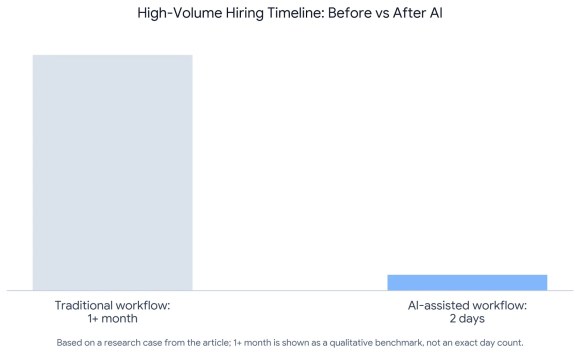
One research example reported application to hire in 2 days versus 1+ month for a similar high-volume workflow. Another discussion referenced a public claim that AI tools could reduce hiring time by 75%, although that figure should be treated as an external claim rather than a verified internal result.
The insight: AI can work well in high-volume hiring when it collects facts and speeds up coordination. It becomes risky when it replaces human judgment for complex roles.
Case Study 2: AI Candidate Ranking Failure
AI ranking can also fail. In one applicant-screening case, an ATS AI ranking system was used on a pool of 800 applicants. The ranking was described as misaligned with key technical requirements. The same case identified around 10 resumes that appeared heavily rewritten by AI to match the job description but contained obvious inconsistencies.
Before AI, the recruiter had to review a large applicant pool manually. After AI, the ranking did not save time because the recruiter still had to verify quality and detect misleading resumes.
The insight: AI screening must be audited. Keyword similarity is not the same as real experience. For HR teams, AI should support screening, not own the decision.

Case Study 3: AI Sourcing Misalignment
In another sourcing case, an AI recruiting assistant was trained with 60 strong-fit profiles for a technical recruiting role. The system still returned many poor-fit profiles, including HR generalists and recruiting coordinators, with some outputs containing about 10% random agency recruiter mismatch.
The insight: sourcing assistants need strong role context, exclusion rules, and recruiter oversight. AI can expand search capacity, but it may misunderstand seniority, specialization, and domain fit.
Case Study 4: Candidate Experience Failure With AI Phone Screening
One candidate experience case showed why HR AI needs careful boundaries. A candidate who believed they were a 90%+ match received an AI screening call within 10 minutes of applying. The AI requested a 5–7 minute interview, failed to clarify a broad project question, and later sent 4 text messages plus 1 voicemail asking the candidate to continue.
The insight: AI voice screening can damage employer brand when it cannot clarify, adapt, pause, or hand off to a human. Candidate-facing AI must be transparent, respectful, and easy to exit.

Where Buda Fits: A Practical AI Assistant Layer for HR Teams
For teams that want to test AI assistants without building a full custom HR automation stack, Buda is worth considering as a practical AI agent workspace. Buda positions itself as a platform for teams that want specialist AI agents across functions such as HR, finance, research, writing, marketing, operations, and sales, instead of relying on one generic assistant for everything.
For HR teams, that model is useful because HR work is not one workflow. Benefits questions, onboarding, recruiting, policy writing, employee communications, and manager support all require different instructions, knowledge, and boundaries. A Buda-style multi-agent setup can help teams create separate assistants for HR policy research, onboarding support, recruiting drafts, employee communications, and internal documentation.
If your HR team has outgrown scattered ChatGPT prompts and wants a more structured way to run repeatable HR AI workflows, try Buda as a lightweight AI agent layer before investing in a heavy enterprise transformation project.
How to Implement an AI Virtual Assistant for HR
- Start narrow. Do not begin with employee relations, terminations, investigations, or final hiring decisions. Start with a measurable workflow such as leave balances, payroll FAQs, benefits policy lookup, onboarding checklists, interview scheduling, or HR document requests.
- Build a clean HR knowledge base. Upload only approved, current documents: employee handbook, benefits guides, leave policies, payroll FAQs, onboarding guides, performance timelines, reimbursement rules, and escalation procedures.
- Connect the assistant to systems where needed. For real value, it should integrate with HRIS, payroll, ATS, identity tools, ticketing systems, Slack, Microsoft Teams, and knowledge bases.
- Define human handoff rules. Escalate legal issues, medical questions, harassment complaints, payroll disputes, policy ambiguity, angry language, accommodation requests, and candidate requests for a human.
Measure performance from day one. Track ticket deflection, average resolution time, first-contact resolution, escalation rate, incorrect answer rate, employee satisfaction, HR hours saved, candidate drop-off, and time-to-schedule.
AI Virtual Assistant for HR FAQ
What is an AI virtual assistant for HR?
It is an AI-powered assistant that answers HR questions, retrieves information, completes workflows, and escalates sensitive issues to human HR teams.
Is an AI HR assistant different from a chatbot?
Yes. A chatbot usually follows scripts. An AI HR assistant understands natural language, uses approved knowledge, connects to HR systems, and can complete actions.
What are the best HR virtual assistant use cases?
The best use cases are benefits questions, leave requests, payroll queries, onboarding, policy lookup, document generation, interview scheduling, candidate updates, and performance-cycle reminders.
Can AI replace HR?
No. AI should reduce repetitive work, not replace human judgment in employee relations, conflict, investigations, accommodations, layoffs, or final hiring decisions.
Can AI help recruiters?
Yes, especially with job descriptions, scheduling, interview summaries, candidate communications, and basic screening. It should not be the only evaluator of candidate quality.
Is it safe to upload HR documents into an AI assistant?
Only if the platform provides enterprise security, access control, audit logs, encryption, and clear data handling policies. Sensitive employee data needs stricter controls.
How do you measure ROI?
Track ticket deflection, HR hours saved, resolution time, employee satisfaction, escalation rate, incorrect answers, candidate drop-off, and time-to-hire improvements.
What is the biggest mistake with HR AI?
The biggest mistake is automating situations that require trust, empathy, or judgment. The second is launching an assistant without approved knowledge sources, integrations, and human handoff, which happens when teams fail to understand AI assistant capabilities and limitations.
Final Takeaway
An AI virtual assistant for HR is most valuable when it acts as a secure, source-grounded service layer for repetitive HR work. The winning model is not “replace HR with AI.” It is “let AI handle routine questions and workflows instantly, while HR focuses on trust, judgment, employee experience, and strategic people work.”