Buda vs Agent Zero: Who Should Own the Agent Runtime?
Compare a self-hosted agent workbench with a managed multi-agent workspace across deployment, host access, context, maintenance, and review.

Buda vs Agent Zero: Who Should Own the Agent Runtime?
Agent Zero and Buda can both put an AI agent in front of a browser, files, a terminal, and real work. That overlap makes a feature checklist look tempting. It also hides the purchase decision that matters most: who should operate the environment after the first successful demo?
Agent Zero is an open agent framework built around a Dockerized Linux desktop. You can inspect and change its prompts, tools, plugins, Skills, projects, memory, models, and deployment. Buda is a managed cloud workspace built around persistent, named Agents, shared Space and Drive context, isolated work environments, sessions, permissions, and human review.
Neither model is automatically more capable or safer. They assign operational responsibility differently. Agent Zero gives the operator direct control of the runtime. Buda takes responsibility for the managed workspace so a team can spend more time assigning work and reviewing artifacts.
The hidden question is not “which agent is more autonomous?”
Both products can execute more than chat. Agent Zero's current official documentation describes a real Linux desktop, a Browser with DOM annotation, live document cowork, Projects and memory, Skills, plugins, an A0 CLI host connector, and multi-agent cooperation. Calling it “just a terminal agent” would be wrong.
Buda also goes beyond chat, but its organizing object is different. A Buda Space can contain multiple persistent Agents with separate workspaces and sessions, while Drive holds shared files and human review returns responsibility to the team. Browser, Terminal, Git, Files, Skills, integrations, and Automations are execution surfaces inside that operating model; availability varies by plan.
The useful comparison is therefore not an autonomy contest. It is a responsibility map:
- Who provisions and updates the runtime?
- Who decides when host files or a browser profile become reachable?
- Where do project state and team context persist?
- Does delegation happen inside one running framework or across named long-lived Agents?
- What does a reviewer approve: an action, a system change, or a finished business artifact?
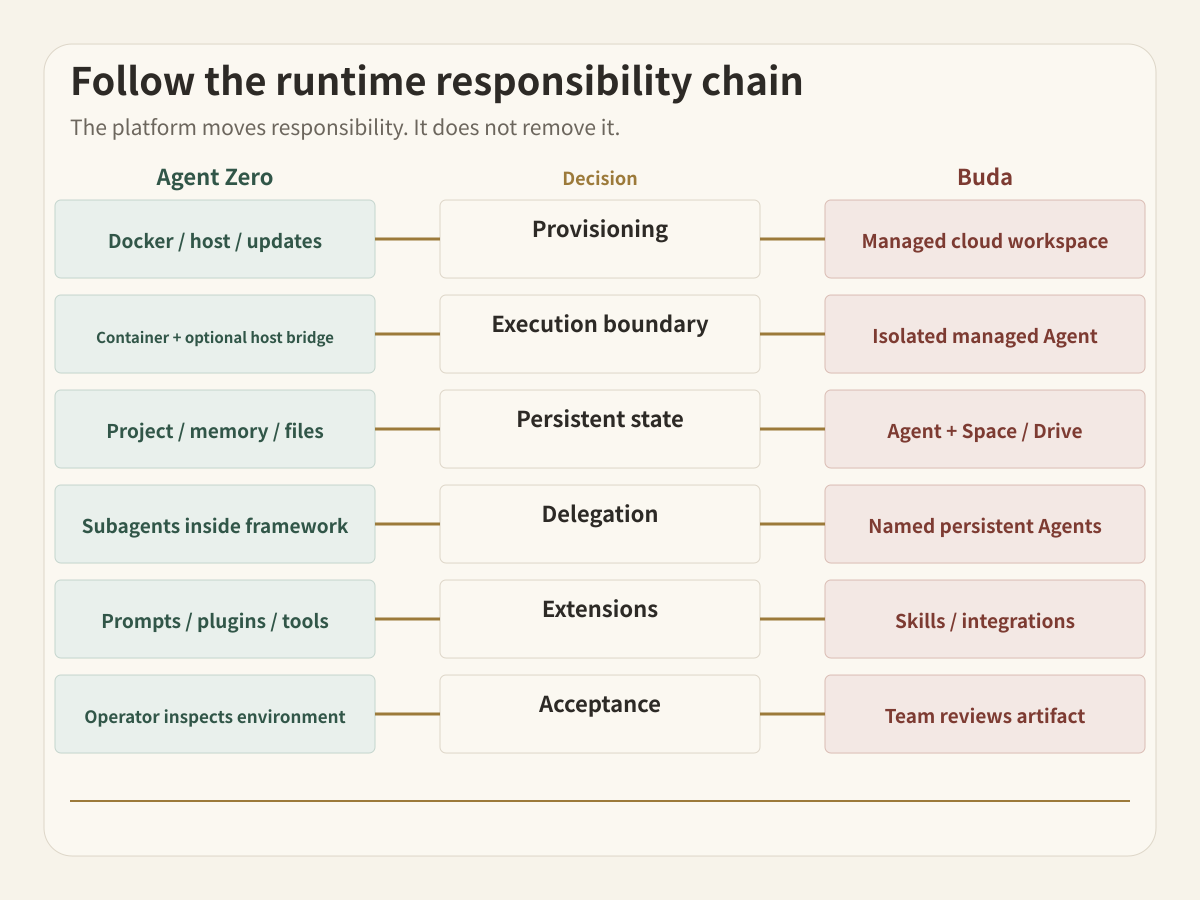
Trace the runtime responsibility chain
Every serious agent workflow crosses six handoffs. A platform choice moves those handoffs; it does not remove them.
1. Provisioning
Agent Zero offers the A0 Launcher, terminal installers, and direct Docker deployment. That flexibility is valuable when you need a local workstation, private server, VPS, Raspberry Pi, GPU machine, or infrastructure you already control. It also means someone owns Docker availability, ports, storage, authentication, network exposure, backups, and updates.
Buda provides the cloud computer and Agent Workspace. A team still decides who belongs in the Space and what each Agent may reach, but it does not maintain an Agent Zero installation or container lifecycle.
2. Execution boundary
Agent Zero normally works inside its Docker environment. Its A0 CLI Connector can extend the same agent onto host files, terminal commands, and a host browser. That is a powerful boundary because the operator chooses exactly when the container reaches the real machine. It is also a boundary that must be designed: the official safety guidance warns against mounting an entire home directory and recommends granting read/write access or remote execution only to trusted machines and workspaces.
Buda isolates each Agent in a managed cloud workspace. Team members grant integrations, files, and shared context through the product's Space, Drive, and Agent boundaries. The tradeoff is less control over the underlying framework and more emphasis on managed access and review.
3. State unit
Agent Zero Projects isolate instructions, files, memory, variables, secrets, repositories, and model choices. This is substantial persistent context, not a disposable chat. The operator decides how project storage is mounted, backed up, upgraded, and recovered.
Buda separates the named Agent's own workspace and sessions from Space-level shared material. This makes it natural to keep a researcher, content operator, developer, and operations Agent active over time while sharing selected files through Drive.
4. Delegation topology
Agent Zero lets a superior agent create focused subordinate agents and receive their reports. Delegation happens within a configurable framework and project context.
Buda makes multiple persistent Agents visible as team members. Each can have its own role, tools, files, sessions, and scheduled work. The distinction matters when the organization wants to inspect “which Agent owns this recurring job?” rather than only “which subagent handled this step?”
5. Extension and change control
Agent Zero exposes internals. Prompts, tools, plugins, Skills, MCP servers, Agent Profiles, and project settings can be inspected and changed. Its Plugin Hub adds community extensions. This is a strong fit when modifying the harness is part of the work.
Buda emphasizes installing reusable Skills, connecting integrations, and assigning workflows without asking every operator to maintain the underlying runtime. That is useful when the method should be reusable across a team but the team does not want the framework itself to become another software project.
6. Acceptance
Agent Zero keeps execution visible in its Canvas and supports direct intervention, annotations, snapshots, and recovery. A technical operator can inspect the environment closely.
Buda centers the review object at the task and artifact level: a person reviews a decision, file, diff, report, or external action before it changes business state. That is a different review distance, not proof that one system has humans and the other does not.
Start from Agent Zero as it exists today
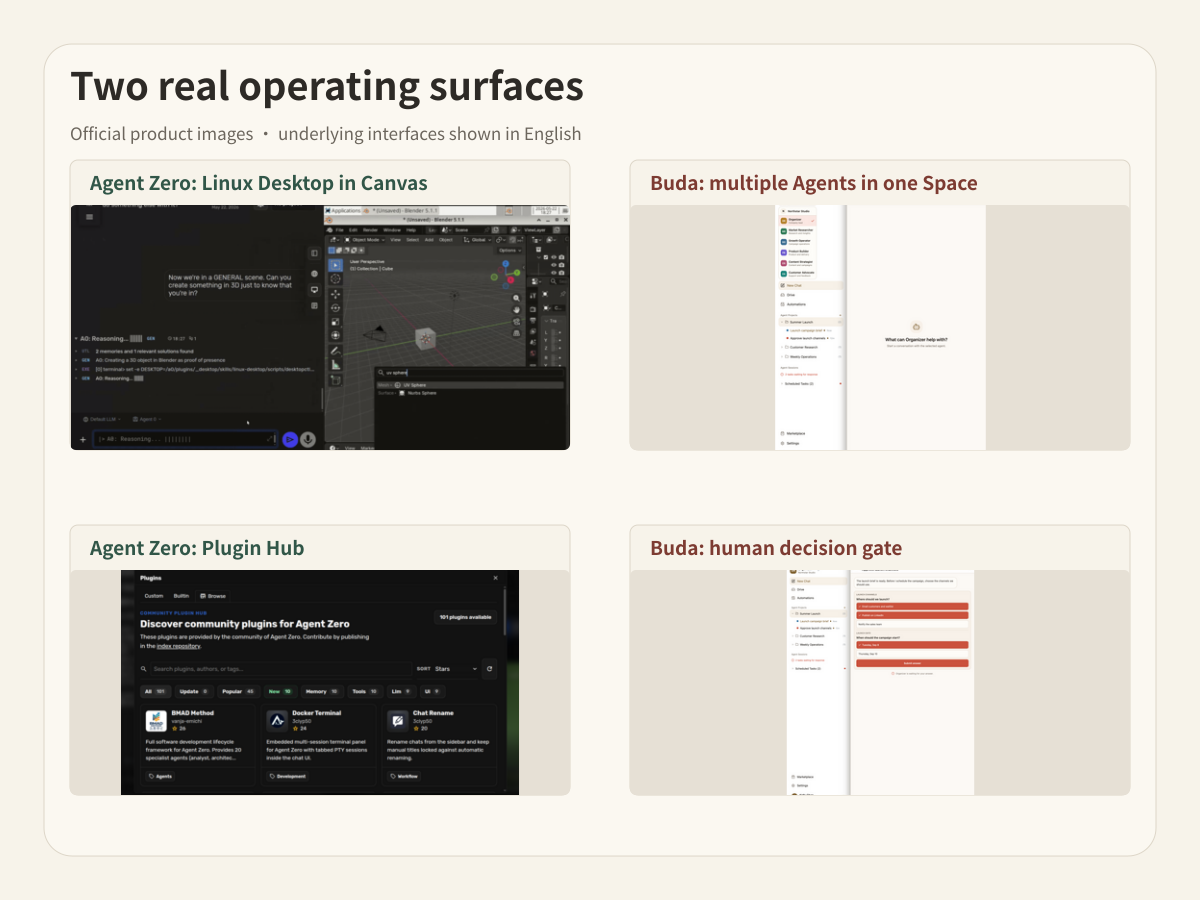
Agent Zero should be evaluated as a full workbench, not a thin open-source demo. Its official repository documents:
- a Linux desktop inside the Canvas;
- a Browser that can click, type, upload, take screenshots, and annotate DOM elements;
- Markdown and LibreOffice cowork;
- Projects with files, instructions, memory, variables, secrets, repositories, and model presets;
- Skills, MCP, plugins, custom tools, and editable prompts;
- subordinate agents for focused delegation;
- A0 CLI access to trusted host files, terminal, and browser;
- Time Travel for inspecting and reverting Agent Zero-owned workspace changes.
The cost is not only server price. It is the operating attention required to choose a deployment, secure it, manage providers and secrets, keep backups, evaluate plugins, update the installation, and define host access. For a builder who wants to understand and shape every layer, that work is part of the value.
Start from Buda as a managed operating environment
Buda's proposition is not “you cannot self-host.” It is “your team may not want runtime ownership to be the product it builds.”
The managed model is strongest when several functions need Agents but only a few people should think about infrastructure. A Space can organize membership and shared context. Named Agents keep recurring roles stable. Drive makes selected inputs and outputs inspectable. Sessions preserve the work trail. Permissions and human review establish who may act and who accepts the result.
This model gives up some framework-level freedom. A team that wants to patch the agent loop, replace internal prompts, operate a custom plugin runtime, or place the system on a specific private machine will find Agent Zero more directly controllable.
Run three buying scenarios
The control lab
One technical founder wants an agent on a local workstation, needs to inspect prompts and tools, and is comfortable managing Docker, model providers, backups, and host permissions. The deliverables are mostly code, research, files, and experiments that the same operator reviews.
Agent Zero is the more direct fit. Runtime control is not overhead here; it is the objective.
The self-hosted platform team
An engineering team has an internal platform owner, a private server environment, security review, and a reason to customize the harness. Several developers will use Projects and plugins, while the platform owner manages upgrades, secrets, access, and recovery.
Agent Zero can fit well if those responsibilities are explicit. Buda may still sit downstream for cross-functional workflows, but the team should not add it merely to duplicate the same technical workbench.
The cross-functional operating floor
Marketing, operations, sales, and engineering each need recurring Agents. They share selected company files, run scheduled work, and hand reports or decisions to managers. The company does not want every department to administer Docker, plugins, host connectors, backups, or model configuration.
Buda is the cleaner operating home. The important object is the managed roster of Agents and reviewable output, not access to framework internals.
Compare the decision at each handoff
| Decision | Agent Zero | Buda |
|---|---|---|
| Runtime | You operate the Launcher, installer, Docker host, or server | Managed cloud Agent Workspace |
| Primary control | Framework, prompts, tools, plugins, models, host connection | Agents, Spaces, Drive, sessions, integrations, permissions, review |
| Persistent unit | Project with files, instructions, memory, secrets, repo, model choices | Named Agent workspace plus shared Space/Drive material |
| Delegation | Superior agent creates focused subordinate agents | Multiple named persistent Agents own ongoing roles |
| Host access | Optional A0 CLI Connector to trusted host files, terminal, and browser | Managed workspace plus explicitly connected services and shared files |
| Maintenance | Operator owns updates, backup, network exposure, plugin trust, recovery | Buda operates the workspace; team owns membership, access, and acceptance |
| Best fit | Builders and technical teams that want a controllable self-hosted workbench | Teams that want managed multi-Agent execution and review across functions |
Security changes with the operator
“Self-hosted” is not a synonym for safe, and “managed” is not a synonym for safe either.
With Agent Zero, the organization can choose the machine, network, storage, model provider, and extension code. It must also configure those choices correctly. Docker isolation helps define a boundary, while host mounts, A0 CLI permissions, internet exposure, community plugins, and stored credentials can widen it. The official guidance explicitly recommends authentication before internet sharing, backups, narrow host access, and human review for sensitive systems.
With Buda, the provider operates the cloud workspace. The customer still has to manage Space membership, Agent scope, integrations, shared files, sensitive external actions, and the reviewer. Managed infrastructure reduces one category of work; it does not outsource accountability.
A two-system boundary can be sensible
Some organizations can use Agent Zero as an engineering-owned lab and Buda as the cross-functional operating layer. That only works when the handoff is explicit.
For example, Agent Zero can produce a tested script, structured evidence bundle, or reproducible analysis inside a controlled project. A human accepts that artifact. Buda can then use the accepted artifact in a recurring business workflow with named owners and a different review gate.
Do not connect the systems merely because both support agents. Define one artifact, one source of truth, and one person responsible for promotion between them.
Questions specific to this choice
Is Agent Zero only for coding?
No. Its official materials show a Linux desktop, Browser, live document cowork, spreadsheets and presentations, research, data analysis, plugins, Projects, and host-machine access. Software work is one use case, not the whole product.
Does Agent Zero support persistent memory and multiple agents?
Yes. Projects isolate persistent files, instructions, memory, secrets, repositories, and model settings. A superior agent can create subordinate agents for focused work. The organizational question is whether that project-level, framework-operated model matches the persistent role ownership your team needs.
Is Buda an Agent Zero hosting service?
No. Buda is a managed Agent workspace with its own product model. It does not host an Agent Zero installation or promise compatibility with Agent Zero plugins, prompts, or Projects.
Which product needs less maintenance?
Buda removes the need to maintain the agent runtime itself. Agent Zero gives more runtime control, but someone still owns deployment, provider configuration, backups, updates, host permissions, and extension trust. “Less” depends on which responsibilities your organization already has staff and processes to carry.
Decide with a seven-day responsibility drill
Do not start with a company-wide migration. Pick one workflow that needs a live source, file persistence, tool execution, and a human decision.
Before the pilot, name the owner of six things: runtime, credentials, context, extensions, recovery, and final acceptance. Run the workflow for seven days. Count not only successful tasks, but also every manual update, permission exception, lost context, unclear handoff, and review delay.
If your team wants to own and modify the runtime, Agent Zero deserves a serious pilot. If your team wants named cloud Agents to execute recurring work while people manage access and accept artifacts, try the Buda AI Agent Workspace. You can also review Buda's Agent roles, install repeatable procedures from the Skills Marketplace, and inspect the current product boundaries in the Buda Docs.