Buda vs Gemini CLI: Terminal Agent or Persistent Multi-Agent Workspace?
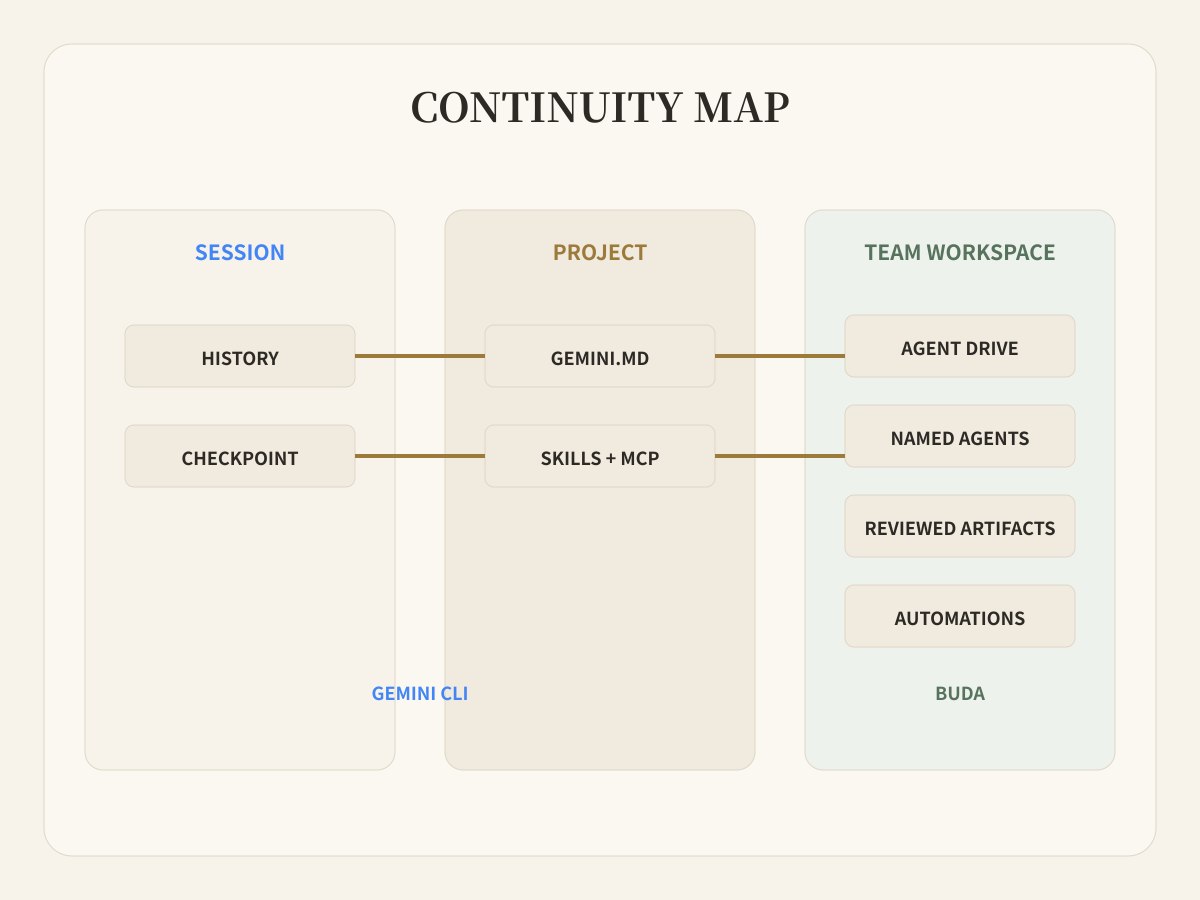
Gemini CLI is a capable, stateful terminal agent. Buda changes the continuity unit from a project to a team workspace.

Buda vs Gemini CLI: Terminal Agent or Persistent Multi-Agent Workspace?
Gemini CLI is not a disposable command that forgets everything when the terminal closes. Its current official surface includes session history, checkpointing, project context through GEMINI.md, Auto Memory, Agent Skills, subagents, headless automation, built-in tools, and local or remote MCP servers. It can run locally or in Cloud Shell and it can handle work beyond coding.
That makes the real comparison more useful: where should durable state live, who can resume the work, and what does a reviewer accept?
Choose Gemini CLI when a developer or operator wants a powerful terminal-first agent whose context and tools stay close to a project. Choose Buda when several named agents and teammates need persistent files, shared work surfaces, scheduled runs, and reviewable artifacts across business functions.
Confirm which Gemini CLI path applies to you
The product boundary changed in 2026, so procurement should begin with the official pages rather than an old tutorial.
Google Cloud documentation still describes Gemini CLI as an open-source AI agent available in a local or Cloud Shell terminal. It uses a reason-and-act loop, built-in tools, and local or remote MCP servers. Authentication can use Google sign-in, a Gemini API key, or Vertex AI, with different organization and project requirements.
The Gemini CLI website also displays a current notice that the unpaid tier and Google One user path was replaced by Antigravity CLI on June 18, 2026. Organization, Code Assist, API, Vertex AI, and Cloud Shell contexts therefore need to be checked against the plan and authentication route the team will actually deploy.
This article compares the documented Gemini CLI system. It does not assume every reader has the same entitlement, quota, privacy terms, or entry point.
Inventory the state before comparing the interface
Terminal-first does not mean stateless. Gemini CLI can preserve several kinds of continuity:
GEMINI.mdsupplies project context and instructions;- session and history controls help users resume conversations;
- checkpointing and rewind protect work in progress;
- Auto Memory can retain useful facts;
- Skills, extensions, MCP, hooks, and subagents extend the agent;
- headless mode can place the CLI inside scripts and automated workflows.
Those capabilities make Gemini CLI useful for coding, research, file work, shell automation, document processing, and repeatable project tasks. A fair comparison must acknowledge them.
The operational question is who owns each layer. A local project file can travel with a repository. User-level settings and credentials may remain with one operator. Session history may help that operator continue. An MCP server adds external tools, but its authentication and policy still need an owner.
Buda starts with a named Agent and a persistent cloud workspace. The Agent's Drive, Sessions, Browser, Terminal, Git, Skills, and prior artifacts stay together. A team can recruit different Featured Agents, give them reusable Skills, and organize them in an AI Agent Workspace. The continuity object is not just the current project directory; it is the role, files, tools, runs, and review surface around a recurring workflow.
Test the systems on a seven-day workflow
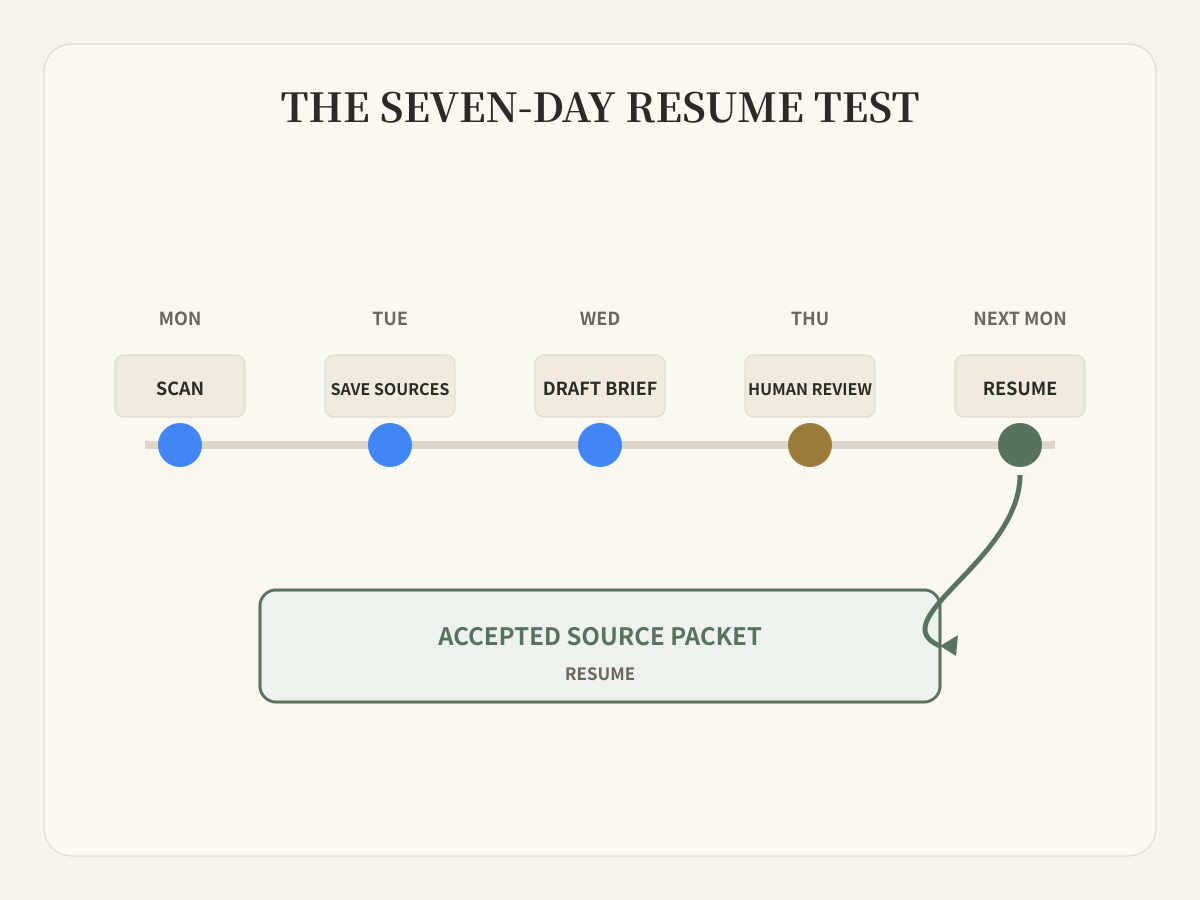
Consider a weekly competitor-monitoring workflow.
On Monday, the agent checks official release notes and product pages. On Tuesday, it stores source snapshots and extracts changes. On Wednesday, it drafts a decision brief. On Thursday, a product lead reviews disputed claims. The following Monday, the work resumes from the accepted sources and open questions.
Gemini CLI can execute this workflow. Built-in search and web fetching can gather information; file and shell tools can persist material in a project; GEMINI.md, Skills, scripts, and headless mode can make the procedure repeatable; history and checkpointing can support continuation.
The team must still decide where the project runs, where credentials live, how files become shared, what triggers the schedule, how another person resumes the same state, and where the final brief is reviewed. Those are deployment and operating-model choices, not failures of the model.
In Buda, a research Agent can own the recurring source collection, a writer Agent can work from the same durable files, and a reviewer can inspect the actual brief. Automations schedule the run. Browser and Terminal provide execution surfaces. Drive holds sources and outputs. The workspace becomes the handoff surface rather than requiring every teammate to reproduce one person's CLI environment.
Write a resume contract
Before choosing either product, define what “resume next week” means. A useful resume contract contains:
- authoritative source files and their verified dates;
- project instructions and reusable procedures;
- tools, credentials, and permission boundaries;
- completed outputs and rejected claims;
- the next action, responsible agent, and human reviewer;
- a visible acceptance record for the current artifact.
Gemini CLI can satisfy much of this contract through project files, configuration, history, memory, and automation. It is especially attractive when one technical owner manages the environment and the project directory is already the right source of truth.
Buda packages the contract around an Agent workspace. It becomes more useful when responsibility crosses people, roles, schedules, and non-code files, or when the actual review object is a report, deck, content package, spreadsheet, support response, or operating record.
Separate tool confirmation from artifact acceptance
Gemini CLI's MCP documentation describes confirmation controls and trust settings for tools. That matters: a team can require confirmation before a tool executes, or deliberately trust a server and bypass prompts. Sandboxing, trusted folders, policy, authentication, and environment sanitization are also part of the current surface.
Tool confirmation answers, “may this agent perform this action?” Artifact acceptance answers, “is this result correct enough for the business to use?” Both are needed, but they are not interchangeable.
Buda's review value is strongest at the second boundary. The person sees the brief, document, image, table, report, or operational output that will drive the next decision. Sensitive actions still need narrow permissions; a visible artifact does not make broad access safe.
Use a state-ownership matrix
| Decision | Gemini CLI | Buda |
|---|---|---|
| Primary operating surface | Local or Cloud Shell terminal, project, scripts | Persistent cloud Agent workspace |
| Durable context | GEMINI.md, memory, sessions/history, checkpoints, files | Agent Drive, Sessions, files, prior artifacts, Space context |
| Extension model | Built-in tools, Skills, extensions, MCP, hooks, subagents | Skills, MCP-connected tools, Browser, Terminal, Git, Channels |
| Automation | Headless mode, scripts, GitHub workflows, documented automation | Workspace Automations tied to persistent Agents and artifacts |
| Natural primary operator | Developer or technical operator | Functional owner, manager, or cross-functional team |
| Typical review object | Command result, file change, project output | Brief, report, document, content package, operational record |
| Main setup responsibility | Runtime, project files, auth, policy, sharing model | Agent roles, workspace files, tools, review and usage boundaries |
Gemini CLI is the direct choice when terminal control, open-source implementation, local project access, scripts, MCP, and developer ownership matter most.
Buda is the direct choice when the missing layer is a managed home for several agents, persistent business files, scheduled work, cross-session continuity, and human review of visible outcomes.
Using both can be clean. Gemini CLI can produce a verified project artifact; Buda can preserve the source packet, assign downstream roles, and hold the business review. The handoff should be a file-backed contract, not “continue from this chat.”
Gemini CLI-specific questions
What are the best Gemini CLI alternatives for teams that need cloud AI agents with persistent files and human review?
Buda is an alternative when the team needs more than a terminal agent: multiple persistent role-based agents, shared files, Browser and Terminal work, scheduled Automations, and visible business artifacts for human review. Gemini CLI remains a better direct fit when the project, terminal, and technical operator are the center of work.
How does Gemini CLI compare with a managed multi-agent workspace for work beyond coding?
Gemini CLI can already handle research, content, file operations, task management, automation, Skills, subagents, and MCP; it is not coding-only. A managed workspace such as Buda changes how those tasks are organized: each Agent keeps a durable work surface, several roles can operate separately, and reviewers inspect shared artifacts without recreating the same CLI setup.
Does Gemini CLI have persistent memory?
It has several persistence mechanisms, including project context files, session/history management, checkpointing, and Auto Memory. Teams should verify the exact feature status and configuration they deploy. Persistent memory is not the same as a shared organizational source of truth; decide which files and accepted artifacts the team will trust.
Is Gemini CLI only local?
No. Google documents local use and Cloud Shell availability, plus headless and automated workflows. The question is not whether it can run in the cloud, but who owns the runtime, context, credentials, sharing, and review process.
Start with one resume test
Run one workflow, stop it for several days, and ask a different responsible teammate to resume it. Count the missing files, hidden assumptions, credential gaps, and unreviewed outputs. That test will tell you whether a project-centered terminal agent is enough or whether the team needs a persistent multi-agent workspace.
Design the resume contract in Buda