How to Install GBrain (Garry Tan's Open-Source AI Agent Brain) Using Buda
GBrain gives your AI agent a persistent memory, 25 skills, and self-improving knowledge base. Install it in ~30 minutes using Buda — no model config, no DevOps required.
TL;DR: GBrain is an open-source "brain" for AI agents — 25 skills, persistent memory, self-improving knowledge base. Installing it traditionally requires a dev environment and manual setup. With Buda, you paste one line into your agent and it does everything for you in ~30 minutes.
What is GBrain?
GBrain is an open-source project built by Garry Tan, President and CEO of Y Combinator. He built it to power his own AI agents — and it's the exact production brain behind his real deployments:
- 17,888 pages of knowledge
- 4,383 people tracked and enriched
- 723 companies with timelines
- 21 cron jobs running autonomously
The agent ingests meetings, emails, tweets, voice calls, and your original ideas — while you sleep. It enriches every person and company it encounters. It fixes its own citations and consolidates memory overnight.
GBrain ships 25 skills out of the box — signal detection, content ingestion, brain operations, task management, enrichment, reporting, and more. Every skill is a fat markdown document that tells the agent exactly what to do, when to fire, and how to chain with other skills.
"Your AI agent is smart but forgetful. GBrain gives it a brain." — Garry Tan
The Problem: Open-Source Setup is Painful
If you've tried installing open-source AI projects before, you know the drill:
- Clone the repo
- Figure out which runtime (Bun? Node? Python?)
- Set up a database
- Configure environment variables
- Get API keys for 5 different services
- Debug why it doesn't start
- Repeat
GBrain's README actually says it best: ~30 minutes to a fully working brain — but that assumes you already have an AI agent running and know what you're doing.
Most people don't. That's where Buda comes in.
The Solution: Install GBrain via Buda in One Step
GBrain is designed to be installed by an AI agent. The entire installation is encoded in a single instruction file. Here's all you need to paste into your agent:
Retrieve and follow the instructions at:
https://raw.githubusercontent.com/garrytan/gbrain/master/INSTALL_FOR_AGENTS.md
With Buda, your agent has a full sandboxed environment — file system, terminal, browser — so it can execute this end-to-end without any manual steps.
Step 1: Open Buda and Start a New Agent
Go to buda.im and start a new agent (or open an existing one).
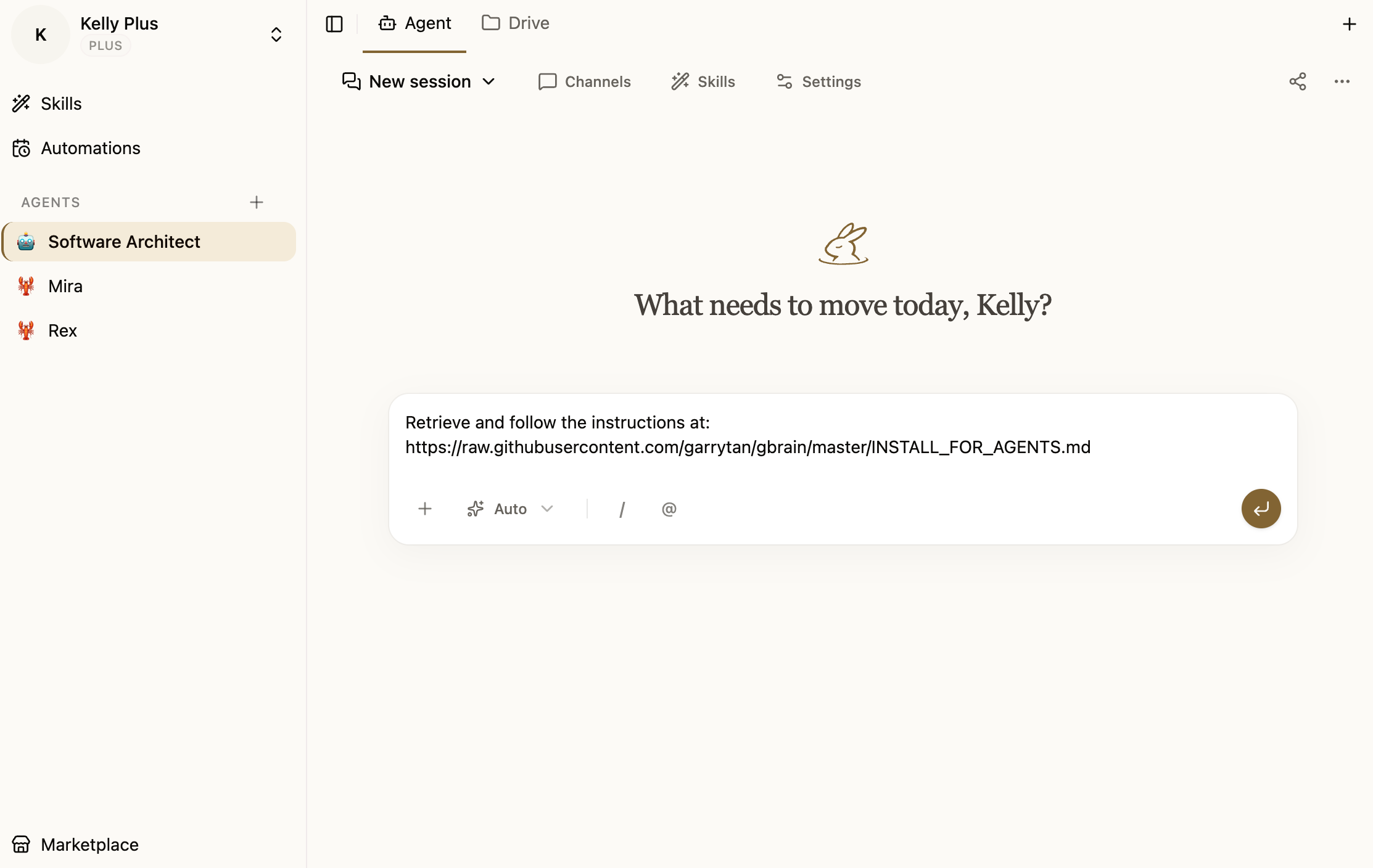
Step 2: Paste the One-Line Instruction
In the agent chat, type or paste:
Retrieve and follow the instructions at:
https://raw.githubusercontent.com/garrytan/gbrain/master/INSTALL_FOR_AGENTS.md
Hit Submit.
Step 3: Answer a Few Questions
The agent will:
- Fetch the installation instructions from GitHub
- Clone the GBrain repository into its workspace
- Install dependencies (
bun install) - Initialize the brain database (PGLite — no server needed, ready in 2 seconds)
- Load all 25 skills
- Configure recurring jobs
- Set up the skill resolver
It will ask you a few questions about API keys (which LLM provider you want to use, etc.). Answer them in the chat.
Step 4: You're Done
Once the agent finishes, all 25 GBrain skills are installed and active. Your agent now has:
| Capability | What it means |
|---|---|
| Persistent memory | Every conversation, meeting, idea gets indexed |
| Entity enrichment | People and companies get their own pages |
| Signal detection | Agent captures key info from every message |
| 25 skills | Full knowledge work suite, ready to use |
| Cron jobs | Maintenance, enrichment, briefings run automatically |
| MCP server | 30+ tools exposed for Claude Code, Cursor, Windsurf |
Why Buda Makes This Easy
Buda agents run in cloud sandboxes — each agent has:
- A full Linux environment with terminal access
- A persistent Drive (file system that survives between sessions)
- Browser access for web research
- Pre-configured tool access (git, bun, npm, etc.)
You don't install anything on your machine. You don't configure a server. You don't debug environment variables. The agent does all of that inside its sandbox.
GBrain explicitly recommends running on an agent platform. Buda is exactly that platform.
What You Get: The 25 GBrain Skills
Once installed, your agent has the full GBrain skill suite:
Always-on
signal-detector— captures original thinking and entity mentions on every messagebrain-ops— brain-first lookup before any external API call
Content ingestion
ingest,idea-ingest,media-ingest,meeting-ingestion
Brain operations
enrich,query,maintain,citation-fixer,repo-architecture,publish,data-research
Operational
daily-task-manager,daily-task-prep,cron-scheduler,reports,cross-modal-review,webhook-transforms,testing,skill-creator
Identity and setup
soul-audit,setup,migrate,briefing
Getting Started
- Sign up at buda.im — free to start
- Create a new agent
- Paste the one-line GBrain install instruction
- Answer the API key questions
- Done — your agent has a brain
The harder problem of "which AI agent platform should I run this on" is now answered: Buda handles the infrastructure so you can focus on what the agent actually does.
GBrain on GitHub: github.com/garrytan/gbrain Garry Tan: President & CEO of Y Combinator