Meta Muse Topped the App Store. The Bigger Shift Is from Chat to Action
Its rapid rise points to a new expectation: AI should keep working, cross apps, and pause before consequential actions.

On September 18, 2026, Meta's new Muse app reached No. 1 on the US iPhone free-app chart, ahead of ChatGPT in that moment's ranking. The chart is only a snapshot. It is not a market-share result and it does not tell us which product will lead next month.
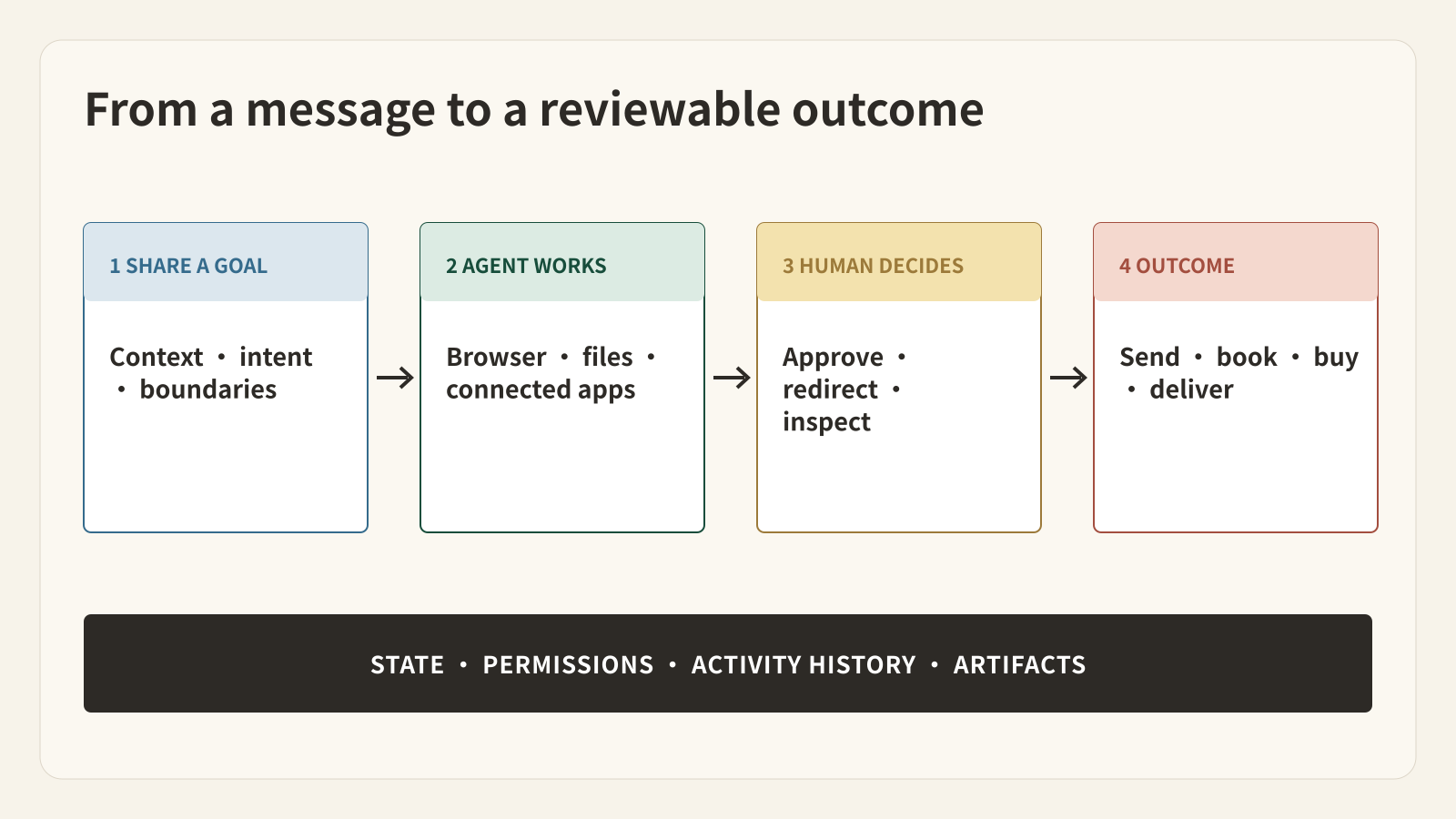
The more durable signal is what people downloaded. Muse is not presented as another place to ask questions. Meta presents it as a personal agent that keeps working after the app closes, uses a browser and connected services, and pauses for approval before consequential actions.
That changes the consumer expectation for AI. A useful agent is increasingly judged by whether it can carry work across the gap between an answer and an outcome.
What Muse actually does
Meta launched Muse in the United States on September 8 for iOS, Android, and the web, with AI glasses support planned later. Most use is free, while subscription plans are available for heavier use.
A person can ask Muse to manage a long-running goal or complete a specific task. Meta's examples include monitoring email, placing dates on a calendar, booking travel or a restaurant, filling out forms, researching options, preparing documents, tracking prices, and completing a purchase after approval.
Muse runs in a dedicated cloud computer called Muse Secure VM. It has its own browser, filesystem, and terminal. Work can continue in the background, and Muse can return when something changes or when it needs a decision.
The interaction still looks like messaging. The important change is behind the chat box: the conversation can create ongoing state, scheduled work, browser actions, files, and approvals.
Why the chart position matters, and why it is easy to overread
9to5Mac reported that Muse topped the US free iPhone chart on September 18, ten days after launch. The canonical Buda SEO report also captured a matching search-demand spike: Google Trends returned the Muse topic cluster in US Trending Now, with related queries for meta muse ai agent, meta ai agent, and muse ai agent rising in the same 24-hour window.
Together, those signals show strong launch curiosity. They do not prove retention, paid conversion, task success, or a lasting lead over ChatGPT. App Store rank is a relative snapshot, and Trends measures attention rather than product quality.
What the moment does support is narrower and more useful: a mainstream audience is willing to try an AI product whose headline promise is action, not only conversation.
For product teams, that raises the baseline. A strong answer is no longer the entire experience. Users also care about whether the system can remember a goal, use the right tools, work asynchronously, surface progress, and stop at the right moment for consent.
The hard part starts when an agent can act
A chatbot can give bad advice. An agent with email, a browser, a calendar, and a payment path can create a bad outcome.
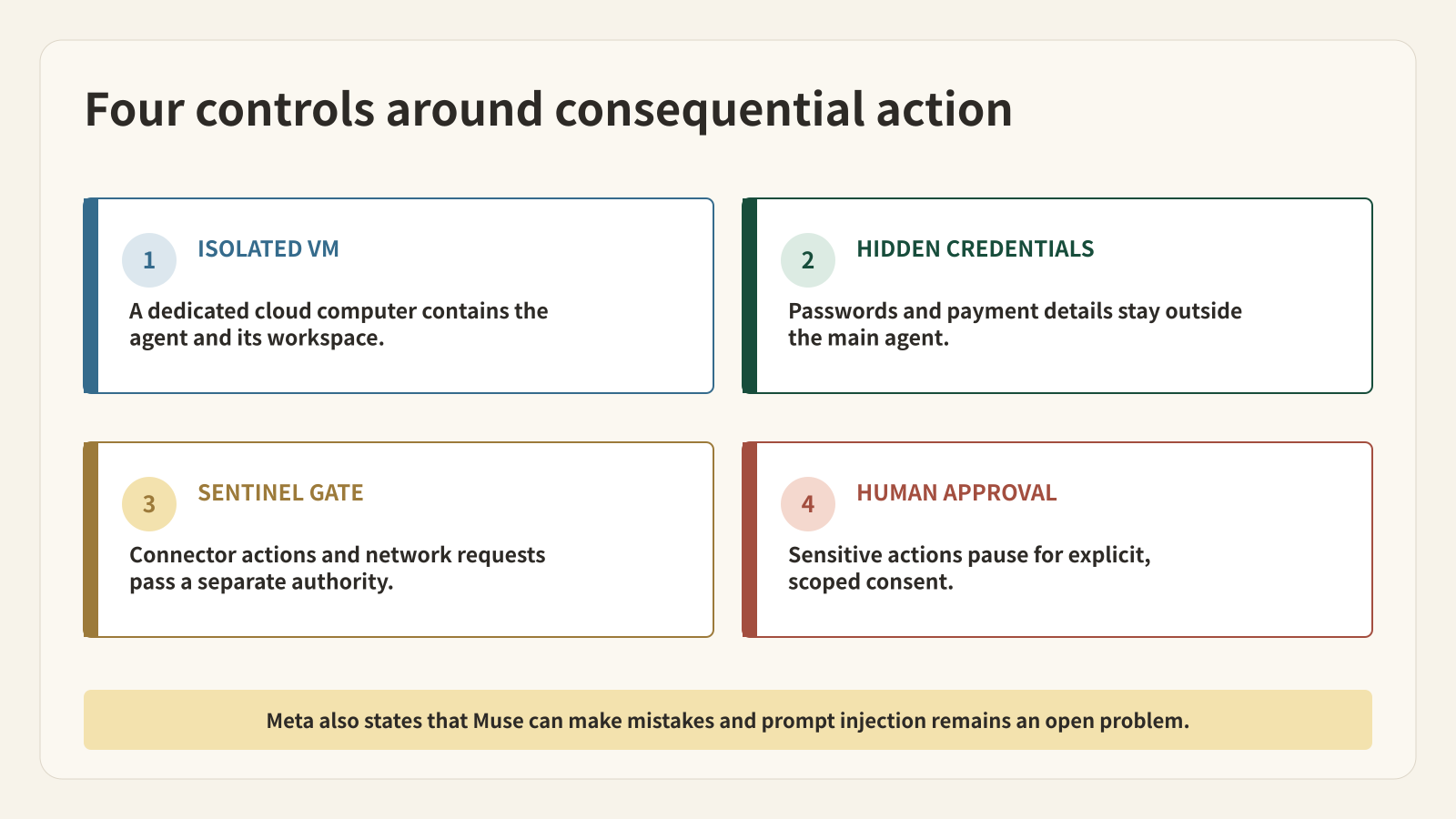
Meta's launch materials describe several controls around this risk. Each Muse runs in an isolated VM. Credentials are kept in secure storage rather than exposed to the main agent. A separate Sentinel component evaluates connector actions and network requests. Sensitive actions such as sending an email or making a purchase require approval, and users can inspect an audit trail, change permissions, or disconnect services.
Meta's deeper security paper is also unusually direct about the remaining boundary: Muse is not immune to attack, prompt injection remains an open industry problem, and the agent will sometimes make mistakes. The current architecture restricts access by Meta personnel through policy, but it does not technically prevent Meta from accessing VM data when needed to operate or secure the service. Meta says a Confidential VM intended to provide that stronger cryptographic boundary is planned for later in 2026.
This distinction matters. “Secure VM” is a real architectural claim. “No operator can access the data” is not yet a property of the launch system.
Muse is a personal agent; Buda is an agent workspace
Muse and Buda overlap in one important belief: AI becomes more useful when it has a real computer, tools, persistent context, and the ability to produce artifacts. They package that belief for different operating surfaces.
Muse is designed around one person's life. It emphasizes a single continuing relationship, personal memory, proactive suggestions, consumer services, and approval cards for actions such as email and purchases.
Buda is designed as a workspace for running and managing Agents across projects and roles. Each Agent works in a cloud computer with files, browser, terminal, previews, IDE, Git, and chat sessions. Skills turn repeatable procedures into reusable capabilities. Channels route conversations from WhatsApp, Slack, Feishu, Telegram, and other messaging surfaces to the appropriate Agent session.
That means the choice is not simply “which agent is smarter?” It is “where does the work live, who needs to inspect it, and what should become reusable?”
| Need | Muse | Buda |
|---|---|---|
| Personal goals and daily-life tasks | Core product surface | Possible through a configured Agent |
| Ongoing message-style relationship | Main interaction model | Available through Agent sessions and Channels |
| Dedicated cloud execution environment | Muse Secure VM | Agent cloud computer |
| Reusable procedures | Muse can build tools and connectors | Skills package repeatable SOPs and toolkits |
| Multi-project operational work | Side chats and goals | Separate Agents, sessions, files, terminal, browser, IDE, and Git |
| Human control | Permissions, approval cards, activity log | Observable workspace, intervention, task-specific review, and channel routing |
Muse is the more direct fit when the product should feel like a personal assistant that learns routines and coordinates everyday services. Buda is the more direct fit when a person or team needs multiple specialized Agents, inspectable work surfaces, reusable Skills, and artifacts that move through an operational workflow.
The new product question: what happens after “yes”?
As agents gain more access, asking for approval is necessary but not sufficient. A good approval screen must tell the reviewer what will happen, which account or destination is involved, what data will leave the workspace, and whether the action can be reversed.
The same standard applies to business work. “Approve this report” should mean more than approving a paragraph in chat. The reviewer should be able to open the underlying files, check sources, inspect a spreadsheet formula, view a browser result, or examine a code diff before accepting the outcome.
This is where an agent's operating environment becomes as important as its model. The environment holds the state, permissions, evidence, tools, and artifact history that make review possible.
A practical way to evaluate an action-taking agent
Do not begin with the most sensitive workflow. Start with a task that has a visible artifact and a reversible next step.
- Give the agent a bounded outcome, such as comparing three service plans and preparing a recommendation.
- Specify the accounts and data it may use.
- Require a reviewable artifact, not only a completion message.
- Keep the final external action, such as sending, booking, or purchasing, behind explicit approval.
- Check the activity history and confirm that the result matches the request.
- Repeat the task to see whether the workflow becomes more reliable, not merely more familiar.
The evaluation metric should be accepted outcomes per unit of human review, not the number of autonomous steps. More activity is not inherently more useful.
What Muse's launch changes
Muse's early chart success does not settle the consumer-agent market. It does make one transition visible: the mass-market AI interface is beginning to stretch beyond the answer box.
The next competition is over trusted execution. Products will need to combine enough autonomy to remove work with enough visibility and control to keep people responsible for consequential decisions.
For individuals, that may look like a personal agent coordinating life across apps. For teams, it may look like a set of specialized Agents working inside an observable workspace. In both cases, the value appears only when AI can produce a real outcome and a human can still understand, review, and redirect the path.
FAQ
Did Muse permanently overtake ChatGPT?
No. Muse reached No. 1 on the US free iPhone chart in a September 18 snapshot reported by 9to5Mac. App rankings change continuously and do not measure long-term usage or market share.
Can Muse send emails and make purchases by itself?
Muse can prepare and execute those workflows, but Meta says it checks with the user before sensitive actions such as sending an email or making a purchase. The exact permissions can be changed or revoked.
Is Muse available worldwide?
Meta's September 8 announcement says Muse is rolling out in the United States on iOS, Android, and muse.ai. It does not establish worldwide availability.
Is Muse's Secure VM fully inaccessible to Meta?
Not at launch. Meta says operational policy restricts personnel access, but the current system does not technically prevent Meta from accessing data when necessary to support, secure, or operate the service. Meta plans a Confidential VM with a stronger cryptographic boundary later in 2026.
Is Buda a replacement for Muse?
They serve different primary contexts. Muse centers a personal, proactive relationship and everyday connected services. Buda centers inspectable Agent workspaces, specialized Agents, reusable Skills, project artifacts, and messaging Channels. The better fit depends on where the work and review need to live.
Sources
- Meta: Introducing Muse
- Meta AI Research: How We Built Safety Into Muse
- Meta: How We Designed Muse
- Meta AI: Muse product overview
- 9to5Mac: Muse overtakes ChatGPT as the top US iPhone app
- Google Trends: US Trending Now
- Buda documentation: The Agent Workspace
- Buda documentation: Channels
- Buda documentation: Skills