OpenAI Dots: where should teams draw the line for an always-on agent?
Separate read-only discovery, action approval, and result review before delegating continuing work.

Background discovery, task execution, and external commitments need different rules.
On September 29, 2026, OpenAI introduced Dots: always-on agents with their own cloud computers, persistent projects, and the ability to learn from feedback. OpenAI says Dots is powered by GPT-6 Astra, connects to more than 4,000 applications through its plugin ecosystem, and can receive work and carry context through ChatGPT, Slack, and Teams.
The change is a working relationship, not just a longer chat. In a conventional conversation, a person asks and the model answers. Dots describes a different rhythm: a person sets the goal and standards, the agent keeps working, and it returns deliverables alongside questions that require judgment. Closing a window no longer supplies a natural stopping point. Steps previously controlled by someone watching need explicit rules.
Always-on does not mean unrestricted. Background proactive research, active execution, and the specialist dots being piloted for organizations have different boundaries. Teams should distinguish them before deciding what work to delegate.
Work between conversations becomes part of the product
OpenAI describes a developer's Dot finding recurring issues in customer feedback, preparing a fix, running tests, and producing a PR with a video. A product lead's Dot updates launch materials when scope changes. A sales lead's Dot checks documentation against changing customer requirements, prepares a proof of concept and test plan, and brings unresolved questions back.
These are interdependent deliverables, not isolated answers. A patch needs tests; launch copy must reflect product scope; a proposal must follow validation results. The agent needs to retain goals, sources, progress, and human revisions rather than wait for each step to be explained again.
A cloud computer and cross-channel context support that continuity. A user can open the Dot's computer to inspect its work or choose to connect their own device. A project started in ChatGPT can continue in Slack; OpenAI says context follows across channels. These are vendor descriptions of intended workflows, not evidence that every business has achieved the same results.
Background research is not task execution
OpenAI calls activity performed when a user is not actively working with a Dot proactive research. It can look for useful information in connected applications, but its tools are read-only: it cannot send messages, change application content, or operate a browser or computer in this state.
The launch page also describes a Dot using its computer and browser to execute projects. Those descriptions concern different states. Independently finding a lead in the background is not the same as executing a delegated task.
Finding a potentially missing customer invoice is discovery. Preparing an invoice draft is a deliverable. Sending it to the customer is an external action. OpenAI's early testing example specifies that the sending happened after user approval. It does not establish that every background discovery can trigger a send automatically.
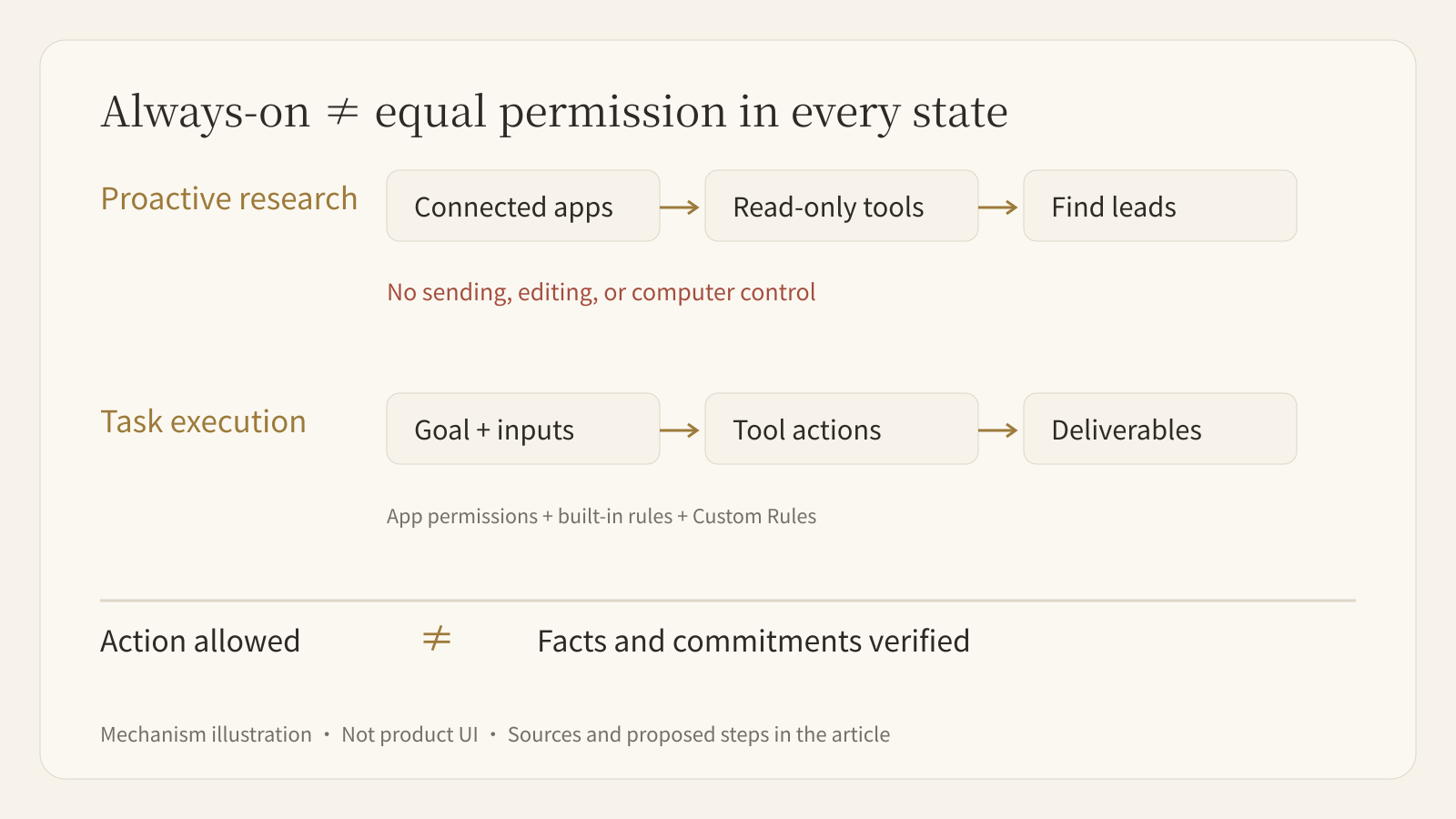
“Do nothing dangerous” is not a usable operating scope. Connecting an application defines what the agent can access. Rules for individual actions define what it can change.
Access, action approval, and result review are separate gates
Access is the first gate. Users manage connections and permissions through existing ChatGPT application controls. A source being useful does not justify opening an entire business system. Identify the minimum information needed for the task rather than treating potential relevance as sufficient permission.
Action approval is the second gate. Dots starts with built-in rules. Custom Rules can allow an action, require approval, or block it; built-in safety requirements still apply. OpenAI also describes auto-review: actions affecting accounts or sharing information are checked against instructions, Custom Rules, and safety requirements to determine whether they can proceed, need approval, or must be performed by a person. Sensitive tasks such as changing a password remain with people.
Correctness is the third gate. Permission to execute does not establish that an invoice amount, customer requirement, or launch claim is correct. OpenAI advises reviewing important work. Before an approval button, a business owner should see sources, material changes, unverified facts, and affected recipients—not merely “send?”
A proposal can be well formatted and within permissions while making an unverified integration promise. Action checks and business acceptance solve different problems. Both need a place in the workflow.
Start with one customer proposal, not an entire department
The following is a proposed task design, not a measured efficiency case. A sales team wants proposals updated as technical requirements change, without letting the agent commit to delivery dates or write opportunity stages back to its CRM.
- Specify inputs. Provide current customer requirements, confirmed product documentation, the previous proposal, and test records. Identify authoritative versions and internal material that must not be shared with the customer.
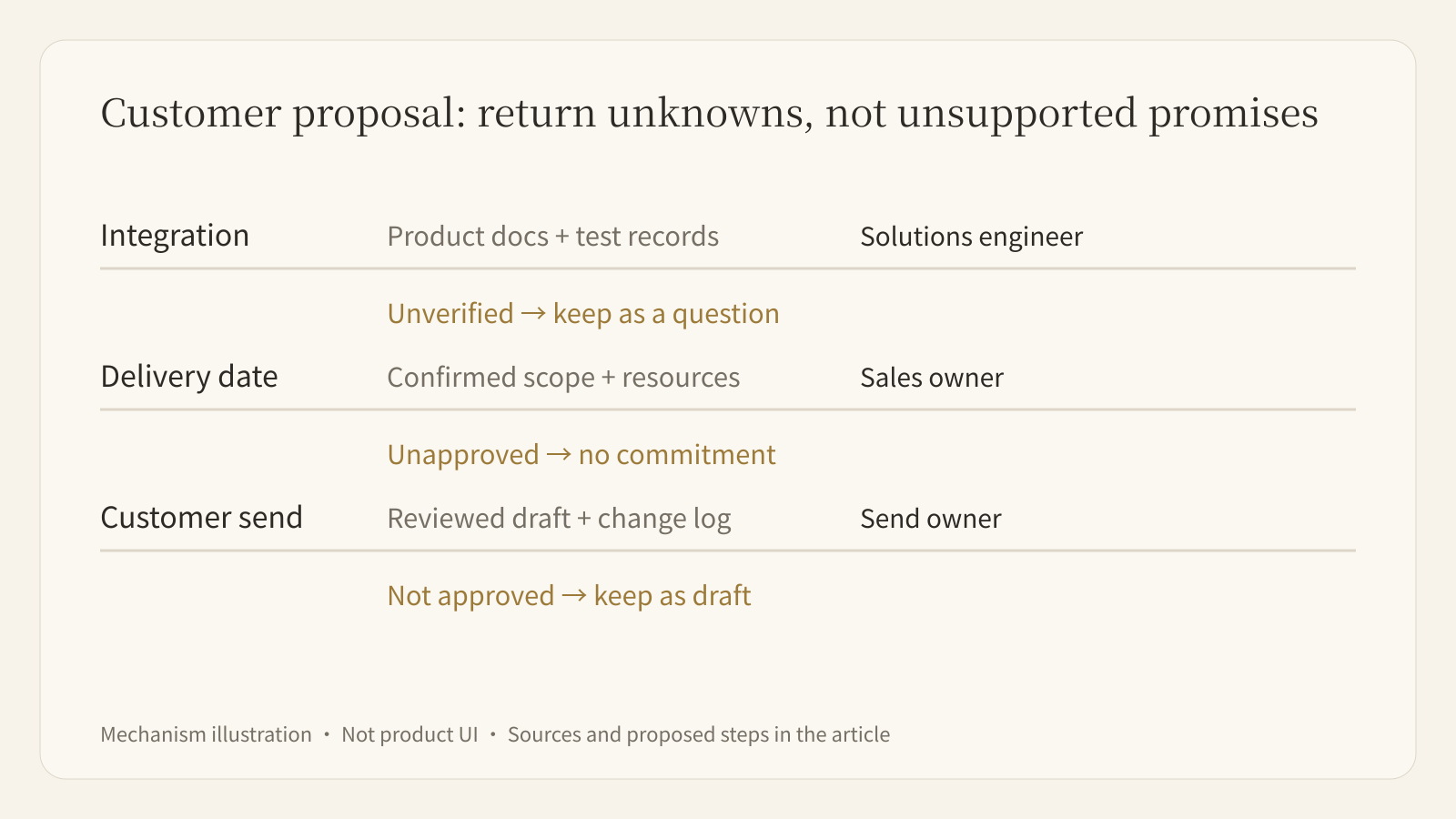
- Define continuing work. Compare new requirements with established capabilities and update the proposal draft and test checklist. Unsupported capabilities stay as questions rather than becoming claims of support.
- Specify deliverables. Each iteration returns a readable proposal, a change table, and unresolved questions. Keep original sources separate from drafts so reviewers can check individual claims.
- Separate actions. Draft preparation is allowed; external emails, quotes, delivery commitments, and CRM stage changes need a named owner's confirmation. Actual rules must be configured against available product capabilities: this design is not a ready-made permissions template.
- Assign acceptance. A solutions engineer checks integration and testing; a sales owner checks commercial commitments. Feedback must reach the next task iteration rather than remain in an unrelated message.
The owner need not supervise every paragraph, but can inspect what changed, why, and what remains uncertain. A polished proposal without evidence and unresolved items fails this acceptance standard.
Specialist dots are a distinct organizational pilot
OpenAI also previews specialist dots with organizational identities, credentials, and system access for defined responsibilities. It mentions early internal explorations in procurement, invoice processing, email marketing, customer support, and commercial contracts, starting with focused enterprise pilots.
A personal Dot working on someone's behalf and an organizational Dot occupying a defined role pose different management questions. Organizational deployment involves role permissions, system records, and cross-team responsibility. The Microsoft Agent 365 collaboration is intended to connect these dots to existing enterprise governance and security controls. The launch page does not present that integration as a complete service immediately available to every account.
Evaluate a pilot by asking whether the responsibility is narrow, access is bounded, execution can be paused, and someone owns acceptance. Giving an agent a job title does not establish reliable operations.
Validate one workflow in a persistent workspace
Buda's Agent Workspace brings sessions, Drive, a terminal, browsers, and Git into one working environment. Persistent files let agents continue from sources and existing outputs while users inspect execution and results. Maintaining proposal drafts and an open-question checklist is a bounded starting task.
Buda can handle source organization, tool execution, and inspectable deliverables. Once the workflow is stable, capture its method in a Skill. Installable Skills can be found and installed in the Buda AI Marketplace. Use Automations for work that must repeat on a schedule. Persistent files, reusable instructions, and scheduled starts address different needs; none replaces business acceptance.
Run one complete manually triggered task first. Confirm sources, outputs, and owners before adding continuous execution. A bounded trial makes errors easier to locate than a promise to autonomously handle all work around the clock.
FAQ
Does 24/7 availability mean any action can happen automatically in the background?
No. OpenAI explicitly limits proactive research to read-only tools. Execution also depends on application permissions, built-in rules, Custom Rules, and action review. Evaluate the state and action rather than infer permission from availability.
How does Activity View differ from acceptance review?
Activity View helps users follow progress, including background work, and redirect a Dot. Acceptance checks facts, calculations, and commitments. Seeing that a step ran improves traceability but does not prove its result is correct.
Which plans can use Dots?
The September 29 announcement describes a rollout to Pro and Business Premium in eligible markets. Enterprise, including Edu and Healthcare, can enable the beta through workspace administrators. OpenAI says the first Dot is included in Pro or Business Premium, with allowances for deep work; Codex and ChatGPT Work tasks still follow their respective usage rules. Check actual account availability. Inclusion of a first Dot does not mean unlimited execution.
What should a team's first trial record?
Record delivered and undelivered tasks, facts requiring human correction, actions stopped by rules or permissions, and the reviewer's work. Repeated errors guide scope and standard changes. Generated file counts alone do not measure successful delegation.
Sources and further reading
Verified September 30, 2026. Dots capabilities and rollout follow OpenAI's announcement. The proposal workflow is a suggested design, not a performance test or a claim that the two products are equivalent.