Your automation ran on time. Did it report the right day?
Separate the launch time, source calendar and business date before accepting a daily report.

The Monday report arrives at 9 a.m. in Shanghai. Its heading says “yesterday,” but its figures describe a Sunday that has not yet ended in Los Angeles. Management thinks it is comparing two complete days. It is comparing a complete day with an unfinished one.
An on-time launch does not establish a complete data window. An AI automation timezone determines when execution starts. It does not define the source's day or the business date assigned to the report.
In Buda, Skills define how work is done; Automations define when it runs. Put calendar decisions in the method before deciding the schedule.
Name three clocks instead of saying “yesterday”
- Schedule clock: the IANA timezone and local launch time, such as Monday 09:00 in
Asia/Shanghai. - Source calendar: the timezone that defines a source's dates, such as midnight to midnight in
America/Los_Angeles. - Report business date: the date under which the team files the report, and the data interval the report actually intends to compare.
The business date is neither the retrieval timestamp nor an alias for the source date. A Monday Shanghai briefing can legitimately use complete Saturday Los Angeles data. Its cutoff must say so. Changing the heading cannot turn Saturday's figures into Sunday's performance.
At nine, the source day is still open
This is a fictional internal-reporting scenario using real IANA timezone arithmetic—not an actual Buda run or a claim about any provider's publication lag.
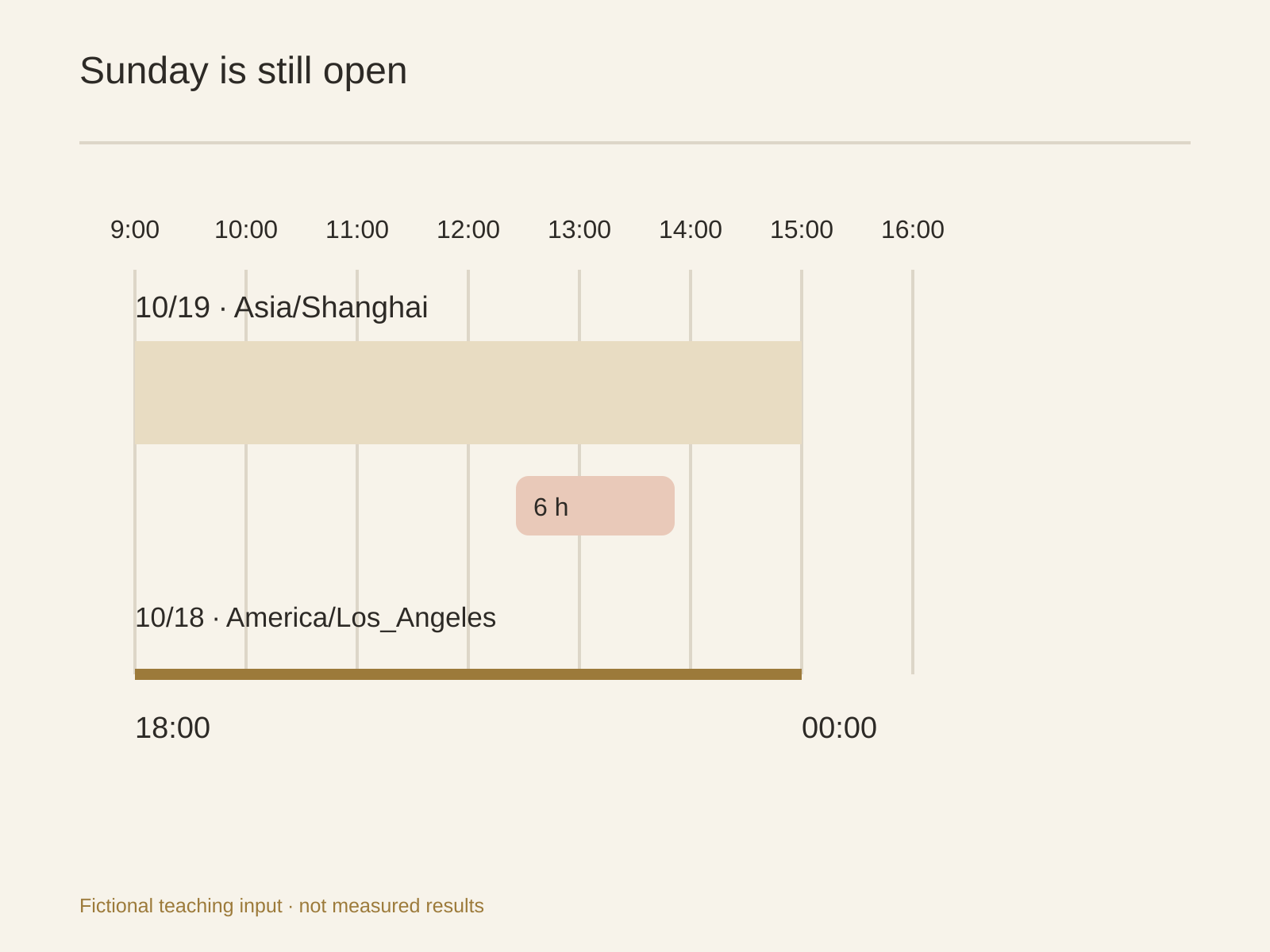
Monday, October 19, 2026 at 09:00 in Shanghai is Sunday, October 18 at 18:00 in Los Angeles. Six hours of the Los Angeles Sunday remain. Its calendar day closes at 15:00 Monday in Shanghai.
| Shanghai | Los Angeles | What can be concluded about Sunday? |
|---|---|---|
| October 19, 09:00 | October 18, 18:00 PDT | The calendar day is unfinished |
| October 19, 15:00 | October 19, 00:00 PDT | The day has closed; ingestion may still be incomplete |
| After source confirmation | Check the provider's actual state | Accept completeness only with its supporting evidence |
Specify the source range as the half-open interval [2026-10-18 00:00, 2026-10-19 00:00) in America/Los_Angeles. In Shanghai it is [October 18 15:00, October 19 15:00). This avoids arguing about whether an inclusive 23:59:59 captures the final fraction of a second.
Shanghai's calendar yesterday is October 18 00:00 through October 19 00:00. The rolling 24 hours before Monday 09:00 run from Sunday 09:00 to Monday 09:00. Those are three different ranges. Label intervals and zones rather than concealing the difference behind “yesterday.”
Give each run a calendar contract
“Analyze yesterday at nine” leaves important decisions unstated. Record the following in the task input or Skill method. This is a proposed contract, not a native Buda lock or an automatic completeness guarantee.
Report business date: 2026-10-19, Asia/Shanghai
Planned launch: 09:00, Asia/Shanghai
Source: authorized Los Angeles operations data
Source date: 2026-10-18, America/Los_Angeles
Source range: [10-18 00:00, 10-19 00:00)
Comparison: previous complete source day on the same basis
data-through: latest date actually returned by the source
Completeness: source-confirmed; null if unknown, not zero
Earliest availability: not before 15:00 Shanghai;
                       confirm ingestion lag separately
Business key: source ID + source date + report type + version
Unresolved: lag, revisions, owner of wait/partial decision
A business key helps locate existing work. It is not an exactly-once lock. If a report needs revision, retain the previous version and its replacement relationship. Keep source-update time, coverage cutoff and report-generation time separate rather than collapsing them into one updatedAt.
For event-based data, also establish whether the filter uses event time or import time. Timezone conversion cannot eliminate late arrivals and backfills. A closed source date may still be revised.
An unfinished day needs an honest output
At the fictional Monday 09:00 checkpoint, the owner can choose between two explicit outcomes:
- Wait for the requested source date. State that Los Angeles October 18 remains open until 15:00 Shanghai and that ingestion completion is unconfirmed. This is a status output, not a complete Sunday report.
- Deliver a partial report. If complete data through Saturday has actually been verified, label the business date October 19 and the source cutoff October 17, Los Angeles. Mark Sunday incomplete and do not compute a daily change between incompatible windows. Without a verified complete day, do not supply a substitute number.
Choosing to wait does not mean the system automatically pauses, retries or changes the schedule. A later run needs its own authorized execution arrangement. The method's immediate job is to express the state accurately.
Daylight saving changes the offset, not the business meaning
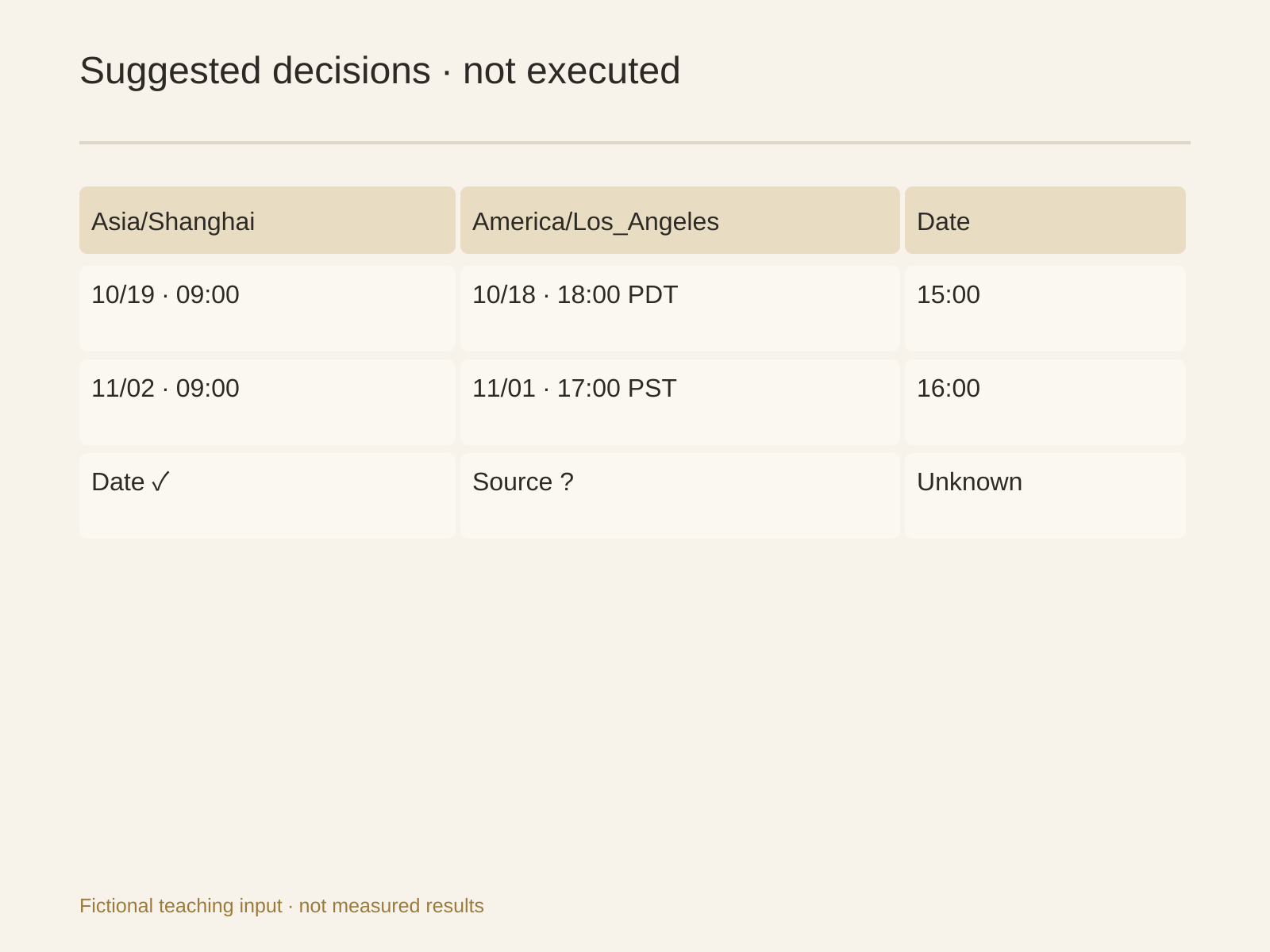
On Monday, November 2, 2026, 09:00 Shanghai is Sunday 17:00 in Los Angeles, now PST. Sunday closes at 16:00 Shanghai rather than October's 15:00.
Keep America/Los_Angeles and convert the specific date. Do not encode “subtract fifteen hours” as a permanent rule: the examples differ by fifteen and sixteen hours respectively. The Shanghai schedule remains 09:00; its correspondence with Los Angeles changes.
A launch in a daylight-saving region's early morning can encounter missing or repeated local times. Establish how the scheduler handles them and check concrete dates before promising one execution per business interval.
Test the method without creating a schedule
| Proposed check | Input state | Expected output |
|---|---|---|
| Normal | Day closed and source confirms completeness | Business date, source range, cutoff and comparable previous window |
| Delayed | Calendar closed but source unconfirmed or partial | Wait/partial status and the specific gap; unknown is not zero |
| Repeat | Business key already exists, or prior sending state is unknown | Locate its version, establish state and ask for a decision before resending |
These are unexecuted acceptance requests, not passed tests. Preserve inputs, actual outputs and the owner's decision. A repeat check must read real state: an existing file does not establish that a message was sent.
Calendar questions worth resolving
The source returns dates without a timezone. Can the agent infer one?
No. The boundary determines which events count. Ask the source owner for its timezone and completeness definition. Mark the zone unknown and stop cross-day comparisons rather than borrowing the browser's or operator's timezone.
Why isn't a closed day enough?
Calendar closure and completed ingestion are different conditions. Inspect data-through, coverage and the late-arrival policy. If closure is all you know, completeness remains unknown.
Where should a next-day rerun be filed?
Keep the original business date and source interval. Record the rerun timestamp and revision separately. Otherwise one business day becomes several apparently new reports. Unknown delivery state must be checked before another send, even if regeneration succeeds.
Make one sample explain its dates first
Give the Buda Agent the three confirmed clocks and stopping rules. Request a sample date statement and unresolved-items list—not a new automation or outbound message. In the Agent tab, inspect tool inputs and the actual file to verify that retrieval time has not become the data cutoff.
For repeated work, search for and install a suitable Skill in the Buda AI Marketplace, then inspect whether it accepts these calendar inputs. A one-sentence daily report request can simplify execution, but it cannot define the team's meaning of “yesterday.”