Buda vs Gemini agent: integrate enterprise systems or create a separate execution workspace?
Compare context preparation, agent identity, inspectable outputs, and the cost of returning accepted work.

Sales notes live in Drive, opportunities in a CRM, and discussion in Slack. Marketing needs to turn them into a launch plan. Adding an agent raises three practical questions: where does it get context, whose identity does it use, and where does completed work go?
Google announced the Gemini agent on October 8, 2026. Its description includes persistent cloud execution, coworker identities, dynamic subagents, Skills, enterprise tools, and governance—not merely a sidebar for Gmail.
Buda organizes execution around a visible Agent Workspace: chat, persistent files, terminal, browser, previews, and Git are views into the same cloud computer. Both approaches support continuing work. The buying decision is where the operating record should live and how people will inspect and accept results.
Google places the agent inside the organization
Google describes access through Workspace, Microsoft 365, Slack, command line, and third-party applications. Its tools can connect to Salesforce, ServiceNow, databases, Git, Jira, and MCP servers; company registries organize shared tools and Skills.
The useful advantage is an agent appearing where employees already work. In Google’s example, a marketing manager adds an events coordinator agent to a Chat group to draft a launch-readiness document. Colleagues can mention it in a Docs comment, and its edits appear under its own name in version history.
A coworker can have its own Workspace account, email, calendar, Drive, and company-directory presence, seeing what colleagues share with it. Dynamic subagents are a separate mechanism: temporary task-specific identities for parallel or sequential work. A durable role and a temporary delegation are not the same operating unit.
The new Gemini agent also differs from Gemini Spark and Gemini models. The agent is the execution layer; the underlying model is a separate choice. Google describes Gemini and Claude support, with further model choices planned.
Buda makes the execution site inspectable
In Buda, chat, Files, Terminal, Browser, Web Preview, and Git expose one Agent cloud computer. People can open generated files, inspect commands and browser work, preview an application, or review a diff and commit history.
This fits work that mixes files, webpages, and scripts. An agent might normalize approved sales data into a CSV, run an analysis, create a sourced report, and prepare a marketing proposal. The owner can inspect those artifacts and unresolved questions instead of accepting a completion message.
Agent Drive and Space Drive define two context locations: private working files and memory for one Agent, and explicitly shared material for a Space. A file in a private Drive does not automatically become team context.
A visible workbench does not replace authorization in enterprise systems. It is not evidence that Buda implements controls equivalent to Google’s announced Agent Gateway, identity propagation, or auditing. Inspectability and centrally enforced policy need separate acceptance criteria.
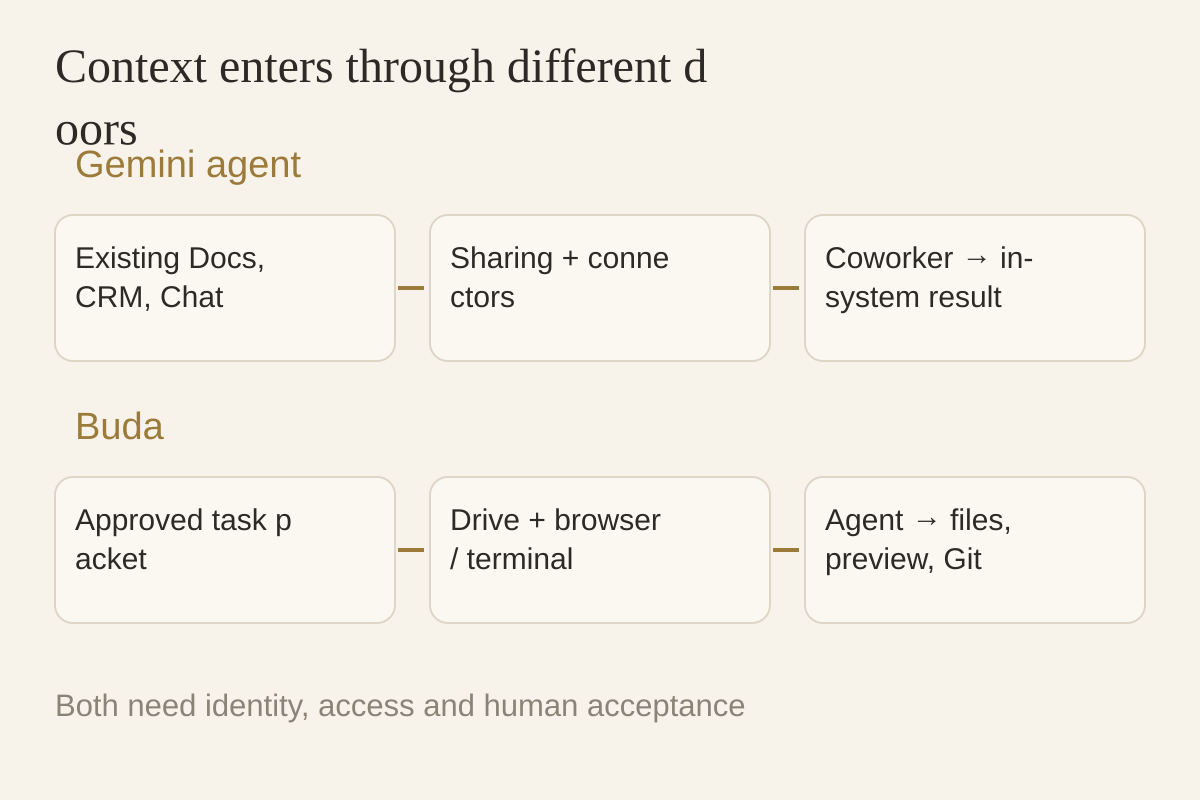
One marketing proposal, two context costs
Start with a marketing plan based on sales feedback: prepare the draft, then have a colleague inspect and continue it.
Gemini route: share existing documents and a Chat space with the coworker, verify eligibility and CRM permissions, and prepare the plan in Docs. Check citations against records, agent identity in logs, access changes, and whether another colleague can continue through the existing document process.
Buda route: create an approved input packet with business definitions in a designated shared location. Produce a source index, analysis files, and a proposal inside the workspace. Inspect files, browser work, or Git before returning an accepted result to the business system.
Google’s route may reduce movement of native documents. Buda’s route concentrates inspectable outputs from file, web, and code work. Integration cost includes preparation, connection maintenance, access settings, and writing accepted results back—not just the first prompt.
Four procurement questions
| Question | Verify for Gemini agent | Verify for Buda |
|---|---|---|
| Where are authoritative inputs? | System connections and sharing scope | Input packet, Drive, and tool boundaries |
| Who manages identity? | Coworker/subagent identity and policies | Space, Agent, members, external grants |
| What can a reviewer inspect? | In-system outputs, versions, available logs | Files, commands, browser, previews, Git |
| How does work return? | Updates and handoff in the source systems | Accepted files or verified connections |
If your main sources already sit in managed Workspace and enterprise systems, with administrators responsible for identity, policy, and connectors, test Gemini’s in-system route first.
If your work crosses web research, file processing, scripts, and application outputs, and you want an explicit input packet plus a visible execution site, Buda merits a pilot. The distinction is not that Google lacks multi-agent work; it is how execution, context, and delivery are organized.
Using both requires one authoritative input and one accepted output. Do not maintain two changing customer records or let both agents write to the same system without a designated handoff owner.
Turn announcements into account-level acceptance
Google describes agent identity, authorization, audits, sandboxes, Agent Gateway, and spending controls. Check which features are enabled for your company and which require administrator configuration.
Confirm subscription, region, administration, connector availability, and rollout first. Use test material to check what the agent can see, what it rejects, and what evidence it retains. Apply the same account-level checks to a Buda Space and external tool grants. A launch page cannot substitute for that test.
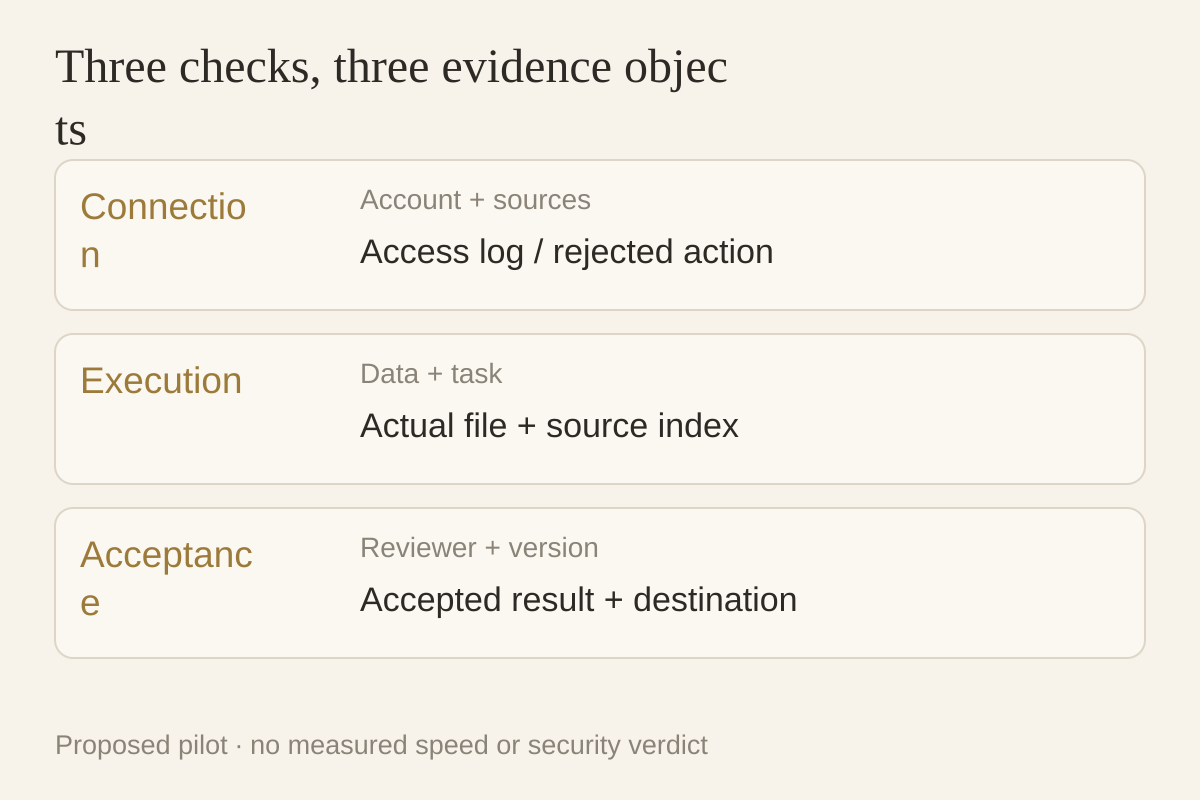
Ask the first pilot for five deliverables
Use one recurring task with minimal necessary data and request:
- Sources: records, dates, links, and business definitions.
- An actual artifact: report, spreadsheet, script, or proposal.
- Identity and access evidence: executor, systems used, rejected actions.
- Unfinished work: missing input, failed steps, and human decisions.
- Acceptance: approved version, destination, and next-run maintainer.
Ask a second colleague to inspect and continue without borrowing the original operator’s account. Record missing inputs, repeated explanations, access problems, and verification time; do not assume either product is faster.
In Buda, start with the Agent Workspace, input packet, and acceptance criteria. Package repeatable steps as a Skill; search and install an appropriate ready-made Skill in Buda AI’s Marketplace. Establish a transferable task before expanding automation.