Cloud or Connector? Put the task where its dependencies actually live
Choose an execution environment by files, tools, network access and availability—not by a blanket preference for local or cloud.

A research brief can start with public sources. A project script may need a workstation with the right dependencies. An internal report may depend on a company server and an authorized account. Asking an AI agent to handle all three does not mean all three belong on the same computer.
The useful question is not whether cloud or local execution is better in general. It is which environment can carry out this particular task, with the right inputs, access and output location. Choose that before asking the agent to work.
Start with a dependency inventory, not a machine preference
For each task, write down five things: where the input files are, which installed tools it needs, which account or network it depends on, how long the environment must stay available, and where the deliverable must end up. A filename alone is insufficient: record the intended directory and whether copying that input is permitted.
Buda cloud agents have a cloud computer for execution. Connector registers a selected computer as an agent runtime. With Connector, the conversation stays in the cloud while file operations and commands run on that selected computer. A local runtime is not a promise that the entire service, including conversation, stays local.
Four questions narrow the choice
Can the necessary material be transferred with authorization? Public documents or an approved, redacted export may be portable. Confidential data does not become transferable merely because the agent can read it. If permission is unclear, stop and resolve it before choosing a copying workflow.
Does the work require an existing installation? A portable CSV and a standard script may fit a cloud environment after checking dependencies. A repository with machine-specific tooling may be easier to run where it is already configured. Do not assume an installation is reproducible until you have checked its versions and setup.
Does the task need a particular network or account? A company server may be the practical location for internal tools. Connection to the machine does not grant permission to every internal system; verify the actual account and approved operation separately.
Will the chosen machine remain available? Connector needs the device, its network and the Connector process to remain online. Sleep, a network loss or a stopped process makes the device unavailable. Opening the desktop application is not evidence that the target runtime is ready.
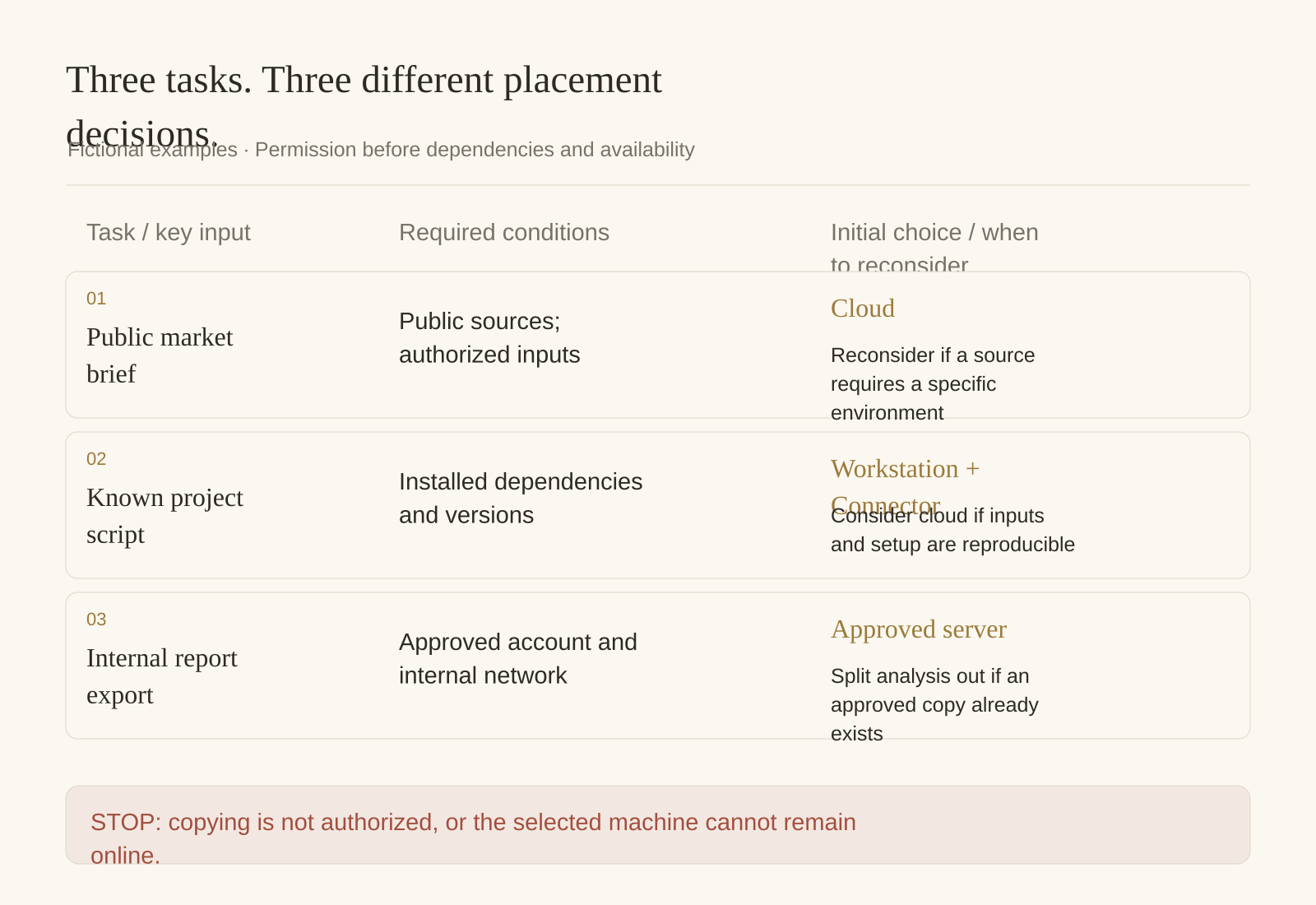
Three fictional tasks, three different decisions
These scenarios illustrate the method; they are not customer results or measured comparisons.
| Task | Initial choice | What would change it? |
|---|---|---|
| Brief from public market sources | Cloud, with authorized inputs and a named output folder | A necessary source is accessible only through a specific approved environment |
| Run a known project script | Connector on the configured workstation | Dependencies and permitted inputs can be reproduced in the cloud |
| Export an internal report | The approved server environment, after access checks | An authorized export already exists and only its analysis is needed |
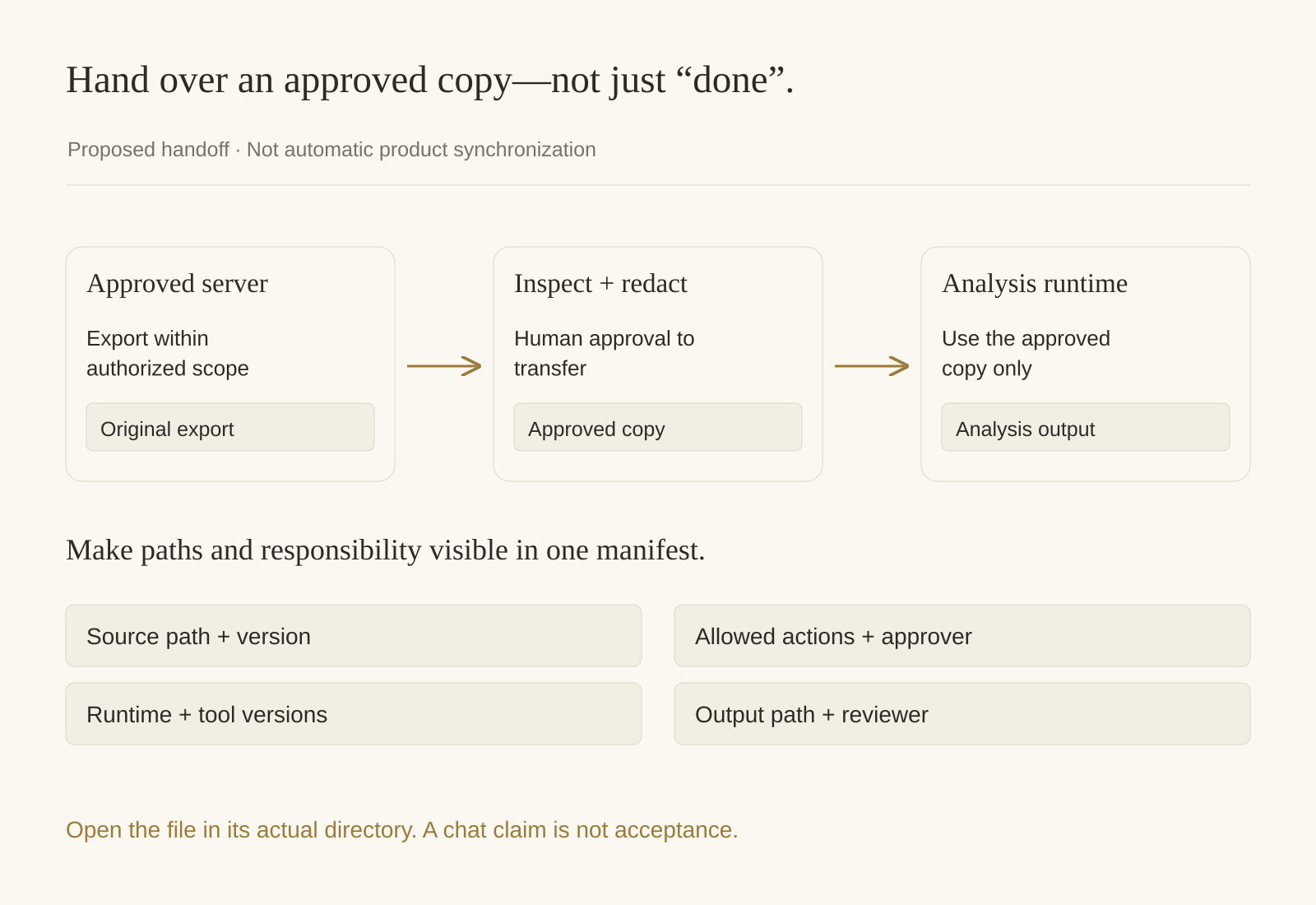
The third task can also be split. Export through the approved environment, inspect and redact a copy, then transfer only that approved copy for analysis. Record who approves the transfer and where each output belongs. This is a proposed handoff, not an automatic synchronization feature.
Test the location before expanding the job
Start with a small task whose effects you understand. Ask the agent to report its execution environment, list a specifically authorized directory and read one non-sensitive sample. Then, with explicit permission, create a harmless test document in a named output directory. Run a familiar script only after confirming it does not send messages, modify production or overwrite files.
Inspect the file at its actual location. A chat statement that the file was created is not a substitute for finding and opening it. Redact device names, tokens and private paths before sharing screenshots or logs.
Before doing substantive work, identify the selected runtime and confirm the approved input and output paths. List only the named directory. Do not copy data, install software, change configuration, send anything or delete files. Propose a harmless location check and wait for authorization before writing a test file.
Leave a handoff that survives the conversation
Use a small manifest rather than a vague “done”: source path and version; selected runtime; required tool versions; permitted operations; output path; reviewer; and the next manual check. If an input was copied, record both source and destination and the approved scope of the copy.
Drive and memory distinguishes private Agent Drive from shared Space Drive. Neither that distinction nor a shared conversation means a file on a connected computer has automatically appeared in a cloud Drive. Confirm every intended handoff explicitly. When a dependency or access requirement changes, reassess placement instead of silently running the old task elsewhere.
Questions to settle before the next run
Does a cloud agent need my laptop to stay awake? Its cloud execution does not depend on keeping your laptop online. A task assigned to your laptop through Connector does. Check the selected runtime, not the device you use to read the chat.
Does running locally provide automatic privacy protection? No blanket conclusion follows from location. The conversation remains in the cloud; inspect the intended data flow, account access and permitted operations before using sensitive material. Do not assume the cloud sandbox's isolation properties apply to an arbitrary connected computer.
Can stopping Connector undo completed work? Going offline stops availability; it does not establish that files or prior effects were erased. Inspect retained outputs and ask for confirmation before any cleanup or deletion.
Pick one low-risk task, name its dependencies and verify one real output location. That gives you a grounded decision about where the next, larger job should run.