Introducing the new Agent Workbench UI
Meet Buda's new Agent Workbench UI: fixed Agent Chat, Side Panel, Bottom Panel, and Projects for durable AI agent work.
An AI agent workspace has one job:
keep the agent's work visible enough for a human to judge it.
That sounds simple. In practice, many agent interfaces still behave like ordinary software: every tool becomes a page, every page replaces the previous one, and the human keeps jumping between chat, files, browser, terminal, and history.
That is the wrong shape for agent work.
Agent work is not a linear flow through separate screens. It is a live loop of asking, watching, inspecting, correcting, and continuing. When the interface hides the agent at the exact moment you need to review its work, it pushes the human out of the command position.
The new Buda Agent Workbench UI is designed around a different principle: the agent stays visible, the work surfaces stay close, and long-running work has a durable project home.
The old problem: tabs made every surface compete
The earlier Buda workspace used a tabs-first layout. It was simple and familiar, but every tab competed for the same main canvas.
Open Drive, and the chat moved away. Open a browser, and the session disappeared behind another tab. Open a terminal, and the conversation was no longer the stable center of the workspace.
That works for small utilities. It does not work for agents.
A capable agent does not just answer a question. It reads files, writes files, opens a browser, runs commands, waits for feedback, and changes direction. The human's job is not to stare at a final answer. The human's job is to review the execution while it is happening.
If the UI keeps replacing the conversation with the tool you are inspecting, it creates friction exactly where human judgment matters most.
The new anchor: Agent Chat is not a tab
The redesigned Agent Workbench UI moves from a tabs-first model to a stable working structure.
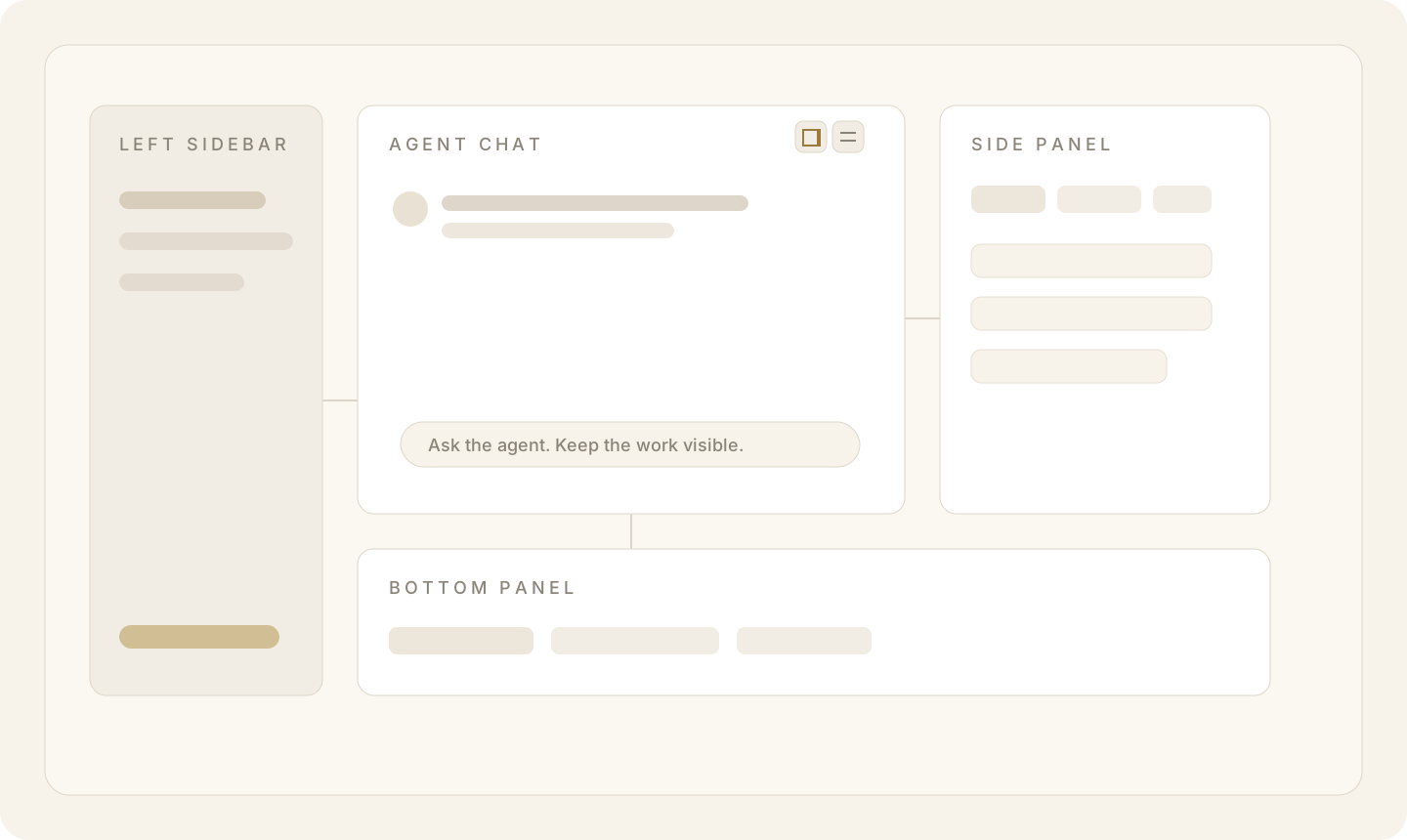
Left Sidebar keeps navigation in place. In Single Agent Layout, it is session- and project-first. In Company Layout, it still supports broader agent and space navigation.
Agent Chat stays fixed in the main canvas. This is the center of the work. The agent's messages, tool calls, reasoning trail, and next action remain visible while supporting surfaces open around it.
Side Panel sits on the right. It is for focused auxiliary surfaces that benefit from height: Drive, browser, Git, files, and other tabbed tools.
Bottom Panel spans the lower area. It is for wider surfaces and quick inspection, especially when you want to keep the conversation visible while reviewing a broad tool view.
The chat is not one more tab. It is the anchor.
Panels make execution visible
Panels change the relationship between the human and the agent.
When Drive is a page, opening Drive means leaving the conversation. When Drive is a panel, opening Drive means checking the agent's working context.
The layout difference is small. The behavioral difference is large.
You can keep the agent visible while inspecting files. You can keep a browser beside the conversation. You can open a wide bottom panel without breaking the session. You can close every support tab and return to a clean chat surface without losing your place.
This is the work pattern Buda is built for:
- Ask the agent to do the work.
- Watch the execution.
- Inspect the files, browser, terminal, or Git state.
- Correct the direction.
- Continue from the same conversation.
Visible execution is not a cosmetic feature. It is how humans stay in control of AI work.
Toggle states keep orientation clear
The Side Panel and Bottom Panel each have their own toggle in the Agent Chat toolbar.
When a panel is open, its toggle is active. When the panel is hidden, the toggle returns to a quieter state. This is small, but it matters.
Agent work often involves several surfaces at once: a conversation, a file view, a browser, a terminal, or Git. The user should know, at a glance, which surfaces are currently participating in the workspace.
The toggle state is not decoration. It is orientation.
What this unlocks
The new Agent Workbench UI makes several patterns feel natural:
- Keep a session open while browsing Drive.
- Compare generated files without losing the chat.
- Run a terminal or Git view while the agent keeps context.
- Use the Bottom Panel for wide supporting views.
- Close all support tabs and return to a clean chat surface.
- Start a new session inside a Project and keep related work together.
- Move an existing session into a Project when a one-off chat becomes part of longer work.
It also makes Buda easier to teach. The mental model is simple: left is navigation, center is the agent, right and bottom are work surfaces, and Projects hold the long-running work.
Projects make sessions durable
Panels solve the visibility problem inside a session. Projects solve the continuity problem across sessions.
A single chat thread is rarely enough for real work. A coding task may start with a bug report, continue with file inspection, branch into browser testing, and come back later as a follow-up request. A marketing workflow may involve research, drafts, assets, reviews, and revisions across multiple conversations.
Without a project layer, those sessions become scattered threads.
Buda now adds Projects as the long-lived container above sessions.
A Project is not just a label. It creates a project-backed folder in Drive, groups related sessions together, and lets new sessions inherit the current project context by default.
That changes the mental model:
Agent
└── Project
    ├── Session
    ├── Session
    └── Session
Sessions become chapters inside a larger body of work, not isolated conversations that disappear into a history list.
In the sidebar, Projects appear as expandable folder rows. You can create a new session directly inside a Project, move an existing session into a Project, remove it from a Project, rename the Project, or delete it when the work is no longer needed.
The first version is intentionally light. There is no heavy project dashboard. The goal is continuity and discoverability: give long-running work a home without adding another management surface.
Why this matters for human review
Buda is not trying to make humans watch more UI.
It is trying to keep humans in the right position.
As agents become more capable, they will handle more of the execution: writing code, editing files, browsing the web, preparing reports, and building artifacts. The interface should not turn the human into a tab manager. It should help the human stay close enough to judge quality, approve direction, and catch mistakes early.
That requires three things:
- A stable conversation anchor — Agent Chat stays visible.
- Nearby execution surfaces — Side Panel and Bottom Panel keep files, browser, terminal, and Git close.
- Durable work context — Projects keep related sessions and files together over time.
Together, these make the workbench feel less like a pile of tools and more like a command desk for AI work.
A quieter interface for heavier work
The more capable agents become, the calmer the interface around them should be.
Users do not need more panels for the sake of panels. They need a workspace where execution is visible, context is organized, and review is easy.
That is what the new Agent Workbench UI is for.
The agent does the heavy lifting.
The human stays in position to judge the work.