Three Days Without a Reply: Is It Actually Time to Follow Up?
Check the latest conversation, customer timing and stop requests before preparing the next message.

A CRM says the opportunity is active. A task says “follow up after three days.” The customer has already replied in another channel. Which record should drive the next message?
Build a contact-eligibility queue before asking an AI sales assistant to draft outreach. The useful output explains who can receive a proposed draft, who needs clarification and who must remain paused. Sales owns the relationship and the final send.
Six records at one cutoff
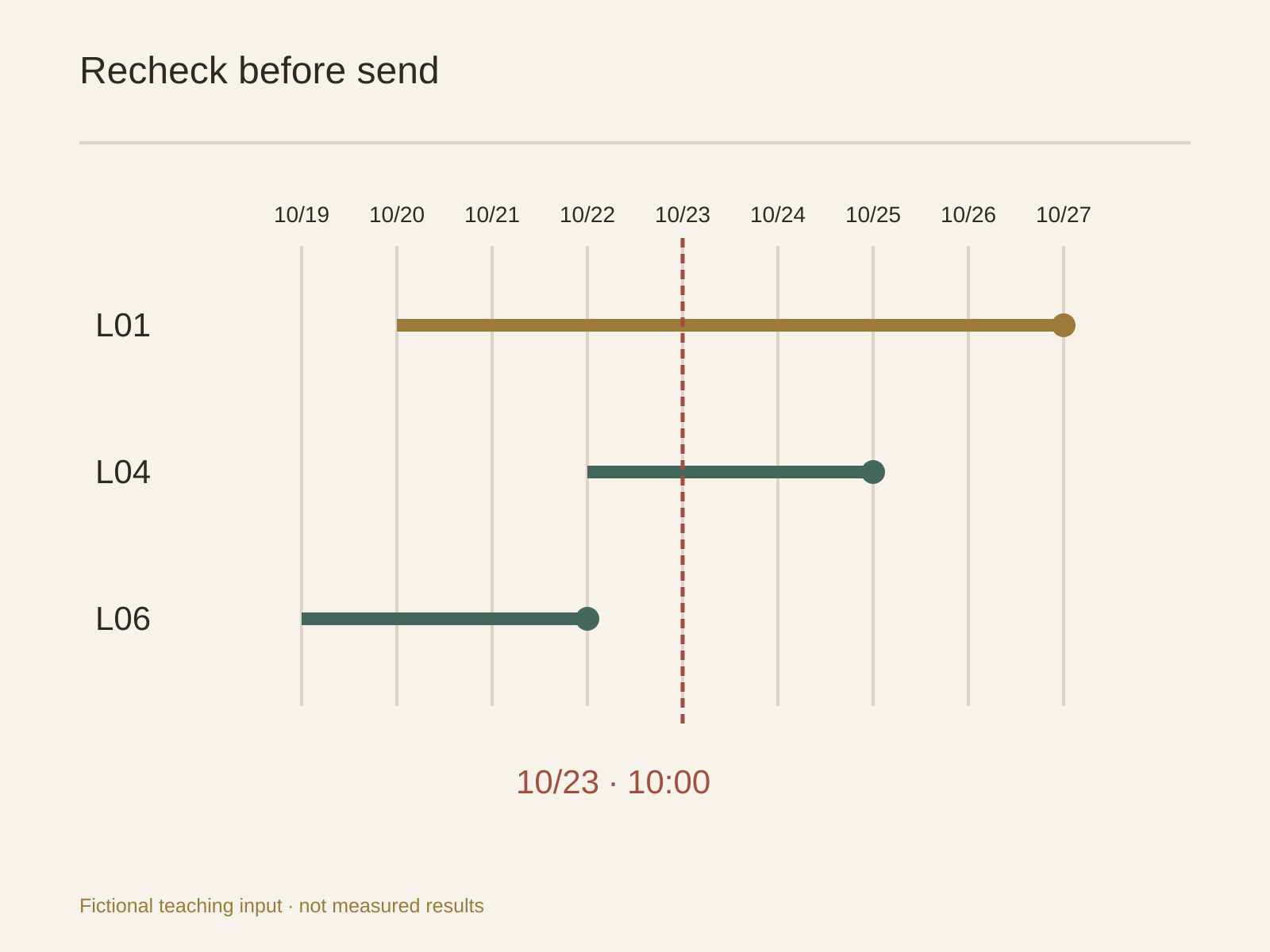
These are fictional teaching inputs, not customer activity or a completed Buda test. The cutoff is October 23, 2026, 10:00 Asia/Shanghai. A sales manager supplies policy P1: respect a customer's explicit contact date; pause on a stop request; review the latest authorized conversation across channels; otherwise propose a follow-up after three complete calendar days in the customer's timezone. This is an example policy, not a universal cadence or legal compliance rule.
- L01, owner A, email: E01, October 20 at 09:00 Asia/Shanghai, records the customer's words: “Please contact me on October 27.” Next candidate date is October 27 in that zone, subject to a fresh check. Pause now; the general three-day cadence does not override a specific request.
- L02, owner A, email: E02 shows an outbound message but its timestamp and customer timezone are missing. “No response” alone cannot establish elapsed days. Seek the actual source time and timezone; leave the candidate date unknown.
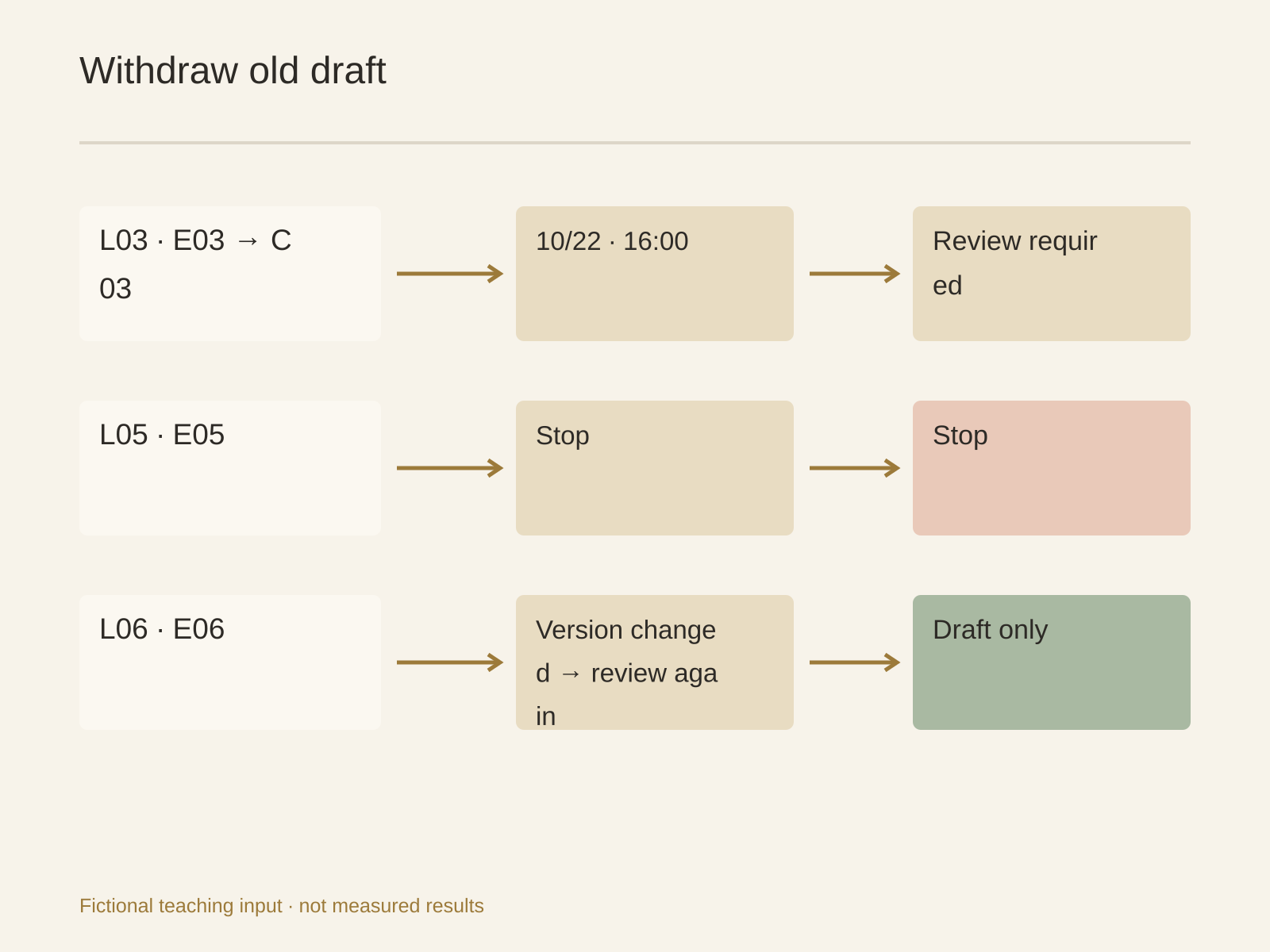
- L03, owner B, email and chat: E03 contains the October 19 email; authorized C03 records a reply on October 22 at 16:00 Asia/Shanghai: “I sent the requirements; please review first.” Prepare an internal requirements review, not another no-reply nudge. Update the candidate only after the owner reviews that reply.
- L04, owner B, email: export rows X04a and X04b share the same provider message ID E04 and lead ID L04, October 22 at 09:00 Asia/Shanghai. Mark duplicate input and keep one candidate history. Do not merge contacts. Under P1 the earliest candidate date is October 25; pause at the cutoff.
- L05, owner A, email: E05, October 21 at 11:00 Asia/Shanghai: “Stop contacting me.” Pause and retain that source. An open sales stage does not override the stop request; no routine sales draft is prepared.
- L06, owner B, email: E06 records the last outbound contact on October 19 at 10:00 Asia/Shanghai; the authorized snapshot contains no later reply, special date or stop flag. P1's earliest date is October 22, so it is eligible for a draft at the cutoff. Eligibility still depends on fresh information before sending.
Preserve the evidence behind the date
Request eligibility.csv first. Keep lead ID, source-system namespace, provider message ID, latest real inbound/outbound source, timestamp with offset and IANA timezone, customer wording, stop flag, channel, current owner, proposed next date and explanation. Missing fields remain null with a specific question. A CRM extraction time is not the time of customer contact.
Use states such as draft eligible, confirm, and paused, with a separate reason. Both L01 and L05 are paused, but one has a dated re-evaluation and the other has a stop instruction. Unknown state or contradictory sources should never be compressed into “overdue.”
For conflicting records, preserve both raw values. Identify the latest actual communication by its source event, not the newest import. A recent salesperson note cannot silently cancel an older customer stop request. If the customer later changes instructions, the owner verifies identity, scope and the applicable policy before changing eligibility.
Draft only after the eligibility decision
For L06, a bounded candidate might read: “Following up on the workflow questions sent on October 19. Would a short clarification help with your review?” It must not assert that the customer has accepted a demo or that a quote expires tomorrow. Link the draft to E06 and the approved product material used for any factual statement.
Return message-drafts.md only for eligible rows, plus review-checklist.md for recipients, channel, timing, claims and permissions. These are proposed files, not built-in Buda controls. Keep recommendation, authorized send and actual send as different states. This example performs no send.
Immediately before an authorized send, reread the latest allowed conversation and stop signals. If a reply arrives, withdraw the old candidate and retain its history; do not resend a stale draft. If a send times out, check the provider's actual sent record before retrying. A local draft or planned date proves neither delivery nor a reply.
Start with exports in Buda
The sales workflow supports research and follow-up preparation. Use authorized email/CRM exports in Drive, plus the manager's policy and source coverage window. A Session organizes the work; it is not a file-permission boundary. No mailbox connection or CRM write is assumed.
Read the authorized exports and P1 only. Preserve stable IDs, original timestamps and customer instructions. Produce eligibility.csv first, with reasons and missing fields. Draft only eligible rows. Keep duplicate inputs visible without merging identities. Do not send, create reminders, change stages or update CRM. Return the draft packet for the account owners.
Before expanding the process, try a sanitized sample with a missing timezone, a cross-channel reply, duplicate event and stop request. The acceptance question is whether each case reaches the right review state with its source intact. This is a suggested trial, not a reported result or a promise of higher response rates.
After reviewing a sample, search the Buda AI Marketplace for a suitable Skill and inspect its instructions and permissions before installing. A reusable method still needs current inputs and explicit authorization for any later sending workflow.
What if the timezone is missing?
Ask the owner or use a timezone explicitly approved for that account. Keep the candidate date unresolved until the assumption is confirmed; a country or language is insufficient to infer it.
What if the only date comes from CRM?
Identify what it means: last contact, manual note, import or extraction. Ask for the underlying event when contact timing is uncertain. Keep the raw date visible rather than relabeling it.
Does another-channel reply restart the clock?
Read what it says and which account/contact it belongs to. It may require a response or internal work rather than a timed follow-up. Apply the owner's policy to that actual instruction.
Can an old approved draft be reused?
Recheck recipient, latest conversation, stop state, timing and claims. Preserve the old version, but require a current decision before sending it again.