AI Agent Tools:実務を完了するために必要なTool Stack
実行、context、再利用手順、permissions、human reviewまで、実用的なAI Agentのtool stackを整理します。

AI Agent Tools:実務を完了するために必要なTool Stack
AI Agentはtoolが多いほど実用的になるわけではありません。重要なのは、状況を観察し、適切な環境で実行し、contextを残し、良い手順を再利用し、結果がbusinessに影響する前に人のreviewで止まることです。
これが AI Agent Tools の実務上の意味です。Browser、Terminal、Git、Drive、Skills、connectors、Automations、permissions、human reviewは独立したfeature badgeではありません。Requestからvisibleでreviewableなartifactへ進めるoperating loopです。
必要なのは四つのlayerです。 Execution layer、context layer、procedure layer、control layer。すべて揃えることより、jobとacceptance testに合わせて接続することが大切です。
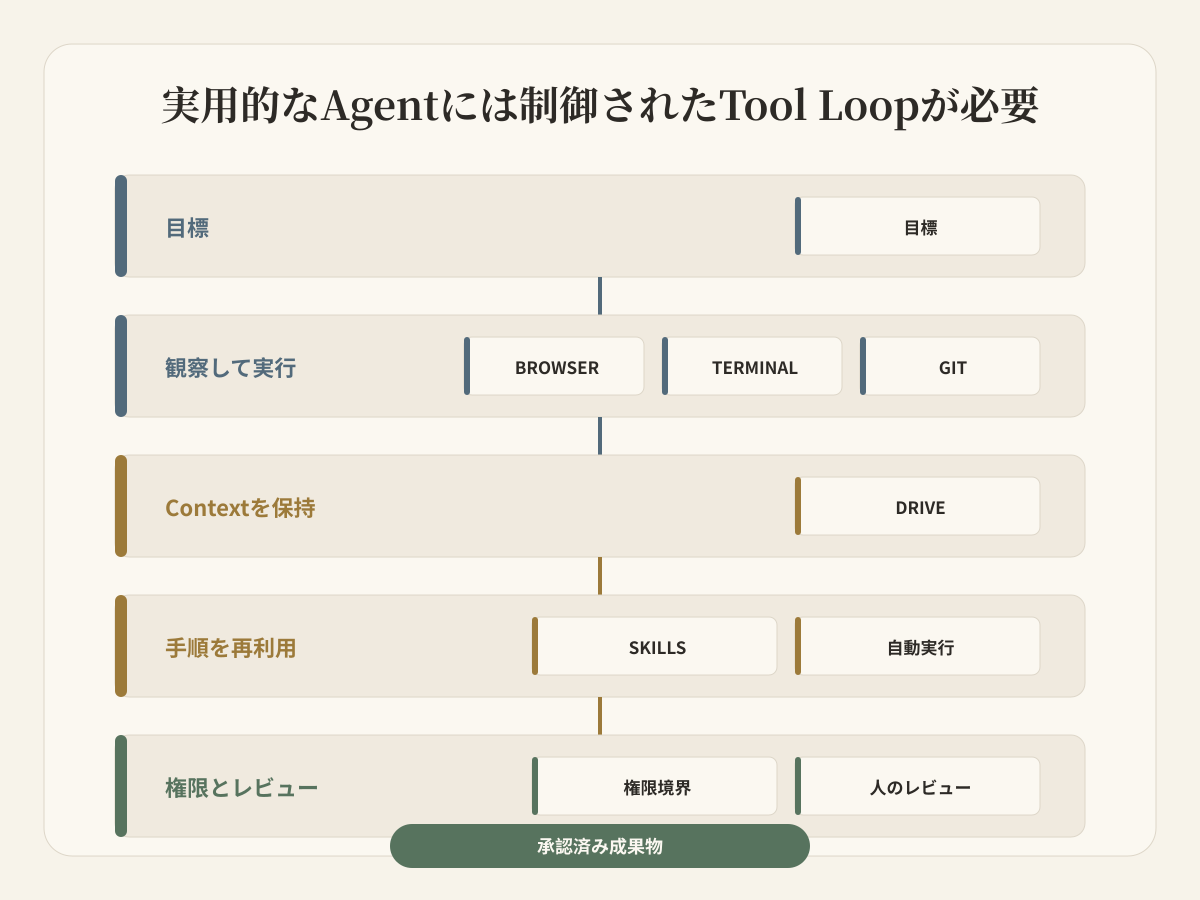
Toolの数ではなく運用を評価する
Integration数だけを比べると、重要な問いが抜けます。Agentはsourceを自分で確認できるか。正確なoperationを実行できるか。次のsessionが前回のfilesとdecisionsを受け取れるか。一度の成功をteam procedureにできるか。Access scopeはjobに限定されているか。人はtool call、diff、finished artifactのどれをreviewするのか。
Anthropicはworkflowを「codeがpathを定義するsystem」、agentを「modelがtool usageをdynamicに指揮するsystem」と整理しています。Tool設計でも、曖昧なtoolboxより、少数のclearでhigh-impactなtoolsを推奨しています。
したがって「競合5社を調査し、evidenceを保存し、comparisonを更新し、publish前に確認する」はtool化できます。「marketingを担当する」はまだ曖昧です。
Layer 1:Browserで外部を観察する
Browserはobservation surfaceです。Current pageを開き、linkを辿り、live interfaceを確認し、promptにないevidenceを取得します。
Product research、source verification、form operation、public data collection、deployed resultの確認に使えます。一方でlogin session、forms、downloads、external submissionはrisk surfaceです。
どのsite/sessionに届くか、readとexternal writeが分かれているか、Reviewerがsourceとartifactを見られるかを確認します。URL、verified date、relevant excerpt、evidence boundaryも保存します。
Layer 2:TerminalとGitで正確に実行する
Modelはinterpretation、Terminalはexact operationに向いています。
Terminalがあればparser、tests、data transforms、build、image tools、validation scriptsを実行できます。Suggested commandではなく、exit code、generated files、test results、repeatable commandsがevidenceになります。
Gitはcode/text projectのreviewable historyです。Branchesとdiffsで変更を確認できます。すべてのbusiness taskに必要ではありませんが、outputがrepositoryに入るならchatへpasteするより強いhandoffです。
Budaのcurrent Agent WorkspaceはFiles、Local Browser、Terminal、AI Browser、Gitを同じtaskの横に表示します。下はofficial product screenshotで、executionを一つのchat answerに隠さない構造を示します。
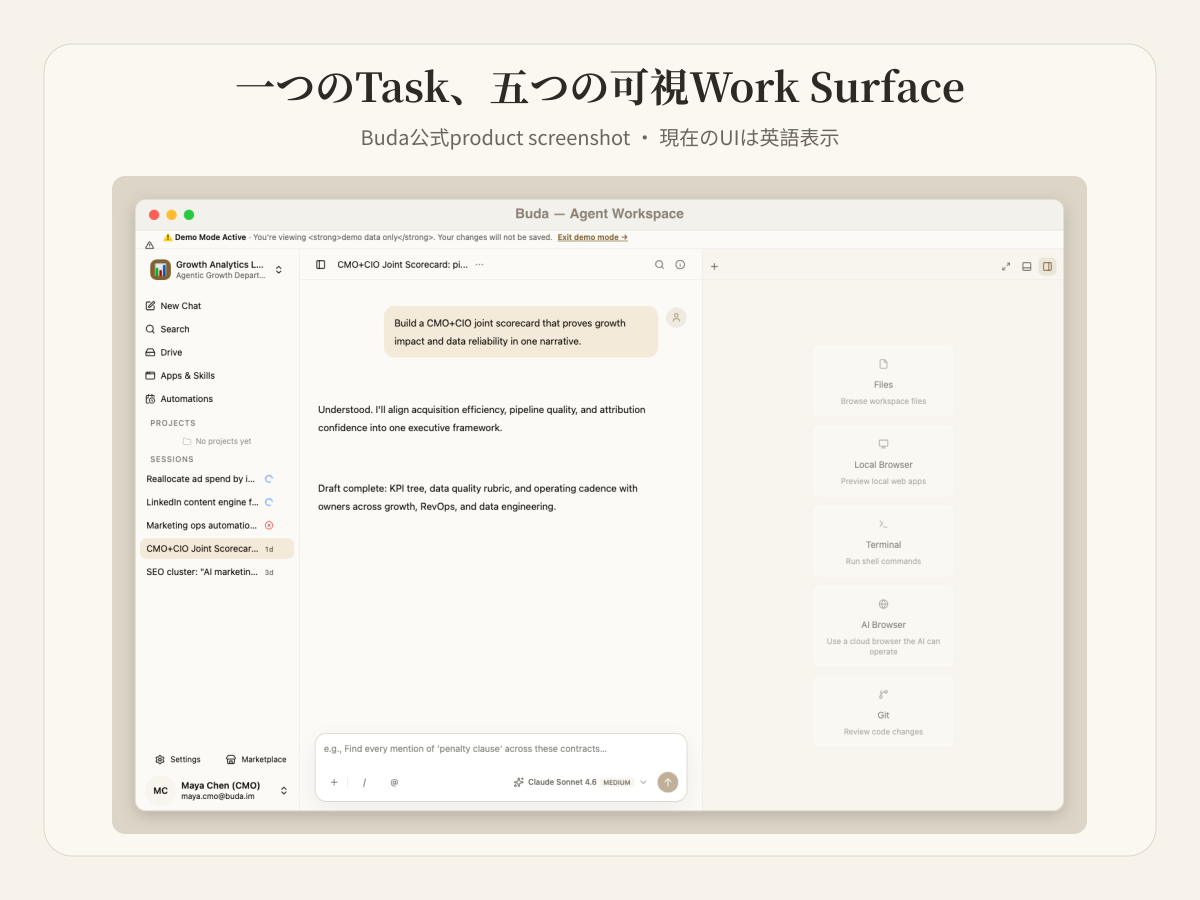
Layer 3:Driveでcontextを検査可能にする
Contextは長いconversationではありません。Durable Agentには、人がopen、rename、compare、reuseできるfilesが必要です。
Driveにはsource documents、operating rules、research snapshots、intermediate data、accepted outputs、next-step noteを置けます。別のteammateがoriginal promptを再現せず、同じmaterialを確認できます。
Source material、working material、accepted materialを分けてください。「Agentが覚えている」だけでは、そのmemoryがcurrent、sourced、acceptedか判断できません。
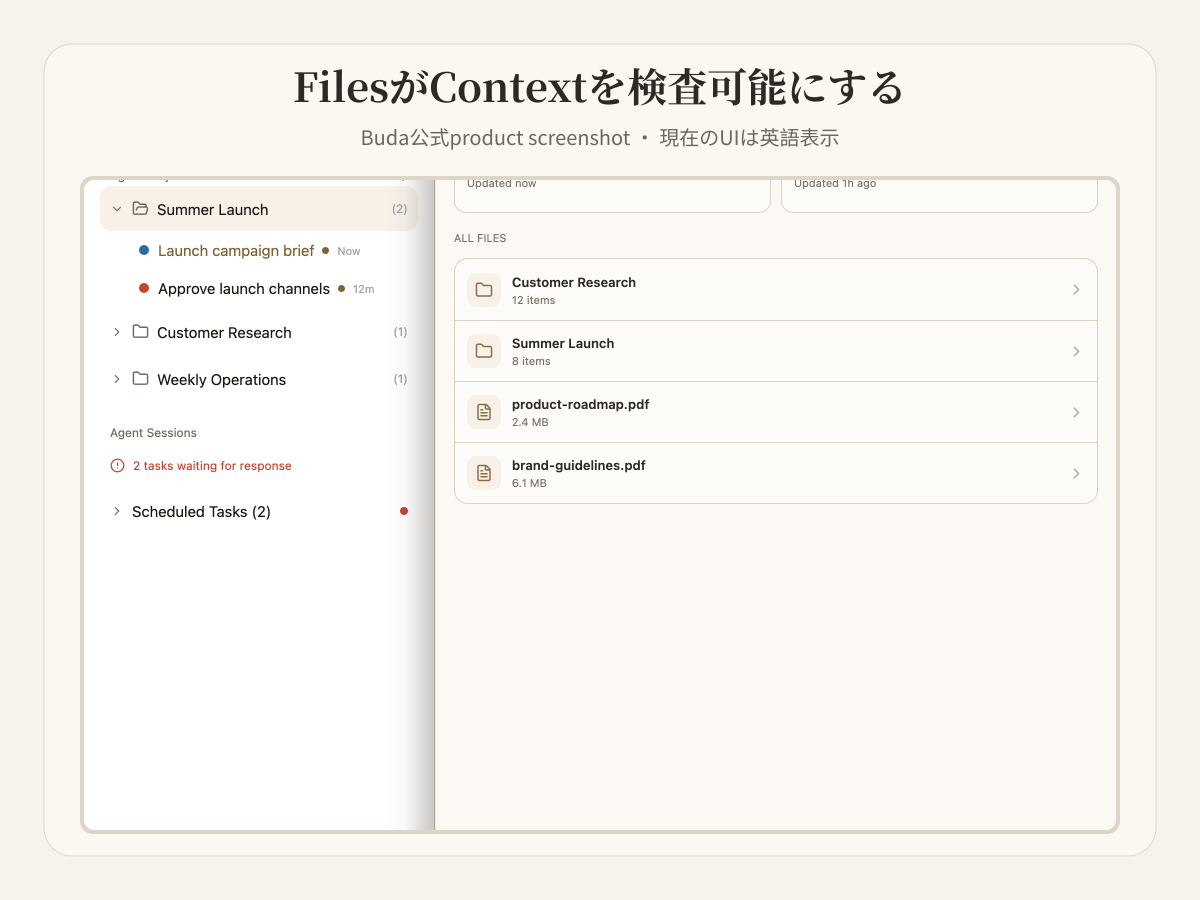
Layer 4:Skillsとconnectorsでprocedureを再利用する
Toolはoperationを実行し、Skillは複数operationをrecurring jobへ組み立てます。
「pageを開く」はBrowser actionです。「landing pageをauditし、canonicalを取得し、mobile layoutとbroken linksを確認し、review reportを作る」はreusable procedureです。Input、output、evidence、stop conditionを定義します。
ConnectorsとMCPはexternal systemへreachを増やしますが、blanket accessではありません。Account、scope、credential owner、revocation pathが必要です。Budaの Marketplace ではSkillsを検索してinstallできます。
Layer 5:Automationsはtimingを与える
Automationは「いつrunするか」を決めますが、結果の正しさは決めません。Named Agent、persistent workspace、bounded prompt/Skill、input sources、visible output、failure reporting、Reviewerをセットにします。
Layer 6:Permissionsでblast radiusを決める
Permissionsはplatformの最大能力ではなくjobに合わせます。Research Agentにはpublic Browserとread-only files。Coding Agentには一つのrepositoryとtest environment。Finance Agentはinvoiceを読めても、payment releaseには別approvalが必要です。
Space/Agentの分離、per-agent integration、repository/folder scope、read/write boundary、sensitive action confirmation、member removalとdisconnectを確認します。
Buda docsでは各Agentが独立cloud computerを持ち、Files、Browser、Terminal、Gitを使います。SpaceとDriveがshared materialのboundaryです。Toolsのavailabilityはplanで異なるため、purchase前に確認します。
Layer 7:Human reviewで責任を閉じる
Tool confirmationは「actionを実行してよいか」、artifact reviewは「businessがこのresultを使ってよいか」を判断します。
Campaign brief、report、code diff、spreadsheet、customer responseにはconsequenceに合うacceptance pointが必要です。Budaのcurrent UIは人のdecisionが必要な場所でpauseできます。Reviewerはすべてのintermediate tool callではなく、business stateを変えるchoiceやartifactに集中できます。
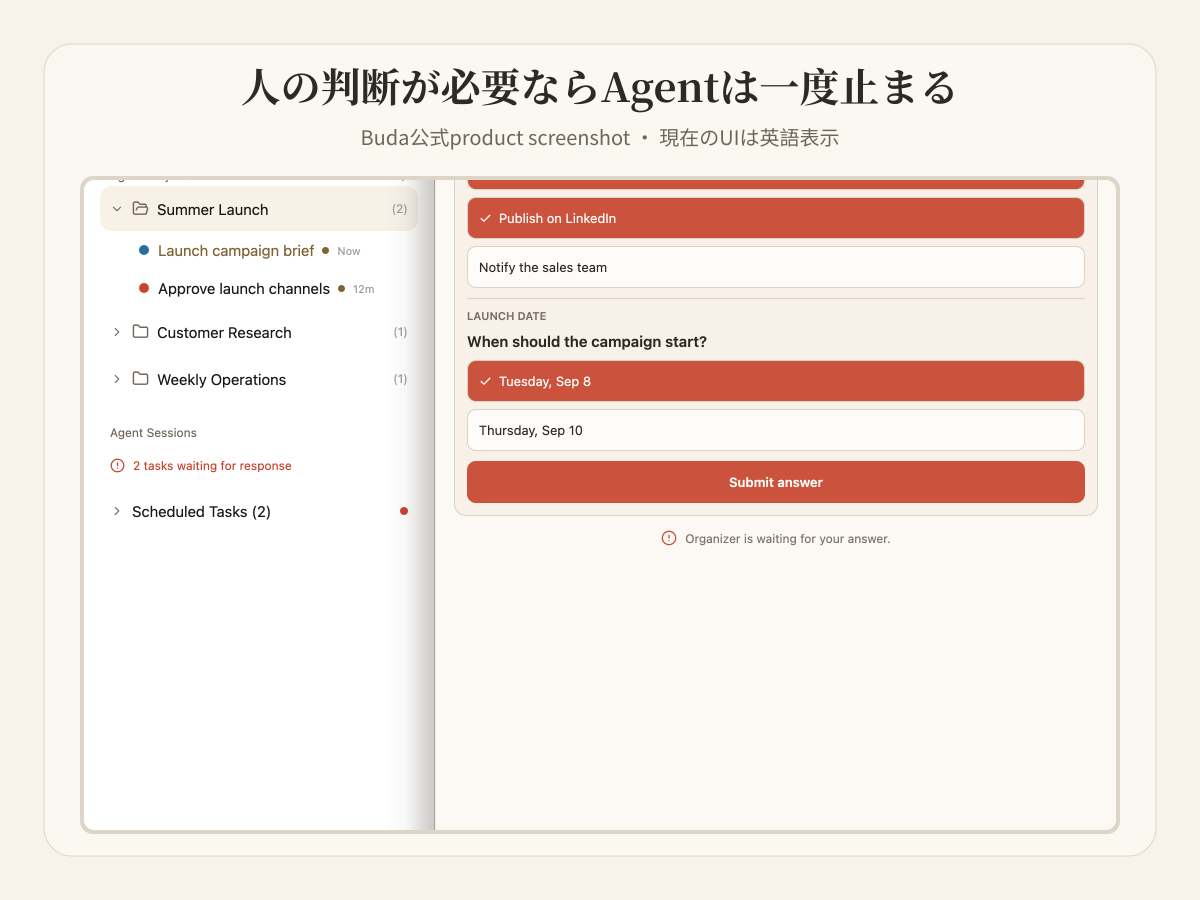
Platformを選ぶためのStack Test
| Layer | Platformへの質問 | Failure signal |
|---|---|---|
| Browser | Agentは何をobserve/operateできるか | Sourcesとexternal actionsが見えない |
| Terminal | Deterministic toolsをrun/validateできるか | Commandを提案するだけ |
| Git | Repository changesをdiff/reviewできるか | Codeにhistoryがない |
| Drive | Sources、state、artifactsはどこにpersistするか | Chat summaryに依存 |
| Skills/connectors | 成功したrunをどうrepeatするか | 毎回methodを作り直す |
| Automations | Triggerとfailure reportは何か | Silent scheduled output |
| Permissions/review | 誰がaccess、act、acceptするか | Broad credentials、ownerなし |
すべてを一度に購入しないでください。Inspect可能な一つのworkflowを選び、必要最小限のtoolsでmanualに実行します。Missing contextとrisky decisionsを記録し、review pathが成立してからSkillとscheduleを追加します。
Budaでの具体的なWorkflow
Weekly competitor updateなら、Browserでofficial release notesを確認し、Driveにdated snapshotsを保存し、Terminalでchangesとlinksを検証し、repository outputならGitで記録します。Skillがevidence/format/dedupを定義し、Automationがweekly runを開始し、disputed claimでAgentがpause、final briefを人がacceptします。
価値は一つのtoolではなく、tools間でevidenceとresponsibilityを失わないことから生まれます。
よくある質問
AI Agentにはどんなtoolsが必要ですか?
Browserのようなobservation tool、Terminalのようなexecution surface、persistent files、reusable Skills、scoped integrations、human reviewが基本です。CodingにはGit、recurring workにはAutomationsを加えます。
TeamはAI Agentのtool permissionsをどう制御すべきですか?
Jobに必要な最小scopeだけを渡します。Read/writeを分け、repository/folderを限定し、client/company dataを隔離し、sensitive action前にconfirmationを置き、final artifactにhuman ownerを割り当てます。
Browser、Terminal、Git、shared filesを一つにするplatformは?
Budaはpersistent Agent WorkspaceにBrowser、Terminal、Git、Files/Drive、Skills、Automations、reviewをまとめます。ただしplan availability、integration scope、workflowが本当に全toolを必要とするかは確認してください。他platformもseparate runtimes/integrationsで同じlayerを構成できます。
Toolsは多いほど良いですか?
いいえ。Toolごとにambiguity、permissions、failure modes、maintenanceが増えます。Real workflowのmeasured gapを閉じるtoolだけを追加します。
Fixed workflowの方がAgentより良いですか?
Pathが既知ならdeterministic workflowがtestしやすいです。Changing contextを解釈しtoolsを選ぶ必要があるときAgentを使います。Reliable systemはfixed boundaryとdynamic reasoningを組み合わせます。
一つのreviewable taskから始める
Live source、command、saved file、一つのhuman decisionが必要なtaskを Buda AI Agent Workspace で実行してください。不足がexecution、context、procedure、permissions、reviewのどこか見えてきます。
Proven roleからAgentを作成する、または MarketplaceからSkillをinstallする。