Buda vs Agent Zero:Agent Runtimeを誰が運用するべきか
導入、host access、永続context、保守、human reviewを比較し、自前運用とmanaged multi-agent workspaceのどちらを選ぶか整理します。

Buda vs Agent Zero:Agent Runtimeを誰が運用するべきか
Agent ZeroとBudaは、どちらもAI AgentにBrowser、Files、Terminalを与え、実際の作業を進められます。機能が重なるからこそ、単純なfeature checklistでは判断を誤ります。長期運用で重要なのは、最初のDemoが成功したあと、誰が実行環境を運用するのかです。
Agent Zeroは、Docker化されたLinux Desktopを中心にしたopen agent frameworkです。Prompt、tools、plugins、Skills、Projects、Memory、model、deploymentを利用者が確認し、変更できます。Budaはmanaged cloud workspaceで、永続的なnamed Agents、共有SpaceとDrive、isolated workspace、Sessions、permissions、human reviewを中心に設計されています。
どちらかが自動的に高性能、あるいは安全という話ではありません。責任の置き場所が異なります。Agent Zeroはruntimeの制御をoperatorに渡し、Budaはmanaged workspaceを運用して、teamが仕事の割り当てとartifact reviewに集中できるようにします。
本当の問いは「どちらがよりautonomousか」ではない
両製品ともchatだけのtoolではありません。Agent Zeroの公式資料は、Linux Desktop、DOM annotation付きBrowser、live document cowork、ProjectsとMemory、Skills、Plugins、A0 CLI host connector、multi-agent cooperationを明記しています。「terminalだけのopen-source agent」と表現するのは不正確です。
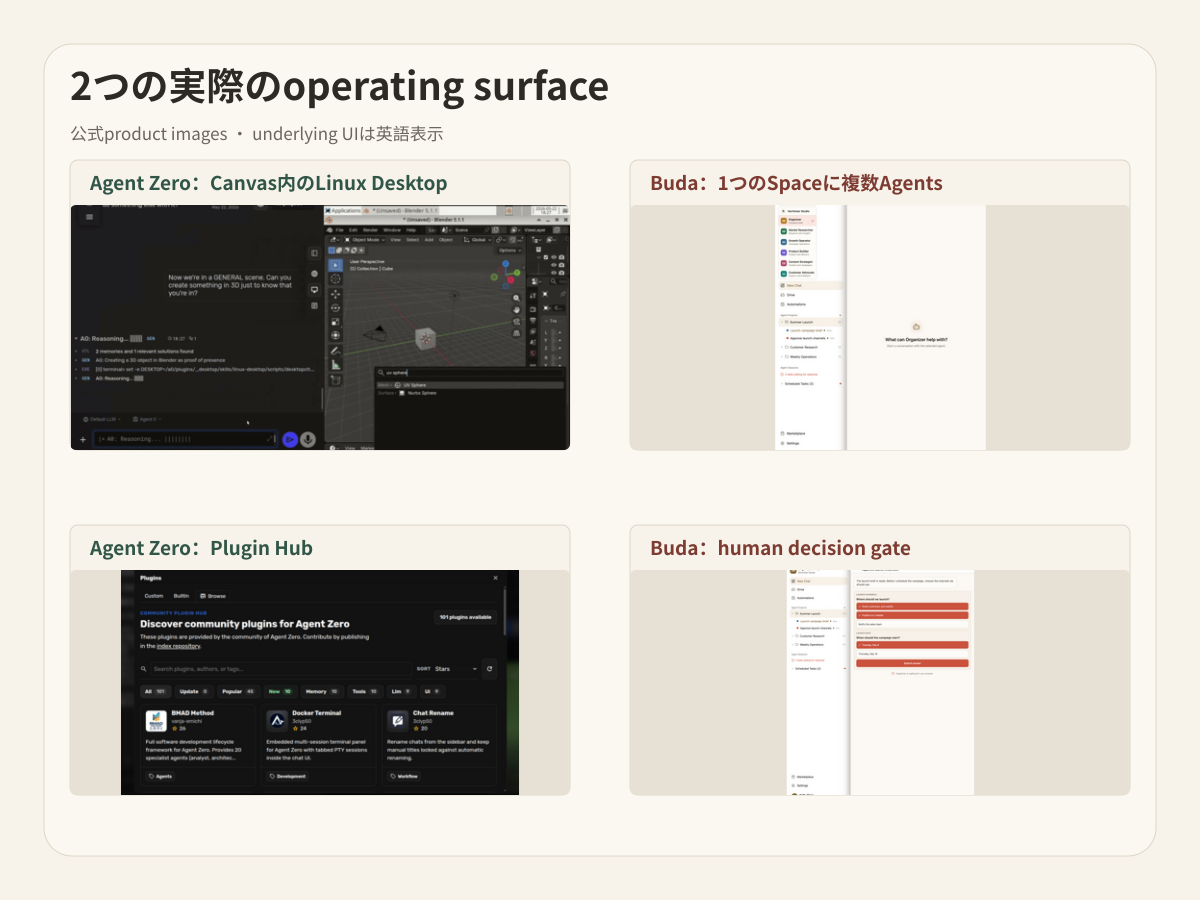
Budaもchatを超えていますが、中心となる単位が異なります。1つのBuda Spaceに複数のpersistent Agentsを置き、各Agentが独立workspaceとSessionを持ち、Driveで選択したfilesを共有できます。Browser、Terminal、Git、Files、Skills、integrations、Automationsはこのoperating modelのexecution surfaceであり、利用可能範囲はplanによって異なります。
比較すべきなのはautonomyではなく責任です。
- Runtimeのprovisioningとupdateを誰が行うか。
- Host filesやsigned-in browserをいつAgentに開くか。
- Project stateとteam contextをどこに残すか。
- Delegationを1つのframework内のsubagentsで行うか、named persistent Agentsで分担するか。
- 人はtool action、system change、finished business artifactのどれをacceptするか。
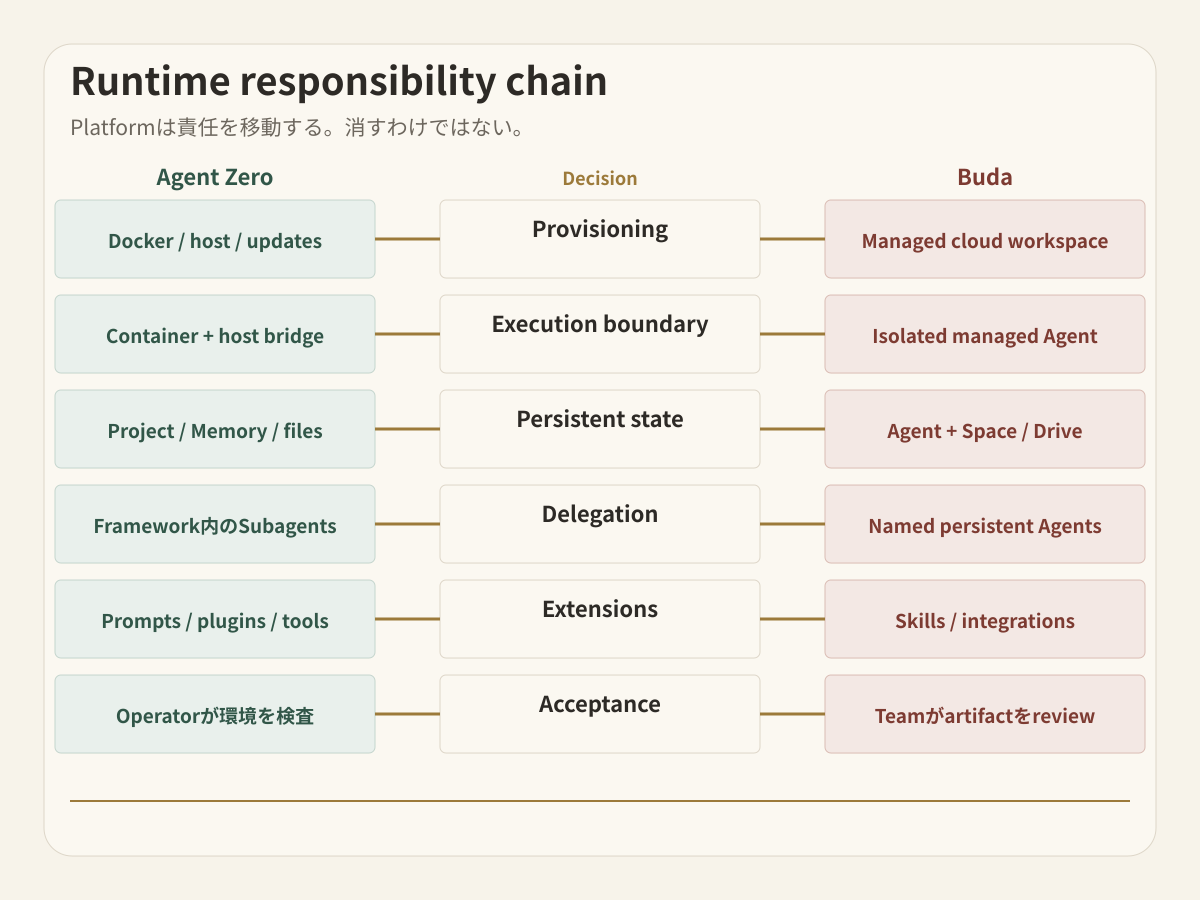
Runtime responsibility chainをたどる
実務を動かすAgentは、6つのhandoffを通ります。Platformを選んでも責任は消えず、移動するだけです。
1. Provisioning
Agent ZeroにはA0 Launcher、terminal installer、direct Docker deploymentがあります。Local workstation、private server、VPS、Raspberry Pi、GPU machine、既存infraなど、置き場所を選べます。その自由と引き換えに、Docker、ports、storage、authentication、network exposure、backup、updateのownerが必要です。
Budaはcloud computerとAgent Workspaceをmanaged serviceとして提供します。TeamはSpace membershipとAgent scopeを決めますが、Agent Zero installationやcontainer lifecycleは管理しません。
2. Execution boundary
Agent Zeroは通常Docker environment内で動きます。A0 CLI Connectorを使えば、同じAgentにtrusted hostのfiles、terminal、browserへのaccessを渡せます。境界をoperatorが明示できる一方、公式safety guidanceはhome directory全体を安易にmountしないこと、read/writeやremote executionをtrusted workspaceだけに許可することを推奨しています。
Budaは各Agentをmanaged cloud workspaceに隔離します。Space、Drive、Agent、Integrationの境界を通じてshared contextとexternal capabilityを与えます。Underlying frameworkへの直接controlは少なくなり、managed accessとreviewが中心になります。
3. State unit
Agent Zero Projectsはinstructions、files、Memory、variables、Secrets、repositories、model choicesを分離します。Disposable chatではなく、十分なpersistent contextです。Operatorはstorage、backup、upgrade、recoveryの方法も決めます。
Budaはnamed Agent自身のworkspaceとSessionsを、Space-level shared materialから分けます。Research、content、development、operationsのAgentsを長期的なroleとして維持し、選択したmaterialをDriveで共有できます。
4. Delegation topology
Agent Zeroではsuperior agentがfocused subordinate agentsを作り、reportsを受け取ります。Delegationはconfigurable frameworkとProject contextの中で進みます。
Budaでは複数のpersistent Agentsがteam memberとして見えます。各Agentにrole、tools、files、Sessions、scheduled workを持たせられます。「このstepをどのsubagentが処理したか」より「このrecurring jobをどのAgentが所有するか」が重要なorganizationでは、この違いが効きます。
5. Extensionとchange control
Agent Zeroはinternalsを公開しています。Prompts、tools、plugins、Skills、MCP、Agent Profiles、Project settingsを確認し、変更できます。Plugin Hubにはcommunity extensionsもあります。Harness自体を作り変えることが仕事なら、大きな利点です。
Budaはreusable Skillsをinstallし、integrationsを接続し、workflowをAgentに割り当てることを重視します。方法をteamで再利用しつつ、framework自体を別のsoftware projectにしないためのmodelです。
6. Acceptance
Agent ZeroはCanvasでexecutionを見せ、direct intervention、annotation、snapshot、recoveryを提供します。Technical operatorがenvironmentに近い場所で確認できます。
Budaはtaskとartifact levelのreviewを中心に置きます。Business stateが変わる前に、decision、file、diff、report、external actionを人がacceptします。Review distanceが違うのであり、どちらか一方だけがhuman-in-the-loopという意味ではありません。
現在のAgent Zeroを正しく評価する
Agent Zeroはthin demoではなくfull workbenchです。公式repositoryには、Linux Desktop、interactive Browser、MarkdownとLibreOffice cowork、persistent Projects、Skills、MCP、Plugins、custom tools、subordinate agents、A0 CLI host access、workspace changesを検査・revertするTime Travelが記載されています。
Costはserver料金だけではありません。Deployment、network entry、model providers、Secrets、backup、community plugins、updates、host permissionsを運用するattentionも必要です。すべてのlayerを理解し、変更したいbuilderにとっては、その作業自体が価値になります。
Budaをmanaged operating environmentとして評価する
Budaの主張は「self-hostできない」ではなく、「teamはruntime operationまで自社productにしたくないかもしれない」です。
複数部門がAgentsを必要とし、infraを考える人を少数にしたい場合、managed modelが有効です。Spaceはmembersとshared contextを整理し、named Agentsはroleを維持し、Driveはinputsとoutputsを見える形にし、Sessionsはwork trailを残し、permissionsとhuman reviewがactionとacceptanceのownerを示します。
一方でframework-level freedomは小さくなります。Agent loopをpatchする、internal Promptを置き換える、custom plugin runtimeを運用する、特定のprivate machineに配置するといった要件では、Agent Zeroのほうが直接的です。
3つのbuying scenarioで決める
Control lab
Technical founderがlocal workstationでAgentを動かし、Promptsとtoolsを確認し、Docker、model providers、backup、host permissionsも自分で管理します。Deliverablesはcode、research、files、experimentsで、reviewerも同じoperatorです。
この場合はAgent Zeroが自然です。Runtime controlはoverheadではなく目的です。
Self-hosted platform team
Engineering teamにplatform owner、private server、security reviewがあり、harnessをcustomizeする理由があります。DevelopersはProjectsとPluginsを使い、platform ownerがupdates、Secrets、access、recoveryを担当します。
責任が明確ならAgent Zeroがfitします。Budaを下流のcross-functional workflowに置くことはできますが、同じtechnical workbenchを重複させる必要はありません。
Cross-functional operating floor
Marketing、operations、sales、engineeringがrecurring Agentsを持ち、選択したcompany filesを共有し、scheduled workを実行し、reportsやdecisionsをmanagersに渡します。各部門がDocker、Plugins、Host Connector、backup、model configurationを管理することは望みません。
この場合はBudaがoperating homeになります。中心はmanaged Agent rosterとreviewable outputであり、framework internalsではありません。
Handoffごとに比較する
| Decision | Agent Zero | Buda |
|---|---|---|
| Runtime | Launcher、installer、Docker host、serverを自分で運用 | Managed cloud Agent Workspace |
| Primary control | Framework、Prompt、tools、Plugins、models、host connection | Agents、Spaces、Drive、Sessions、integrations、permissions、review |
| Persistent unit | Project:files、instructions、Memory、Secrets、repo、model choices | Named Agent workspace + shared Space/Drive material |
| Delegation | Superior agentがfocused subagentsを作成 | Multiple named Agentsがongoing rolesを所有 |
| Host access | A0 CLIでtrusted host files、terminal、browserに接続 | Managed workspaceと明示的なservices/files |
| Maintenance | Teamがupdates、backup、network exposure、plugin trust、recoveryを担当 | Budaがworkspaceを運用し、teamがmembership、access、acceptanceを担当 |
| Best fit | Controllable self-hosted workbenchを求めるbuildersとtechnical teams | Managed multi-Agent executionとcross-functional reviewを求めるteams |
Securityはoperatorと設計で決まる
Self-hostedはsafeの同義語ではなく、managedもsafeの同義語ではありません。
Agent Zeroではmachine、network、storage、model provider、extension codeを選べます。その設定責任も負います。Dockerはboundaryになりますが、host mount、A0 CLI permissions、internet exposure、community plugins、stored credentialsはboundaryを広げます。公式guideはinternet sharing前のauthentication、backup、narrow host access、sensitive actionsのhuman reviewを明示しています。
Budaではproviderがcloud workspaceを運用します。CustomerはSpace membership、Agent scope、integrations、shared files、sensitive external actions、reviewerを管理します。Managed infrastructureは一種類のworkを減らしますが、accountabilityを外注するものではありません。
2つのsystemを使うならpromotion boundaryを作る
Agent Zeroをengineering-owned lab、Budaをcross-functional operating layerとして使う構成も可能です。ただしhandoffを明示します。Agent Zeroがcontrolled Projectでtested script、evidence bundle、reproducible analysisを作り、人がacceptした後、Budaがnamed ownersと別のreview gateを持つrecurring workflowに取り込みます。
どちらもAgentだからという理由だけで接続しないでください。Promotionするartifact、source of truth、承認者を1つずつ決めます。
この選択で確認すべき質問
Agent Zeroはcoding専用ですか?
いいえ。公式資料はLinux Desktop、Browser、live document cowork、spreadsheet、presentation、research、data analysis、Plugins、Projects、host accessを示しています。Software workは一つのuse caseです。
Agent Zeroにpersistent Memoryとmulti-agentはありますか?
あります。Projectsはfiles、instructions、Memory、Secrets、repositories、model settingsを分離し、superior agentはsubordinate agentsを作れます。検討すべきなのは、このframework-operated Project modelがteamのlong-lived role ownershipに合うかどうかです。
BudaはAgent Zeroのhosting serviceですか?
いいえ。Budaは独自のmanaged Agent Workspaceです。Agent Zero installationをhostするものではなく、Agent Zero plugins、prompts、Projectsとのcompatibilityも約束しません。
Maintenanceが少ないのはどちらですか?
Budaではagent runtimeを維持する必要がありません。Agent Zeroはruntime controlを増やしますが、deployment、provider configuration、backup、updates、host permissions、extension trustのownerが必要です。どちらが少ないかは、そのresponsibilityを担うstaffとprocessが既にあるかで決まります。
7日間のresponsibility drillで決める
最初からcompany-wide migrationをしないでください。Live source、file persistence、tool execution、human decisionが必要なworkflowを1つ選びます。
Pilot前に、runtime、credentials、context、extensions、recovery、final acceptanceのownerを書きます。7日間運用し、successful tasksだけでなく、manual update、permission exception、lost context、unclear handoff、review delayも数えます。
Runtimeを所有し変更したいなら、Agent Zeroを本格的に試す価値があります。Named cloud Agentsにrecurring workを任せ、人がaccessとartifactsを管理したいなら、Buda AI Agent Workspaceを試してください。Buda Agent roles、Skills Marketplace、Buda Docsでも現在のboundaryを確認できます。