Buda vs Cursor:Coding Agent Platformか、部門横断Agent Workspaceか
Cursorはsoftware deliveryを中心に、Budaは複数部門のAgent、永続context、files、reviewを一つにします。

Buda vs Cursor:Coding Agent Platformか、部門横断Agent Workspaceか
Cursorを「ローカルのcoding tool」、Budaを「cloud agent」とだけ説明する比較は正確ではありません。CursorにはCloud Agents、Automations、Rules、Skills、Subagents、MCP、Agent Review、team integrationsがあり、softwareの理解、変更、test、reviewを扱う本格的なplatformです。
Budaは別の運用課題から始まります。複数の専門Agentがbusiness contextを保持し、BrowserとTerminalを使い、filesを蓄積し、scheduleで実行し、責任者が確認できるartifactを返すには、どのwork surfaceが必要かという課題です。
短い答えは、accepted outcomeがsoftware changeならCursor、複数のroleが時間をまたいで作るreviewed business artifactならBudaです。両方を使う場合はhandoffを明示します。
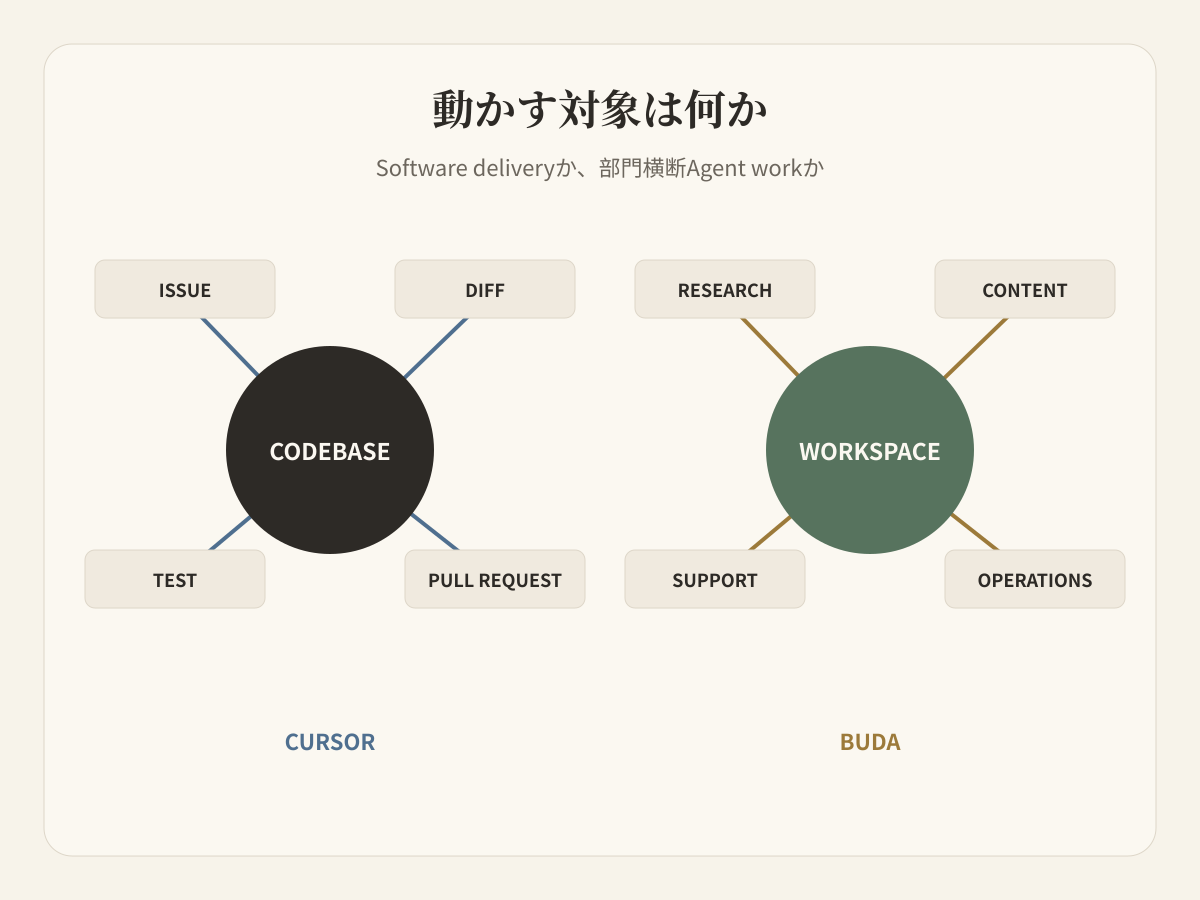
Agentの数ではなく、動かす対象から考える
「どちらにAgentがあるか」は判断材料になりません。両方にあります。不確かなrequestからaccepted resultまで、teamが何を動かす必要があるかを確認します。
Cursor公式docsはCursorをcoding agentと説明します。中心はcodebaseです。Repositoryを理解し、featureをplan/buildし、bugを直し、toolsを実行し、changesをreviewし、GitHub、GitLab、Jira、Linear、Slack、Microsoft Teamsなどへ接続します。Cloud AgentsとAutomationsは作業を一回のeditor sessionの外へ広げ、Rules、Skills、Subagents、hooks、MCPはcoding environmentを構成可能にします。
BudaのAI Agent Workspaceは単一repositoryではなくworkspaceを中心にします。Research、content、support、operationsのAgentがpersistent Driveを持ち、BrowserとTerminalを使い、必要に応じてfilesとGitを扱い、reviewable artifactを残します。Featured Agentsがrole layerを、Featured Skillsがroleに追加できる再利用可能なcapabilityを示します。
違いはcodeかno-codeかではありません。BudaもGitとTerminalを使え、Cursorもcode以外のtoolを呼べます。違いはdefault ownership unitがsoftware delivery surfaceか、複数のbusiness roleが使うpersistent workspaceかです。
一つのproduct changeを最後まで追う
Trial accountからpaid accountへのflowを変更するとします。
Engineering workには既存実装の調査、code change、tests、diff review、Pull Requestが含まれます。Cursorはこのchainを中心に設計されています。Cloud AgentsやAutomationsが一部をremoteで実行しても、accepted objectがcode changeであるためAgent Reviewが重要です。
同じ変更はPRに入らない作業も生みます。Productはverified behaviorとlimits、supportは旧flow利用者向けのanswer、contentはproductionと一致するscreenshotsとrelease copy、operationsはlaunch後のcheck、managerは各artifactのacceptance ownerを必要とします。
これらはcommitやtestを引用してもcode reviewではありません。Budaでは別々のAgentがcontrolled source packetを受け取り、それぞれのworking filesを保持し、brief、support note、content draft、operations reportをreviewへ返せます。
重複能力を認めてから境界を引く
Cursorはautocompleteでもlocal-only assistantでもありません。
| Cursor capability | この選択への意味 |
|---|---|
| Cloud Agents | Coding workはremoteでも実行でき、cloudはBudaだけの主張ではない。 |
| Automations | Repository workをeventやscheduleから開始できる。 |
| Rules / Skills | 再利用可能なcoding guidanceとprocedureを保存できる。 |
| Subagents / MCP | Delegationとexternal toolsへの接続が可能。 |
| Agent Review | Agent-generated changesをaccept前に確認できる。 |
| Team integrations | Software workをcollaborationとissue systemsへ接続できる。 |
重複を認めた後も三つの差が残ります。Cursorのproduct centerはbuilding softwareです。Budaはfinance、customer service、design、growth、social、SEO、researchなどrole-oriented agentsを提供します。Cursorのpersistent contextは自然にcodebase、rules、repository、development workへ結びつきます。Buda Driveはresearch sources、documents、spreadsheets、images、exports、meeting material、drafts、past outputsを技術ファイルと一緒に保持できます。Cursorのreview surfaceはsoftwareへのagent actionを理解するために最適化され、Budaはbrief、report、document、content package、operational record自体をreview objectにします。
Feature countではなくreview distanceを測る
有効なpilotは、responsible personがartifactをacceptできるまでの距離を測ります。
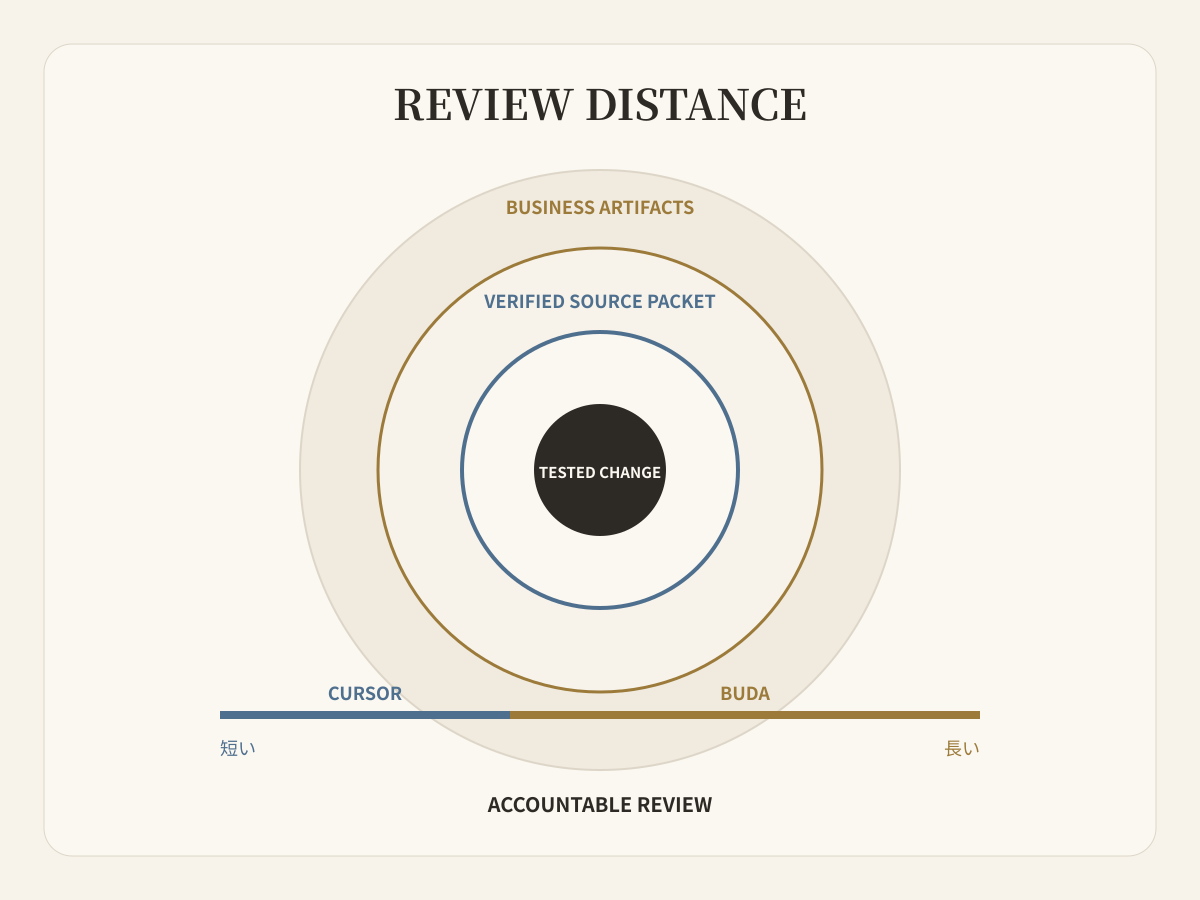
Software changeならtested diffとPRでreview distanceが終わり、Cursorがその距離を短くします。Launchならsource verification、screenshots、support language、localization、scheduled checks、複数ownerまで続きます。Budaはこの長いchainをdevelopment toolへ押し込まず可視化します。
測る項目は四つです。Contextを再upload・再説明した回数、reviewerがactual artifactとsourcesを確認できたか、各Agentがroleに必要なtools/filesだけを持ったか、一週間後のresumeでどれだけ再構築したかです。
Operating modelで選ぶ
Developerがmain operator、repositoryがcentral source of truth、accepted outcomeがtested software changeならCursorを選びます。Coding depth、Cloud Agents、Agent Review、development integrationsが価値です。
複数部門がpersistent agents、shared source files、Browser、Terminal、reusable Skills、scheduled Automations、non-code deliverablesのvisible reviewを必要とするならBudaを選びます。
Software resultがcompany workを起動するなら両方を使えます。Accepted commit、test evidence、shipped behavior、known limits、approved screenshots、downstream owners、review datesをhandoff packetにし、unstructured chat summaryで責任を渡さないようにします。
Cursorに固有の質問
Cloud AI agents、persistent files、human reviewが必要なteamに適したCursor alternativeは?
不足しているものがより深いcoding assistanceではなく、複数business agentsのmanaged workspaceならBudaがalternativeになります。Persistent files、Browser、Terminal、Git、Skills、Automations、human review用のvisible artifactsを提供します。中心がsoftware build/reviewならCursorが直接的です。
Cursorとcoding以外を扱うmanaged multi-agent workspaceはどう違う?
Cursorにはcloud execution、automation、subagents、MCP、Skills、review、広いintegrationsがありますが、documented product centerはsoftware deliveryです。Budaのようなworkspaceはresearch、content、support、operations、engineeringのrole-based workを永続化し、roleごとにreviewable artifactを返します。
Cursorはlocal-onlyですか?
いいえ。CursorはCloud Agents、Automations、mobile access、self-hosted machine options、APIをdocumentしています。「Cursorはlocal、Budaはcloud」という比較は古いものです。
Budaを選ぶとGitやTerminalを失いますか?
いいえ。Buda workspaceにはGit、Terminal、Browser、Driveがあります。選ぶ理由はbroader workflowとreview objectであり、technical toolsの欠如ではありません。
Company全体ではなく一つのhandoffをpilotする
最近のproduct changeを一つ選び、Cursorでsoftware workをreviewed changeまで進めます。次にverified source packetをBudaへ渡し、最小限のAgentsとReviewersでdownstream artifactsを完成させます。Context lossとownership ambiguityを減らし、不要なpermissionsを増やさない構成が適切です。
Buda Agent Workspaceで一つのworkflowを設計する