Buda vs Gemini CLI:Terminal Agentか、永続Multi-Agent Workspaceか
Gemini CLIはstatefulなterminal agent。Budaはcontinuityの単位をprojectからteam workspaceへ広げます。

Buda vs Gemini CLI:Terminal Agentか、永続Multi-Agent Workspaceか
Gemini CLIはterminalを閉じると全てを忘れる使い捨てcommandではありません。Current official surfaceにはsession/history、checkpointing、project contextのGEMINI.md、Auto Memory、Agent Skills、subagents、headless automation、built-in tools、local/remote MCPがあります。LocalまたはCloud Shellで実行でき、coding以外のworkも扱えます。
本当の比較は、durable stateをどこに置き、誰がresumeし、Reviewerが何をacceptするかです。
Developerやtechnical operatorがproject-centered terminal agentを必要とするならGemini CLI。複数roleとmemberがpersistent files、shared work surface、scheduled runs、business artifact reviewを必要とするならBudaです。
実際に使えるGemini CLIの経路を確認する
2026年にproduct boundaryが変わったため、古いtutorialだけで調達判断はできません。Google Cloud docsはGemini CLIをlocalまたはCloud Shell terminalで使えるopen-source AI agentと説明し、ReAct、built-in tools、local/remote MCPを記載しています。AuthenticationにはGoogle sign-in、Gemini API key、Vertex AIがあります。
一方、Gemini CLI websiteは2026年6月18日からunpaid tierとGoogle One usersがAntigravity CLIへ移行したと案内しています。Organization、Code Assist、API、Vertex AI、Cloud Shellの各contextは、実際のplanとauth routeで確認すべきです。
この記事はdocumented Gemini CLI systemを比較し、全読者が同じentry point、quota、privacy terms、permissionsを持つとは仮定しません。
Interfaceより先にstateを棚卸しする
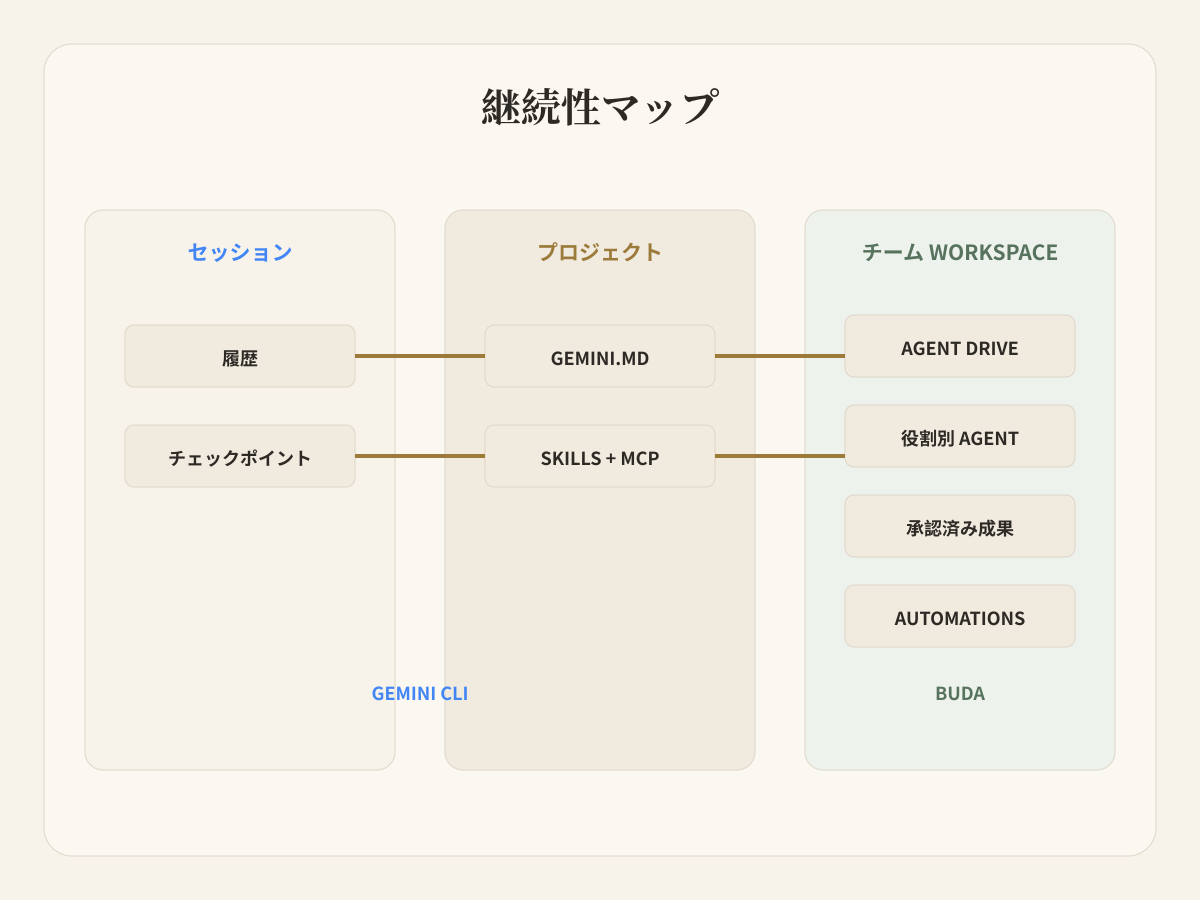
Terminal-firstはstatelessではありません。GEMINI.mdはproject context、session/historyはresume、checkpointing/rewindはwork in progress、Auto Memoryはuseful factsを保持します。Skills、extensions、MCP、hooks、subagentsはAgentを拡張し、headless modeはscriptsとautomationで使えます。
そのためGemini CLIはcoding、research、file work、shell automation、documents、repeatable project tasksに使えます。運用上の問いはownershipです。Project filesはrepositoryと移動できますが、user settingsとcredentialsは一人のoperatorに残ることがあります。MCPはtoolsと同時にauth/policy ownerを増やします。
Budaはnamed Agentとpersistent cloud workspaceから始まります。Drive、Sessions、Browser、Terminal、Git、Skills、prior artifactsが一緒に残ります。Featured Agentsでrolesを選び、Featured Skillsを追加し、AI Agent Workspaceで整理できます。Continuity objectはproject directoryだけでなく、recurring workflowを囲むrole、files、tools、runs、review surfaceです。
七日間のworkflowで試す
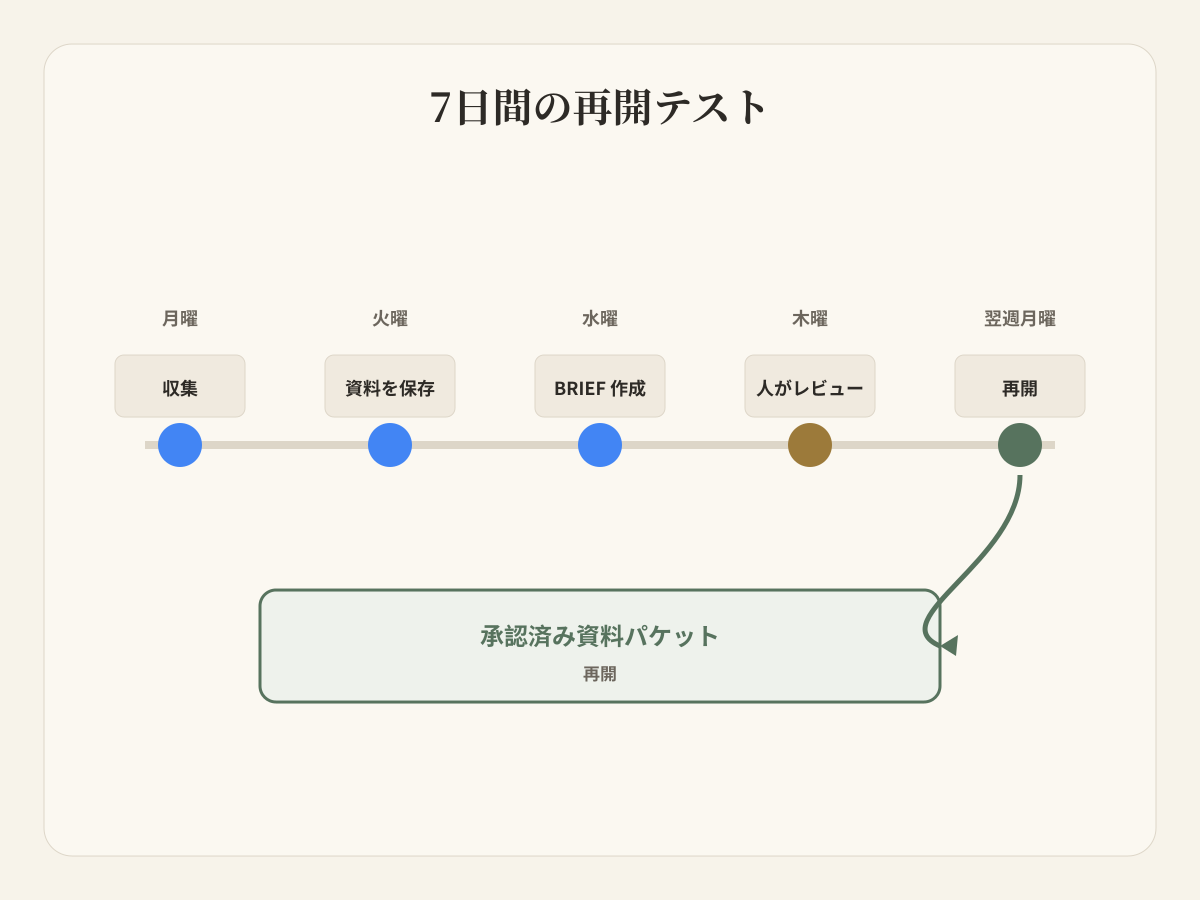
Weekly competitor monitoringを考えます。Mondayにofficial release notes、Tuesdayにsource snapshots、Wednesdayにdecision brief、Thursdayにproduct lead review、next Mondayにaccepted sources/open questionsからresumeします。
Gemini CLIは実行できます。Search/Web Fetch、file/shell tools、GEMINI.md、Skills、scripts、headless mode、history/checkpointingを組み合わせられます。
Teamはproject runtime、credentials、file sharing、schedule trigger、別personによるresume、final briefのreview場所を決める必要があります。これはdeployment/operating modelの選択でありmodel failureではありません。
Budaではresearch Agentがrecurring collectionを持ち、writer Agentが同じdurable filesを使い、Reviewerがactual briefを確認します。Automationsがschedule、Browser/Terminalがexecution、Driveがsources/outputsを保持します。Workspaceがhandoff surfaceになります。
Resume Contractを書く
「来週続ける」の必要条件を定義します。Authoritative sources/date、project instructions、tools/credentials/permissions、completed outputs/rejected claims、next action/agent/reviewer、current artifactのacceptance recordです。
Gemini CLIはproject files、configuration、history、memory、automationで多くを満たします。一人のtechnical ownerがenvironmentを管理し、project directoryがsource of truthなら魅力的です。
BudaはcontractをAgent workspaceの周囲にまとめます。Responsibilityがpeople、roles、schedules、non-code filesを横断する場合、またはreview objectがreport、deck、content package、spreadsheet、support response、operating recordなら有効です。
Tool ConfirmationとArtifact Acceptanceを分ける
Gemini CLI MCP docsにはtool confirmationとtrust settingsがあります。Tool実行前に確認を要求でき、serverをtrustしてpromptをbypassすることもできます。Sandbox、trusted folders、policy、authentication、environment sanitizationもcurrent surfaceです。
Tool confirmationは「このactionを許可するか」、artifact acceptanceは「businessがこのresultを使えるか」を答えます。両方必要ですが同じではありません。Budaのreviewは後者、つまりbrief、document、image、table、report、operation outputを見る場面で強くなります。
State Ownership Matrixで決める
| Decision | Gemini CLI | Buda |
|---|---|---|
| Primary surface | Local/Cloud Shell terminal、project、scripts | Persistent cloud Agent workspace |
| Durable context | GEMINI.md、memory、history、checkpoints、files | Agent Drive、Sessions、files、prior artifacts、Space context |
| Extension | Built-in tools、Skills、extensions、MCP、hooks、subagents | Skills、MCP tools、Browser、Terminal、Git、Channels |
| Automation | Headless、scripts、GitHub workflows | Workspace Automations tied to Agents/artifacts |
| Natural operator | Developer / technical operator | Functional owner / manager / cross-functional team |
| Review object | Command result、file change、project output | Brief、report、document、content package、operation record |
Terminal control、open source、local project access、scripts、MCP、developer ownershipが重要ならGemini CLI。Multiple agentsのmanaged home、persistent business files、scheduled work、cross-session continuity、human reviewが不足しているならBudaです。
両方を使う場合、Gemini CLIがverified project artifactを作り、Budaがsource packet、downstream roles、business reviewを持てます。Handoffはfile-backed contractにします。
Gemini CLI固有の質問
Cloud AI agents、persistent files、human reviewが必要なteam向けGemini CLI alternativeは?
Budaはmultiple role-based agents、shared files、Browser、Terminal、scheduled Automations、visible business artifactsが必要なteam向けです。Project、terminal、technical operatorが中心ならGemini CLIが直接的です。
Gemini CLIとcoding以外のmanaged multi-agent workspaceはどう違う?
Gemini CLIはresearch、content、file operations、task management、automation、Skills、subagents、MCPを扱え、coding-onlyではありません。Budaはorganizationを変えます。Agentごとにdurable work surfaceを持ち、複数roleが別々に実行し、ReviewerがCLI setupを再現せずshared artifactsを確認します。
Gemini CLIにpersistent memoryはありますか?
Project context files、session/history、checkpointing、Auto Memoryがあります。Teamはdeploymentのfeature status/configurationを確認し、trusted filesとaccepted artifactsを定義すべきです。
Gemini CLIはlocal-onlyですか?
いいえ。Google docsはlocal、Cloud Shell、headless、automated workflowsを説明します。問題はruntime、context、credentials、sharing、reviewのownerです。
一つのResume Testから始める
Workflowを実行して数日止め、別のresponsible teammateにresumeしてもらいます。Missing files、hidden assumptions、credential gaps、unreviewed outputsを数えます。その結果がproject-centered terminal agentで十分か、persistent multi-agent workspaceが必要かを示します。