Buda vs Qwen Code:Open Developer Agentか、Managed Company Workspaceか
Runtimeとmodel providerを所有するか、company rolesの継続contextを管理するかで選びます。

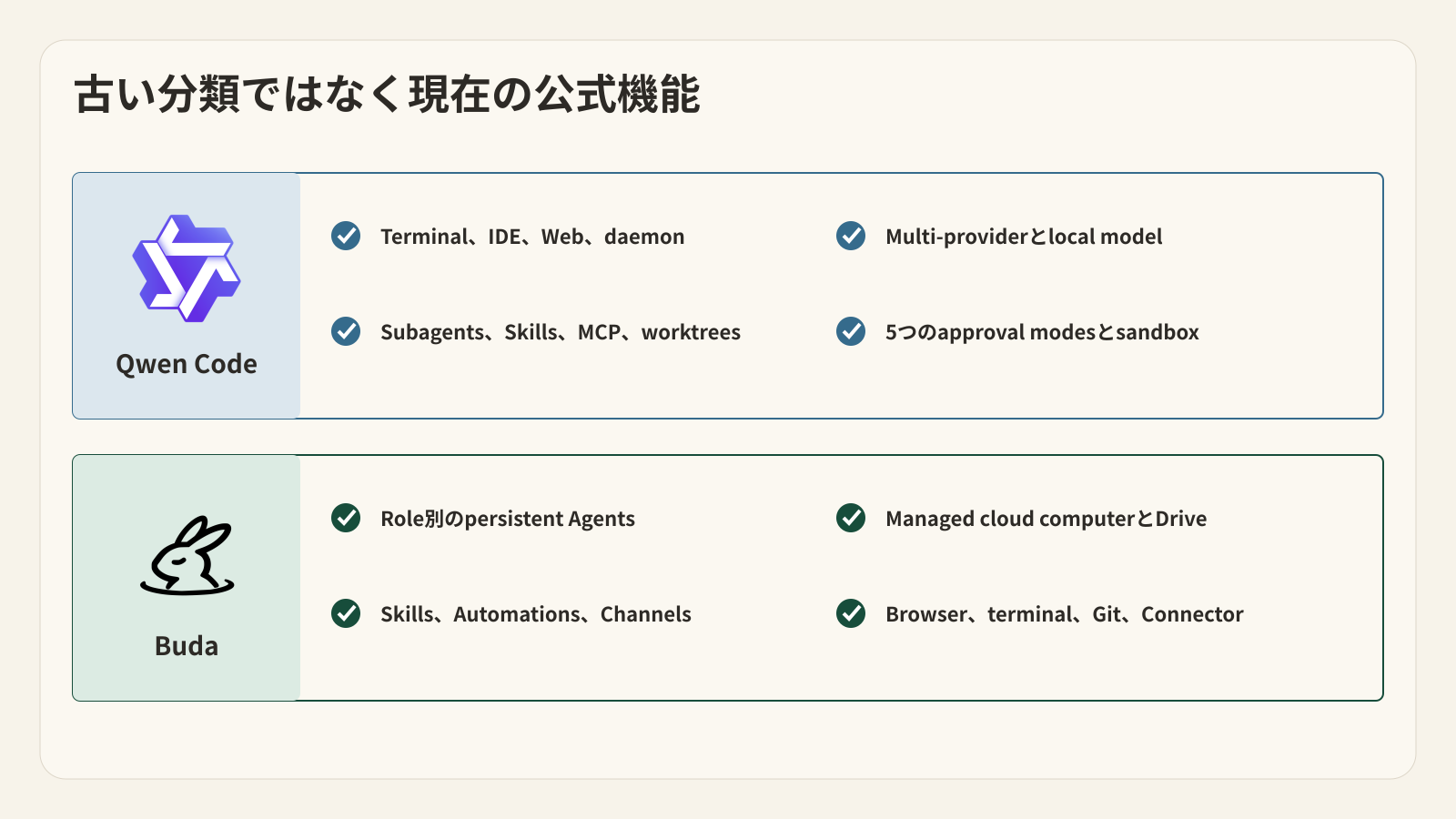
Qwen Code alternativeを探すと、古い前提から始めやすくなります。Qwen Codeは今もterminal-firstでcode-orientedですが、一つのlocal shellに閉じた製品ではありません。公式ドキュメントにはVS Code、Zed、JetBrains、Web、daemon mode、chat Channels、Subagents、Agent Skills、MCP、scheduled tasks、browser/computer use、multi-agent coordination、Git worktreesがあります。
有効な比較は「local coding assistant対cloud workspace」ではなく、openでprovider-flexibleなdeveloper Agent framework対、会社のroleを中心にしたmanaged Agent workspaceです。
結論
Repository、terminal、model provider、machine configurationに近いopen-source Agent frameworkが必要ならQwen Codeが有力です。Sourceを確認し、providersを選び、local/remote modelsを動かし、harnessを細かくcustomizeしたいbuilderに向いています。
Research、content、support、finance、operations、engineeringの各Agentが、それぞれinstructions、Drive、computer、Sessions、Skills、Automations、Channelsを保持するmanaged company workspaceが必要ならBudaが有力です。
Qwen Codeがdeveloper executionを担当し、Budaがcode resultの周囲にあるcross-functional workを担当する形も可能です。Handoffでは、モデルの完了宣言ではなくverified factsとartifactsを渡します。
Qwen Codeは名前から想像するより広い
公式overviewはQwen Codeをterminalで動くagentic coding toolと説明します。Codebaseの理解、feature implementation、debug、file edit、command execution、commit、CI automationに対応します。
同じドキュメントには、より広いplatform surfaceがあります。
VS Code、Zed、JetBrainsのintegrations、qwen serveによるWeb/daemon、Telegram、WeChat、DingTalk、WeCom、Feishu、QQ、GitHub、GitLabのChannels、MCP、Skills、Subagents、worktreesが含まれます。
Model providerも柔軟です。Qwen/Alibaba ModelStudio、third-party providers、OpenAI-compatible endpoints、Anthropic、Gemini、local servingが選択肢になります。Model choice、cost、data path、self-hostingを自分で管理したいteamには重要です。
「localでcodeを書く小さなassistant」と表現するのは、現在の公式製品像と合いません。
Ownership testはruntimeから始まる
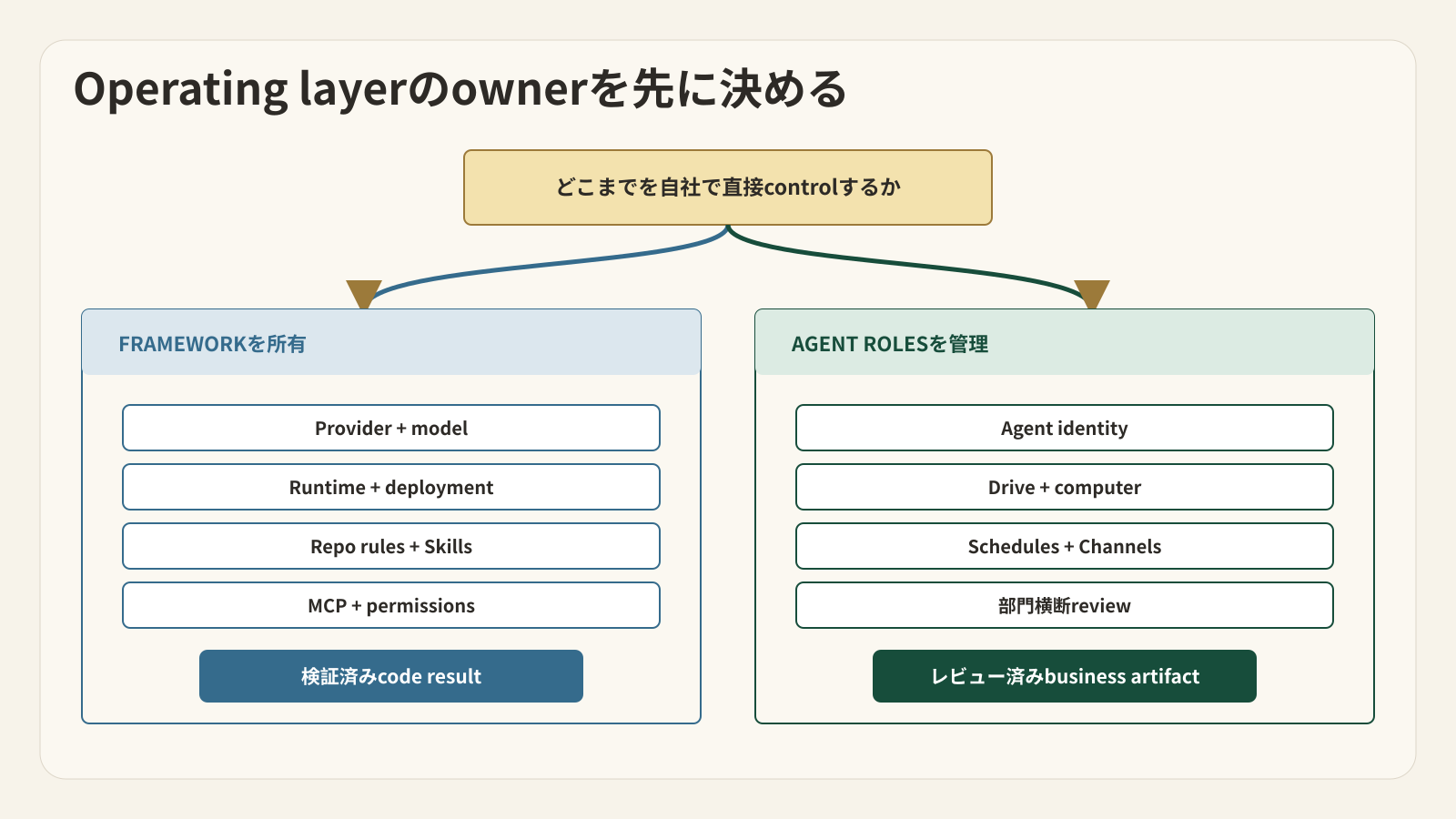
Qwen Codeはbuilderにframeworkを渡します。どのmachineで動かすか、どのmodel providerを呼ぶか、どのMCP serverをtrustするか、QWEN.mdに何を書くか、どのSkillsをrepositoryに入れるか、どのapproval modeを使うかをteamが決めます。
このflexibilityは強みであり、operational responsibilityでもあります。Provider credentials、local/remote runtime、trusted folders、sandbox、MCP、channel setup、extensions、project rulesを誰かが管理します。
Budaはmanaged Agent workspaceを提供します。各Agentにcloud computerとprivate Driveがあり、browser、terminal、Git、files、Sessions、Skills、Automations、Channelsが最初から同じworkspaceにあります。Teamはopen componentsを組み立てるより、rolesとboundariesの設計に集中します。
これはBudaが常に優れるという意味ではありません。Infrastructure decisionsをより多く吸収する代わりに、Qwen Codeほどlow-level framework controlは持てません。
Purchaseを決める四つのlayer
| 判断軸 | Qwen Code | Buda |
|---|---|---|
| 主な単位 | Developer Sessionとproject/repository context | Company Space内のpersistent Agent role |
| デフォルトの仕事 | Code理解、edit、commands、tests、Git、developer automation | Business functionsをまたぐone-off/recurring work |
| Runtime owner | Teamがmachine、deployment、provider、configurationを選ぶ | BudaがAgent cloud computerを管理し、Connectorで既存computerへ接続 |
| Model choice | Multi-provider、BYOK、compatible endpoints、local models | Buda model catalogとplan policy |
| Reusable behavior | QWEN.md、Rules、Skills、Commands、Hooks、Plugins | Agent instructions、Drive knowledge、Skills、Automations |
| Parallel work | Subagents、Agent Arena、multi-agent、worktrees、multiple Sessions | Role-based Agentsとindependent Sessions |
| Channels | Developer-configured plugins/adapters | Agent-bound managed Channels |
| Review | Plan、Ask Permissions、Auto-Edit、Auto、YOLO、sandbox/trust | Session/artifact review、Agent/Channel permissions、role/Space boundaries |
どちらも機能は豊富です。選ぶべきなのは、どこでoperational effortを負担するか、そして半年後も残すべきobjectは何かです。
五つの質問で選択を決める
Qwen Codeには5つのapproval modesがあります。Planはread-only。Ask Permissionsはfile changesとshell commandsの前に承認を求めます。Auto-Editはeditを自動承認し、commandsは確認します。Autoはclassifierでactionsを評価します。YOLOはすべてを承認し、trusted automationだけに向きます。
Sandboxでcommandsとfile modificationsを隔離できます。MCPのtrustやambiguous write replayも保守的に扱われます。Project Skillsにはdeterministic Hooksも登録できます。
Budaにもboundariesがあります。Customer-service Agentをread-onlyにし、Channelのtoolsを狭め、Agentsごとにfilesとresponsibilitiesを分けられます。
差は「Qwenはautonomy、Budaはreview」ではありません。Review objectが違います。Qwenはfiles、commands、code、developer harnessに近く、Budaはtask Sessions、role-owned files、business artifacts、cross-functional handoffsに近いです。
1. Harnessを自社で所有する必要があるか
Open-source Coding Agentを既存環境で動かし、自社のOpenAI-compatible gatewayを使い、project SkillsをGit管理し、MCPでinternal toolsへ接続し、terminalとeditorを往復したいteamを考えます。
Qwen Codeがよい最初のpilotです。Runtime/configuration surfaceが公開され、repository instructionsをcodeとversion管理でき、provider/deploymentとsession autonomyも選べます。
Budaもengineering workを実行できますが、harness ownershipを求めるteamにとってmanaged modelは中心価値ではありません。
2. Contextはrepositoryとroleのどちらに残すべきか
Founderがcustomer research、content、support triage、weekly operating reportを別々のAgentsへ割り当て、同じSpaceでreviewし、scheduleやmessaging channelからtaskを受けたいとします。
Budaの方が自然です。問題はprovider flexibilityやrepository controlではなく、roles、files、schedules、Sessions、delivery channelsを整理し、founderをframework maintainerにしないことです。
Qwen CodeもChannelsを持ち、non-coding workもできます。Official showcaseにはdesktop organization、data analysis、writing、learningもあります。できるかどうかではなく、それをcompany systemとして自分たちで運用するかどうかです。
3. Verified developer workは次にどこへ行くか
Coding Agentがfeatureを実装し、testsを実行し、commitを用意します。Verified resultからrelease docs、customer copy、support guidance、rollout checklist、scheduled reportを作る必要があります。
これは正当なtwo-system designです。
Qwen Codeがrepositoryとdeveloper loopを所有します。Budaはchanged behavior、test evidence、limitations、owner、release stateを含むstructured handoffを受け取り、role-based Agentsがdownstream artifactsを作成・reviewします。
Commit messageはdeployment proofではなく、passing unit testはcustomer updateのapprovalでもありません。Business workflowはteamが信頼するcheckpointから始めます。
4. 妥協できないflexibilityは何か
Openness、provider choice、local/self-managed deployment、developer customizationが必須ならQwen Codeが強いです。Repository-native surfaceが広く、scriptableでextensibleです。
Agent behaviorをcodeと一緒にversion管理したいteamにも向きます。QWEN.md、.qwen/skills、project MCP、Rules、Hooks、Commandsがrepositoryと一緒に移動します。
5. 各functional Agentを誰がmaintainするか
複数のcompany jobsに対応するmanaged environmentと明確なAgent rosterが必要ならBudaが強いです。各Agentはprivate Driveとcomputerを持ち、dashboard、Automation、Channelからtaskを受けられます。
Functional roleごとにmodel providerとharnessを用意する負担を減らす代わりに、underlying frameworkへのlow-level controlは少なくなります。
選ぶ前に三つのfailure modeを試す
一つ目は、古いlocal-versus-cloudの枠を使うことです。Qwen CodeにはWeb、daemon、Channels、scheduled tasks、remote integrationがあり、BudaもConnectorで既存computerへ入れます。Deployment locationだけでは選べません。
二つ目はfeature checkboxだけで比べることです。両方にtools、Skills、multiple agents、Channels、reviewがあります。しかしcheckboxは、runtimeを誰がmaintainするか、durable contextがどこに残るか、reviewerが何を承認するかを説明しません。
三つ目はevidenceのないhandoffです。一つのsystemが「done」と言い、次のsystemがその一文からcustomer outputを作ると、workflowはfictionを高速に公開できます。Handoffにはverified artifact、owner、status、acceptance criteriaが必要です。
Total operating costを測るpilot
Chat answerではなく、accepted workとmaintenance burdenを比べます。
Qwen Codeにはexploration、multi-file edit、tests、command、reviewを必要とするrepository taskを与えます。Setup time、provider config、tool calls、accepted diff、test evidence、reviewer corrections、environmentを再利用可能に保つ保守を記録します。
Budaにはsource files、browser research、structured artifact、schedule、delivery channelが必要なcross-functional recurring taskを与えます。Agent setup、context reuse、artifact accuracy、review corrections、次のscheduled runが正しいstateから始まるかを記録します。
最後にhandoffを試します。Verified engineering factsがQwen CodeからBudaへ、改変、欠落、早すぎる公開なしで移動できるかを確認します。
答えは一つのplatformかもしれず、明確なdivision of laborかもしれません。
FAQ
Qwen CodeはQwen modelだけを使いますか?
いいえ。公式projectはAlibaba ModelStudio、third-party providers、OpenAI-compatible endpoints、Anthropic、Gemini、local servingを記載しています。Dataとpricingの条件は選ぶproviderで変わります。
Qwen Codeはterminal外でも使えますか?
使えます。Terminal-firstですが、IDE integrations、Web/daemon、chat Channels、browser/computer use、worktreesがあります。
Budaは同じopen-source/provider controlを提供しますか?
いいえ。Budaはmanaged Agent workspaceと独自model catalogを提供します。Frameworkを変更したい、または全provider routeを所有したいteamはQwen Codeを先に評価すべきです。
Qwen CodeからBudaへ渡す最低限の情報は何ですか?
Verified artifactまたはdiff、test/source evidence、owner、current release status、known limitations、次taskのacceptance criteriaが必要です。「done」という一文だけでは足りません。