Gemini 3.5 Flash adiciona Computer Use: Por que AI Agents devem aprender a clicar em botões
Google adiciona computer use ao Gemini 3.5 Flash, transformando AI agents de chatbots em estagiários digitais que operam navegadores e desktops.

The most disappointing moment with AI is often not when it lacks intelligence.
It is when it only knows how to "talk".
You ask it to help you write an email, and it writes beautifully. But then, you still have to open your inbox, find the contacts, copy and paste, fix the subject line, attach files, and click send.
You ask it to analyze customer feedback, and it summarizes perfectly. But you still have to open the backend system, export the data, filter the spreadsheet, format it, and share it with your team.
It feels like hiring a brilliant intern who can only stand behind your chair and give advice, but is not allowed to touch the keyboard.
On June 24, Google released an update that fixes exactly this problem.
Google officially integrated computer use into Gemini 3.5 Flash. In simple terms, developers can now instruct Gemini to look at a screen, understand the UI, click buttons, fill out forms, and navigate pages across browsers, mobile devices, and desktop environments.
This is much more important for everyday work than simply making a model "a bit smarter".
It means AI is transitioning from a conversational advisor to an active operator.
O fim da era do copiar e colar
The most exhausting part of office work is rarely making genius-level decisions. It is the repetitive, UI-bound chores:
- Moving customer feedback into a tracking spreadsheet.
- Opening the admin panel to filter yesterday's unprocessed orders.
- Checking websites and documents for obvious errors.
- Uploading files while filling out titles, tags, and descriptions.
- Copying, verifying, screenshotting, and reporting across multiple software tools.
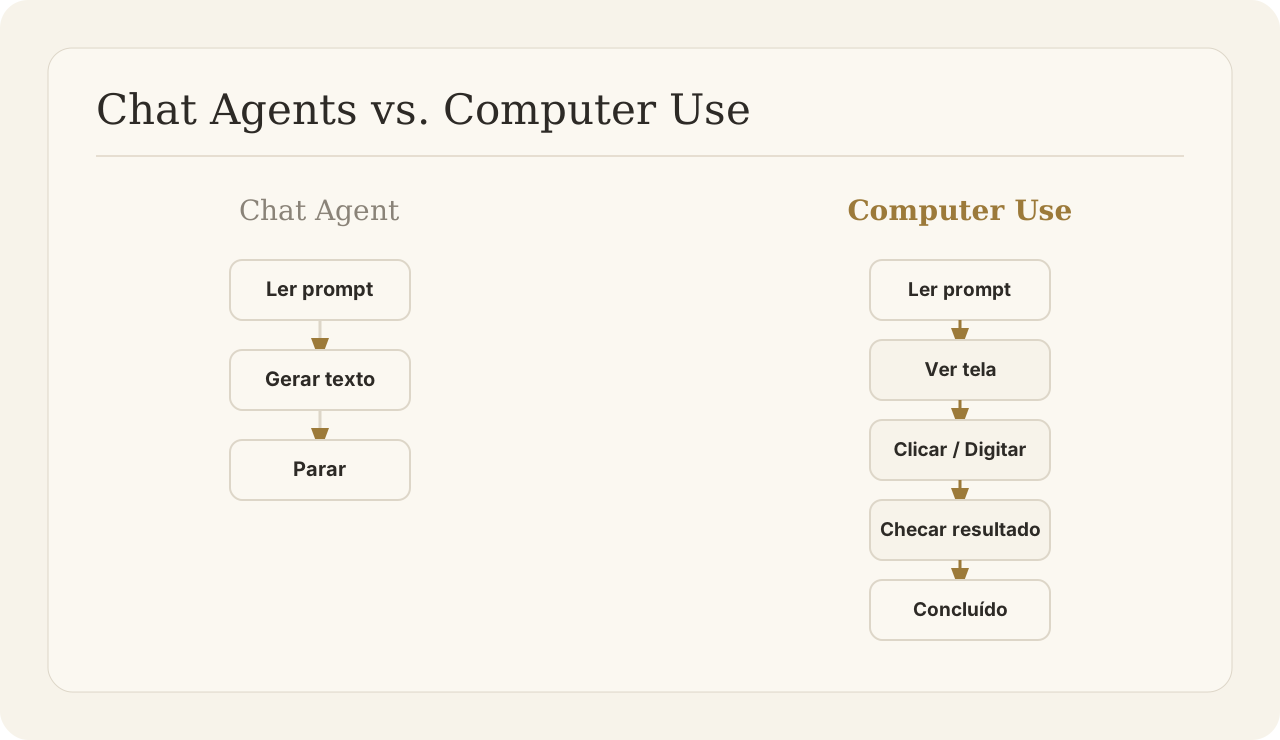
With Gemini's computer use, agents can take over these exact tasks. They see the UI just like a human does, and they interact with it using virtual mouse clicks and keystrokes.
Instead of generating text for you to copy, the agent executes the workflow for you to review.
Perguntas rápidas sobre Gemini computer use
O que é Gemini computer use? It is a new capability in Gemini 3.5 Flash that allows the AI to perceive visual interfaces (like a computer screen or browser window) and take actions like clicking, scrolling, and typing, just as a human user would.
Como a IA opera navegadores e computadores? The AI agent receives continuous screenshots of the environment. It analyzes the visual layout, calculates the precise coordinates of buttons or text fields, and issues commands to move the virtual mouse or enter text.
Pessoas comuns podem usar o Gemini para automatizar seus computadores? Currently, it is primarily available for developers to build into applications. However, AI workspaces and platforms are rapidly wrapping these capabilities into user-friendly tools that allow anyone to assign UI tasks to an agent.
A peça que faltava: Um workspace seguro
If AI agents can now click buttons and operate software, a new problem emerges: Where do they click?
You probably do not want an AI agent moving the mouse on your personal laptop while you are trying to work. You also do not want an agent clicking around your production database without supervision.
Execution requires a controlled environment.
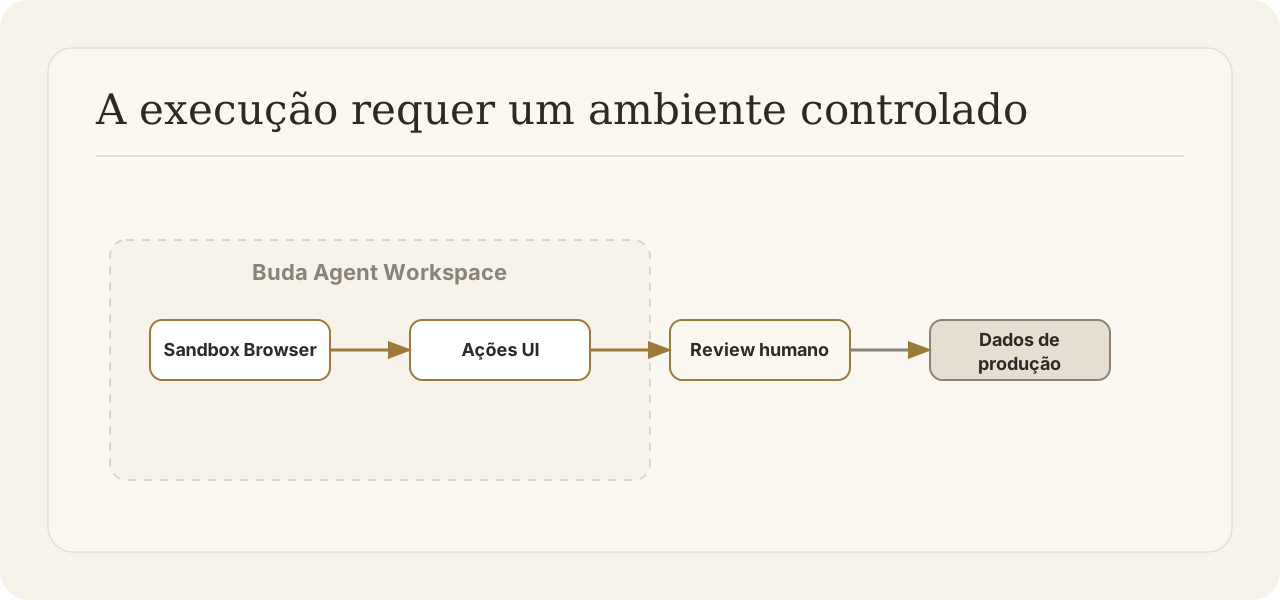
This is why the future is not just about capable models; it is about the Agent Workspace.
In Buda, features like the AI Browser and Local Browser provide exactly this: a sandboxed, dedicated environment where agents can execute UI tasks safely. The agent gets its own browser to click, type, and navigate.
Meanwhile, you get to manage the agent, review its actions, check the logs, and approve the final results.
Gemini 3.5 Flash computer use proves that the "next generation of AI employees" will be doers, not just talkers.
The question is no longer whether AI can do the work. The question is whether your team has the right workspace to manage them.
Explore workflows liderados por humanos no Buda dashboard, ou leia a documentação do Buda Agent Workspace.