Buda vs Grok Bot: one account-wide computer or separate agent workspaces?
Compare the sharing unit for files, sessions, and role offboarding.

A sales Bot needs customer files. A content Bot only needs approved product material. Does creating two roles give them two independent environments?
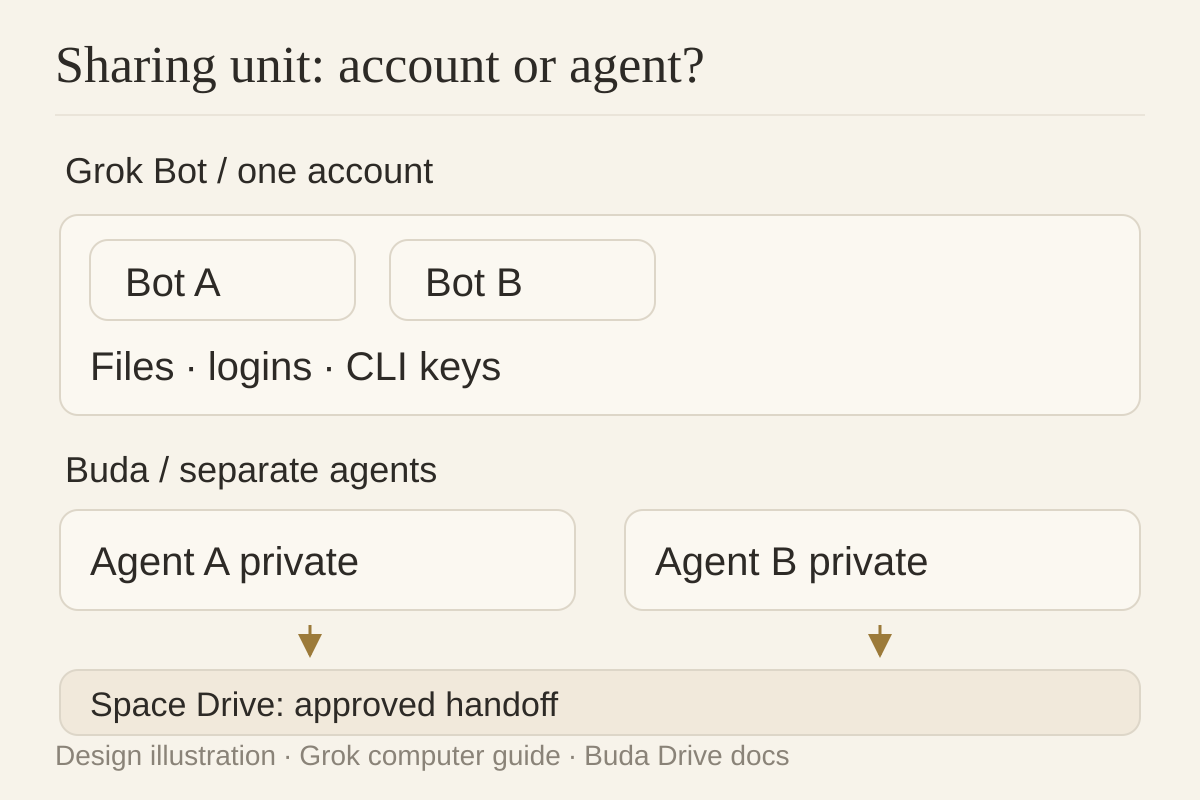
Count sharing boundaries, not Bot names. Grok Bot documents an account-wide shared computer. Buda supplies a computer per agent, with private Agent Drive files and an explicitly shared Space Drive. That distinction shapes handoffs and offboarding.
Grok Bot shares the computer, not just the task
The computer guide, updated October 8, says all Bots on an account share browser cookies, signed-in sessions, files, and command-line credentials. One can continue another’s saved work.
Each Bot gets a screen for parallel browser or desktop work. Those screens are work surfaces, not separate security boundaries. This is sharing within a user account, not across all customers; the security documentation separately describes per-user isolation.
The model is convenient when Bots should reuse one desktop and its materials. It is not a role-based file boundary merely because the Bots have different names.
Distinguish credential types. The security guide says connector OAuth tokens remain on Cursor’s backend, never on the computer or directly available to Bots. Browser sessions and command-line credentials belong to the shared-computer layer. Calling all tokens plaintext shared credentials would be inaccurate.
Buda separates persistence from sharing
Buda’s cloud-computer model gives each agent its own sandbox with files, browser, terminal, and Git visible in the workspace. A task session ending does not remove durable working files.
Drive & Memory distinguishes private Agent Drive material from Space Drive, shared across agents and people in a Space. Sales and content materials can remain with their respective agents; approved product files can be explicitly placed in Space Drive.
Persistence answers whether a file survives. Sharing answers who can use it. Neither proves that Buda has Grok Bot’s enterprise logging, network policies, or certifications—or that every tool requires approval. Check the actual plan and organization policy.
A procurement matrix with explicit limits
| Check | Grok Bot documentation | Verified Buda scope |
|---|---|---|
| Sharing unit | All account Bots share computer, files, and browser sessions | Per-agent sandbox; explicit Space Drive sharing |
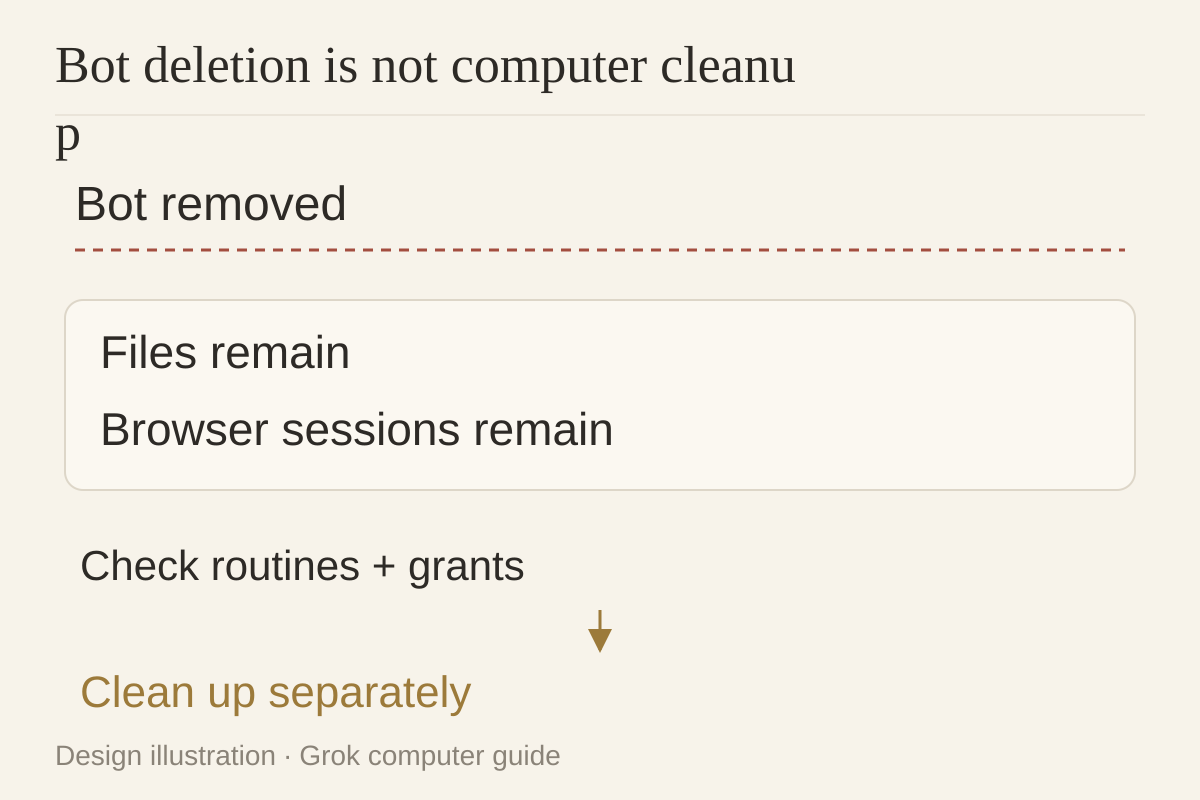
| Offboarding | Deleting a Bot does not remove files or browser sessions | Inspect material, authorizations, and tasks; do not assume third-party session revocation |
| Model choice | Cursor manages serving mix; no customer-facing picker | Workspace model-selection entry; not proof of equivalent enterprise allowlist enforcement |
| Action review | Auto Review can allow, request approval, or deny; enterprise enforcement is plan-specific | Visible execution; validate approval behavior in the actual configuration |
| Hosting and evidence | Cursor-hosted, with separately scoped enterprise logging and Action Recording | Workspace and durable files; no claim of equivalent audit coverage or compliance |
Grok Bot does have review controls. Auto Review examines several risky action types, but not every side effect. Enterprise model-allowlist enforcement is also documented as not guaranteed. Treat these qualifications as procurement facts, not a reason to invent a security ranking.
Test the boundary and the departure
These are unexecuted pilots, without customer data, production keys, or sensitive accounts.
Marker-file test: give two roles different harmless markers and ask them to report readable files and paths. In Grok Bot, account sharing is part of the intended design. In Buda, test each Agent Drive, then explicitly move an approved file into Space Drive. Preserve actual read/write results; a role’s statement “I cannot access it” is not proof of isolation.
Role-offboarding test: pause a test role, then inspect routines, scheduled tasks, browser sessions, files, and connector grants. Grok explicitly says Bot deletion does not clean files or sessions. Verify each Buda item too; do not assume stopping an agent revokes external credentials. Any deletion test requires separate approval and backup.
The useful result is an inventory: what remains, who can use it, and who cleans it up.
Start with one deliberate handoff
Teams wanting several Bots to continue on one account desktop can evaluate Grok Bot’s shared model. Teams needing private role material and explicit handoff of approved files can evaluate Buda’s two Drive layers.
Grok Bot is not automatically the same product as Grok chat or Grok Build codebase upload, and OpenAI Dots behavior should not be transferred to it.
Try passing one approved file between two roles, with source, destination, and reviewer recorded. For repeatable procedures, search and install a suitable Skill in the Buda AI Marketplace and adjust its permissions.
FAQ
Is this the Grok chat product?
Grok Bot provides a persistent execution environment; its feature set differs from Grok chat and Grok Build.
Do two Bots have isolated computers?
Not within the same account. They share a computer; separate screens are not security boundaries. Per-user isolation is a different layer.
Where are connector OAuth tokens stored?
On Cursor’s backend, not on the computer or directly supplied to Bots, according to the security guide.
Does deleting a Bot remove sign-ins?
No. Files and browser sessions remain; routines, plugins, authorizations, sign-ins, and files need separate cleanup.
How do Buda agents share files?
Use Space Drive for explicitly shared material; Agent Drive holds an agent’s private working files. Check permissions before sharing.
Verified October 9, 2026. Pilots are not executed and do not constitute certification or a security ranking.